# Building from source
This page shows how to build Marginalia, run it on your machine while you work on it, and build the plugins and
this manual. Packaging for release (the Docker image, the desktop app, CI) is covered in
[Packaging & releases](packaging.md).
## Requirements
| Tool | Version | Notes |
|---|---|---|
| JDK | 25 or newer | A full JDK, not a JRE: the extension mechanism attaches a Java agent at runtime (`jdk.attach`), and the desktop build uses `jlink` / `jpackage`. |
| Maven | 3.9 or newer | |
| Git | any | The build reads the commit id and closest tag (`git-commit-id-plugin`), so build from a clone, not from a source archive. |
| Node.js | - | Not needed: the Vaadin Maven plugin downloads its own Node.js into `~/.vaadin` on the first build. |
| Servlet container | Tomcat 11 or Jetty 12 | Only for running the WAR outside Docker. Must support Servlet 6.1 (Jakarta EE 11). |
| Docker | optional | For `docker compose`. |
| Retype | optional | For building the manual. |
The first build downloads a lot (Maven dependencies, Node.js, npm packages) and takes several minutes. Later builds
are faster.
## Building the application
The repository root holds the parent POM (`pom.xml`): it carries the version, which the application and all plugins
inherit, the servlet API (`provided`) every module compiles against, and lists them as modules, so `mvn package` there builds the application and every plugin in one go. The
application is the Maven project in `marginalia/`. It depends on the **platform** module `marginalia/platform`
(artifact `marginalia-platform`, a JAR): the classes without a story concept that other applications can build on,
in the same packages (see `TODO.REFACTOR.md`). The platform weaves its own classes (AspectJ for `@Configurable`, the
`BuildTimeWeaver` for `@Extendable`), so the application weaves only its own. From the root, `-pl marginalia -am`
builds the platform first; a build in `marginalia/` alone takes the platform from `~/.m2`, so install it first when
it changed:
```sh
mvn install -DskipTests -pl marginalia -am # (repository root) the parent POM, the platform and the application
mvn test -pl marginalia -am # (repository root) the tests, all in the application, after the platform build
cd marginalia
mvn install -DskipTests -f platform/pom.xml # the platform alone into ~/.m2, before the builds below
mvn package # builds and tests, WAR in target/marginalia-1.9.0.war
mvn package -DskipTests # the same without tests
mvn install -DskipTests # also installs the WAR and the classes JAR into ~/.m2 (needed by plugins)
mvn -N install # (repository root, once) installs the parent POM, the installed POMs refer to it
mvn install -DskipTests -Dvaadin.skip=true # plugins only need the classes JAR: no frontend build, not a deployable WAR
```
What a build does, in order:
1. `git-commit-id-plugin` writes `git.properties` (commit id, time, closest tag) into the classes. `utils.BuildInfo` reads
it together with `META-INF/build-info/build-info.properties` (version and build time, filtered only when the WAR is
packaged, so a run from `target/classes` has the placeholder and reports the version `dev`) for the footer of the page
and the login screen. The resources
step also copies the Markdown pages of the user manual (`../manual/user/**/*.md`, unfiltered) to `classpath:/manual/`
for the [help assistant](services.md#the-help-assistant), and the translated ones (`../translations/*/user/**/*.md`) to
`classpath:/manual-translations/`; both folders are outside `marginalia/`, see [Packaging](packaging.md).
2. `vaadin-maven-plugin` prepares the frontend (`prepare-frontend`): it generates `package.json`, `vite` config and
the files in `src/main/frontend/generated/` (ignored by Git) and downloads Node.js if needed.
3. `maven-compiler-plugin` compiles the sources, then `aspectj-maven-plugin` compiles them again with the AspectJ
compiler and weaves the Spring aspects in (see [AspectJ weaving](#aspectj-weaving) below). Then `BuildTimeWeaver`
(`exec-maven-plugin`, `weave-extendable`, phase `process-classes`) puts the hooks of the extensions into the
`@Extendable` classes (see [Extension hooks](#extension-hooks)). The woven classes in `target/classes` are the
ones that get packaged.
4. Tests run (`maven-surefire-plugin`), see [Running the tests](#running-the-tests).
5. `vaadin-maven-plugin` builds the frontend bundle (`build-frontend`).
6. `maven-war-plugin` packages `target/marginalia-1.8.0.war` (about 185 MB) and, because of `attachClasses`, also
`target/marginalia-1.8.0-classes.jar` - the application classes that plugins compile against.
Outputs in `marginalia/target/`:
| Path | |
|---|---|
| `marginalia-1.8.0.war` | The web application. |
| `marginalia-1.8.0/` | The same WAR, exploded (production mode). |
| `marginalia-1.8.0-classes.jar` | Application classes, the compile dependency of plugins. |
| `surefire-reports/` | Test reports. |
| `test-home/` | Data folders created by tests (safe to delete). |
### Development and production mode
Vaadin runs either in *development mode* (frontend served from a development bundle that Vaadin builds into
`src/main/bundles/`, ignored by Git; Vaadin's dev tools available, more checks) or in *production mode* (optimized frontend
bundle, no dev tools). The mode is decided by `META-INF/VAADIN/config/flow-build-info.json`, the build info that
`vaadin-maven-plugin` writes:
- `prepare-frontend` (every build, also `mvn compile` and `mvn jetty:run`) writes a **development** build info with
the absolute paths of your checkout into `target/classes`;
- `build-frontend` (in `prepare-package`, so only `mvn package` / `install`) builds the optimized bundle, writes a
**production** build info into the WAR and removes the development one from `target/classes`.
By default Vaadin scans the bytecode of the app and puts only the components it finds referenced into the production
bundle. Extensions are loaded at runtime and may use any Vaadin component, so the plugin is configured with
`false` (`-Dvaadin.devmode.optimizeBundle=false` on the command line): the bundle
contains every component on the classpath, at the price of a bigger bundle and a slower frontend build.
So `mvn package` always produces a **production** WAR - the one the Dockerfile, the `desktop` profile and CI use, and
the one to deploy. Nothing has to be copied around. A build info in `src/main/resources` is never packaged into the
WAR (`maven-war-plugin` excludes `META-INF/VAADIN/config/flow-build-info.json*`).
Development mode is for running from the IDE (see [IntelliJ IDEA](#intellij-idea)) or `mvn jetty:run`. Without a build
info Vaadin also starts in development mode and finds the project by the `vaadin.project.basedir` system property,
the classpath or the working directory.
To check a WAR:
```sh
unzip -p target/marginalia-1.8.0.war WEB-INF/classes/META-INF/VAADIN/config/flow-build-info.json # "productionMode" : true
```
### AspectJ weaving
Marginalia relies on **compile-time** AspectJ weaving with the `spring-aspects` library: Vaadin components are
created with `new`, not by Spring, so classes annotated `@Configurable` (all routes, the workspace, dialogs, parts...)
get their `@Autowired` fields injected by the woven `AnnotationBeanConfigurerAspect`.
Transactions are *not* woven: `@CommonTx`, `@CommonTxReadOnly` and `@NoTx` are applied by Spring's class-based
proxies around the service beans (see [Services](services.md#transactions)).
If the classes are compiled by plain `javac`, nothing fails at build time, but at runtime every `@Autowired` field of a
UI class is `null` and the first screen fails with a `NullPointerException`. Maven always uses `ajc`; in your IDE,
make sure the AspectJ compiler is used too (see [IntelliJ IDEA](#intellij-idea)).
The compiler also keeps parameter names (`-parameters`) and all local variables (`preserveAllLocals`): extensions
read method arguments and local variables of `@Extendable` methods by name, so don't remove these options.
### Extension hooks
The hooks that let extensions decorate the methods of `@Extendable` classes are a second, separate weaving: the
Maven build runs `BuildTimeWeaver` on `target/classes` after the AspectJ compiler and marks every class it rewrote
with `@Woven` (details in [@Extendable hooks](plugins/extendable.md#instrumentation)). The packaged application
therefore needs no agent.
The IDE does not run that step. A class compiled by the IDE has no hooks, and the application makes up for it at
start: outside of the packaged WAR it installs a ByteBuddy agent that instruments the `@Extendable` classes without
the mark (see [JVM options](#jvm-options)). Nothing has to be set up for it, and a `target/classes` with classes of
both kinds works. To weave by hand, `mvn process-classes` does it (woven classes are skipped).
Both use ByteBuddy's own ASM, never the JDK's ClassFile API (`ExtendableWeaving.useAsm` sets
`net.bytebuddy.processor=ASM_ONLY` unless it is given on the command line). On a JDK newer than the newest Java the
ByteBuddy of `marginalia/platform/pom.xml` knows, ByteBuddy would switch to the ClassFile API and the hooks woven that
way fail with *Detected branch target out of bytecode range*; with ASM the build stops with *Java N is not supported
by the current version of Byte Buddy* instead. Then raise the ByteBuddy version (`byte-buddy` and `byte-buddy-agent`)
to one that supports that Java.
The IDE (with the `ajc` compiler) compiles into the same `target/` as Maven, and a class compiled by the other one is overwritten (or
left unwoven, with `null` `@Autowired` fields). To keep a Maven run apart from an open IDE, move the output with `-Dbuild.dir=/tmp/marginalia-build`
(the property `build.dir` of the POM, default `${project.basedir}/target`): the classes, the woven classes, the test home
(`/test-home`) and the WAR go there, the platform module's output into `-platform` (a profile of its POM that the property switches on; inside `` the application's `clean` would delete it). Use the same folder for the whole sequence (`mvn install` of the app and the plugins read
from the local repository, not from it), delete it for a clean build, and never run two builds on the same folder.
## Running locally
Marginalia is a plain WAR without an embedded server, so you run it in a servlet container: from the IDE, with
`mvn jetty:run`, in a local Jetty, or in Docker.
### Keep your development data separate
Marginalia keeps everything in `~/.marginalia` (`System.getProperty("user.home")` + `.marginalia`), the same folder
the desktop app uses. To keep test data away from your real books, start the container with another home folder:
```
-Duser.home=/path/to/dev-home
```
The folder `/path/to/dev-home/.marginalia` is created on the first start. Delete it to start over with an empty
installation (you'll be asked to create the administrator again).
### JVM options
The packaged application (the WAR in a servlet container, Docker, the desktop app) needs no JVM option for the
extensions: its `@Extendable` classes were woven by the build.
A development run (`mvn jetty:run`, the IDE) installs a ByteBuddy agent into the running JVM when the application
starts, for the classes the build did not weave (see [Extension hooks](#extension-hooks)). On a current JDK this
works without options, but the JDK prints a warning about dynamically loaded agents, and a later JDK will refuse
the agent unless it is allowed. To silence the warning and allow the agent to attach to its own process, add:
```
-XX:+EnableDynamicAgentLoading -Djdk.attach.allowAttachSelf=true
```
These are the options the tests use. If the JVM refuses the agent, the application still starts: an error in the log
says so, and only the classes woven by a Maven build have hooks.
`-Dmarginalia.extendable.agent=true` installs the agent in the packaged application as well (for an extension with
`@Extendable` classes of its own), `=false` never installs it.
### IntelliJ IDEA
1. Open the repository root; IntelliJ imports `marginalia/pom.xml` (and the plugin POMs, if you add them as Maven
projects).
2. **Settings → Build, Execution, Deployment → Compiler → Java Compiler**: set *Use compiler* to **Ajc**, with the
path to `aspectjtools-1.9.25.1.jar` from your Maven repository, and *Delegate to Javac* checked (javac is then
used only for modules without aspects). `spring-aspects` must be on the aspect path of the `marginalia` module
(its AspectJ facet). Add `-parameters` to the additional command line parameters of the module.
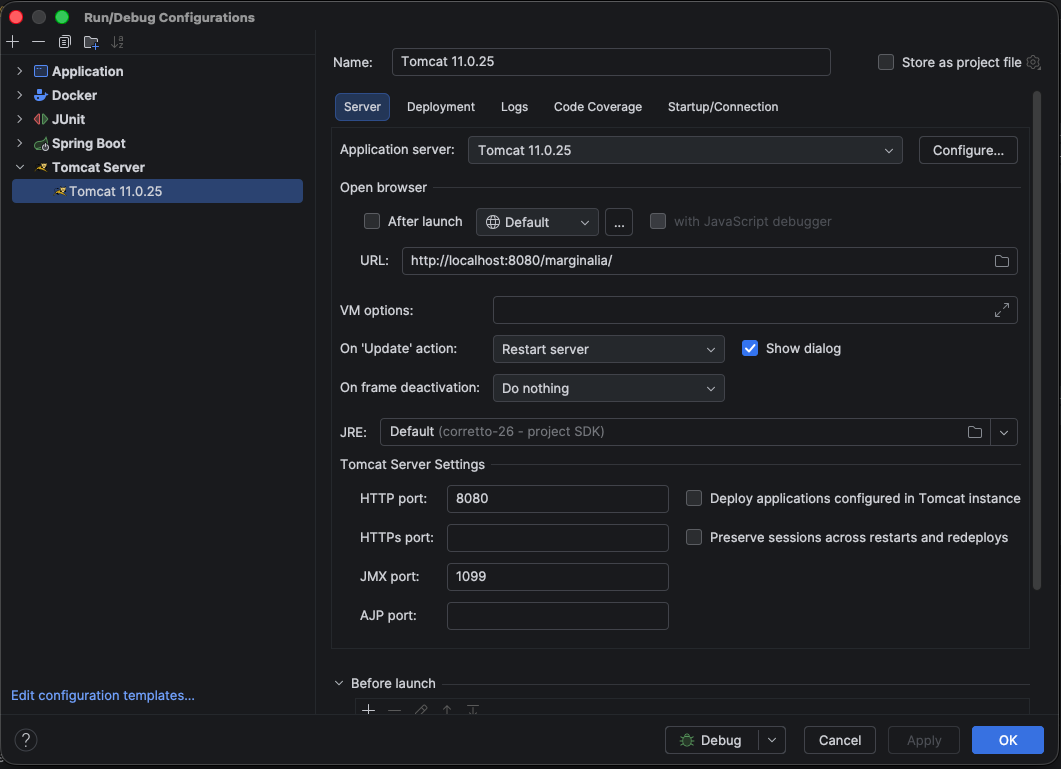
3. Add a **Tomcat Server → Local** run configuration (Tomcat 11), deploy the artifact `marginalia:war exploded`,
and add the [JVM options](#jvm-options) and `-Duser.home=...` to *VM options*.
4. Run it and open the URL shown in the run configuration, e.g. `http://localhost:8080/marginalia/` when the
application context is `/marginalia`.
IntelliJ builds the exploded WAR itself, without the Vaadin plugin, so the application runs in
[development mode](#development-and-production-mode). It needs to know where the project is - either:
- add `-Dvaadin.project.basedir=/path/to/Marginalia/marginalia` to *VM options* (simplest, survives *Rebuild Project*), or
- run `mvn vaadin:prepare-frontend` in `marginalia/` and copy the generated
`target/classes/META-INF/VAADIN/config/flow-build-info.json` to the same path under `src/main/resources/`
(ignored by Git and never packaged into the WAR, but IntelliJ copies it into the exploded WAR on every build).
Don't deploy `target/marginalia-1.8.0/` (the exploded WAR from `mvn package`) from the IDE - it is a production build.
!!!
Marginalia works under any context path. Login cookies are named after the context, so a login saved under
`/marginalia` is separate from one saved under `/`.
!!!
Java changes need a redeploy (*Update application → Restart server*).
### Local Jetty
To run the built WAR the way the Docker image does, download [Jetty 12](https://jetty.org/download.html)
(`jetty-home`), create a Jetty base with the same modules and drop the WAR in:
```sh
export JETTY_HOME=/path/to/jetty-home-12.1.10
mkdir -p ~/jetty-marginalia && cd ~/jetty-marginalia
java -jar $JETTY_HOME/start.jar --create-startd \
--add-modules=server,http,ee11-deploy,ee11-websocket-jakarta,ee11-webapp,ee11-jsp
cp /path/to/Marginalia/marginalia/target/marginalia-1.8.0.war webapps/ROOT.war
java -Duser.home=/path/to/dev-home -jar $JETTY_HOME/start.jar jetty.http.port=8080
```
Marginalia is then at `http://localhost:8080/`. `ee11-websocket-jakarta` is required: the UI is updated through a
push WebSocket.
### `mvn jetty:run`
The quickest way to run from the sources, without an IDE or a server installation. The Jetty 12 Maven plugin
(`jetty-ee11-maven-plugin`) runs the application from `target/classes` and `src/main/webapp` inside the Maven JVM, so
the [JVM options](#jvm-options) go into `MAVEN_OPTS`:
```sh
cd marginalia
export MAVEN_OPTS="-XX:+EnableDynamicAgentLoading -Djdk.attach.allowAttachSelf=true"
mvn -DskipTests jetty:run # http://localhost:8080/
mvn -DskipTests -Djetty.http.port=9090 jetty:run # another port
```
The application runs in [development mode](#development-and-production-mode) with the development logging (see
[Logs](#logs)). Stop it with `Ctrl+C`. Java changes need a restart.
!!!warning Development data
To [keep your development data separate](#keep-your-development-data-separate), add `-Duser.home=...` to
`MAVEN_OPTS` together with `-Dmaven.repo.local=$HOME/.m2/repository` - `user.home` also moves Maven's own local
repository, which would otherwise be downloaded again into the development home.
!!!
### Docker
From the repository root:
```sh
docker compose up --build
```
The image is built from the sources in `marginalia/` (tests skipped) and the data is kept in `./data` in the
repository. See [Server (Docker)](../user/getting-started/docker-server.md) for the configuration and
[Packaging & releases](packaging.md) for how the image is built.
### Logs
Marginalia logs to standard output through SLF4J with logback; the `log4j-api` that Apache POI brings is routed into
SLF4J by `log4j-to-slf4j`, so the output of the libraries that use it is not lost. There are two configurations:
- `src/main/resources/logback.xml` - **development**, used from `target/classes` by IDE runs and
`mvn jetty:run`. The `com.github.enerccio` loggers are at `DEBUG`, so a generation logs each pipeline step and the
activated lore.
- `src/main/resources-release/logback.xml` - **release**, everything at `INFO`. `mvn package` puts it into the
WAR in place of the development one, so the Docker image, the desktop app and any other deployed WAR log no story
content (see [Packaging & releases](packaging.md#the-war)).
In the desktop app the output goes to `~/.marginalia/desktop/logs/`.
## Running the tests
```sh
mvn test # all tests
mvn test -Dtest=LorebookActivationTest # one class
mvn test -Dtest='Backup*Test' # a pattern
mvn test -Dtest='MacroRenderingTest#name' # one method
mvn test -Dbuild.dir=/tmp/marginalia-build # build and run in another folder than target/
```
The tests start the real Spring XML configuration (without OSGi and the instrumentation agent) against a SQLite
database in `target/test-home/ctx-*`, and talk to a fake OpenAI-compatible server, so no network, model or API key is
needed. `RuntimeInstrumentationTest` installs the ByteBuddy agent into the test JVM; Surefire passes the needed JVM
options. [Testing](testing.md) describes the test base and how to write tests.
## Building the plugins
The bundled extensions in `marginalia/plugins/` are separate Maven projects. They compile against the classes
JAR of the application (which brings the platform JAR with it), so install the parent POM, the platform and the
application first:
```sh
mvn install -DskipTests -pl marginalia -am # in the repository root
cd marginalia
cd plugins/chaptermarker # or anthropic, arc-outline, audiobook, authorsnote, beta-readers, book-description-generator, character-tracker, conlang-translator, gemma4toolsfix, google-genai, grok, image-generator, instructionexporter, knowledge-tracker, lore-generator, lorebookvcs, manga-generator, name-generator, name-provider, place-provider, prompt-history, prompt-inspector, reallang-translator, reviewer, sidequery, sillytavern-converter, story-notes, tts-reader, chineselocalization
mvn package # target/chaptermarker-1.9.0.jar
```
### Shared libraries
Code that two plugins share lives in `marginalia/libs/` (see [Libraries for plugins](plugins/libraries/index.md)) (today `translator-common`, used by the Conlang Translator and the Real Language Translator, `story-tracker-common`, used by the Knowledge Tracker and the State Tracker, and `http-hooks`, used by the Image Generator and the Audiobook). A library is a plain
Maven jar that **each plugin embeds** in its bundle (`translator-common;inline=true`): plugins do not see each other's classes, so this is
shared source, not shared runtime, and a library holds no state the plugins would have to share. It is **not** an extension and never goes into the extensions folder (that is why it
is not under `marginalia/plugins/`, the folder every script and workflow loops over to collect the JARs). A plugin that uses a library needs it in the local Maven repository before it
builds: `mvn install -DskipTests` in `marginalia/libs/`. The scripts (`install-plugins.sh`, the `plugins-build` stage of the root `Dockerfile`, the workflows `server.yml` and `desktop.yml`) do this.
Load the JAR in *Admin → Extensions* of your running instance, or copy it into `.marginalia/extensions` of your
development home before starting. Rebuild the plugins whenever you change classes they use - they are built for one
exact version of the application. See [Plugin development](plugins/index.md).
### In Docker
`marginalia/plugins/docker-compose.yml` builds everything in a container, so no local JDK or Maven is
needed (this is how the Docker server is updated, see [Packaging](packaging.md#building-the-plugins-in-docker)). It
builds the target `plugins` of the root `Dockerfile`, which starts from the stage that builds the application image:
the build context is the repository root, the image copies `pom.xml`, `marginalia/pom.xml`, `marginalia/src`,
`manual/user` and `translations` (packed into the application's classes, so a plugin build against it sees the same manual), `.git`, `marginalia/libs` and `marginalia/plugins`, runs
`mvn clean install -DskipTests` for the application (the full build, frontend included: the stage is shared with the
image, so a host that builds both compiles the application once), `mvn install -N` for the parent POM, `mvn install -DskipTests` in every folder of `libs/` and `mvn package` in every folder of `plugins/` that has a `pom.xml`.
The JARs are copied out when the container runs, because they go into a bind mount:
```sh
docker compose -f marginalia/plugins/docker-compose.yml build
docker compose -f marginalia/plugins/docker-compose.yml run --rm plugins # JARs in marginalia/plugins/build
```
A new plugin folder with a `pom.xml` is picked up without changes to the Dockerfile.
`-Dvaadin.skip=true` turns off every goal of `vaadin-maven-plugin`, so the frontend (Node.js download, npm, Vite
bundle) is not built; the plugins need only the classes JAR. The WAR of such a build has no frontend bundle and must not
be deployed. Use the flag for any build that only installs the classes JAR for plugins (the workflows do; the Docker
build doesn't, it shares the application build with the image). Maven cannot tell
that the goal was just `install` (it runs the whole lifecycle up to `package` first), so the flag has to be given.
## Database schema changes
The schema is created and upgraded by Flyway from `src/main/resources/migration/V__.sql`; Hibernate only
validates it (`hibernate.hbm2ddl.auto=validate`), so an entity change without a migration makes the application fail
on start.
`com.github.enerccio.tools.GenerateFlywayDiff` (in `src/main/java/com/github/enerccio/tools/`) helps write the
migration: it compares the entities listed in `persistence.xml` with an existing database and prints the SQL Hibernate
would run to update it. Run it from the repository root (it reads `marginalia/src/main/webapp/config/persistence.xml`)
with the same `-Duser.home` as your development instance - it uses the database in `/.marginalia`. Review
the output before using it: Hibernate's SQLite updates are a starting point, not a finished migration.
[Database & migrations](database.md) explains the rules for migrations.
## Building the manual
The manual is a [Retype](https://retype.com) site. Sources are in `manual/`, the configuration is `retype.yml` in the
repository root, and the generated site is written to `docs/`, which git ignores: the published manual is built by a workflow
([Publishing the manual](packaging.md#publishing-the-manual)), the local one is for reading and checking.
```sh
npm install --global retypeapp # or: dotnet tool install retypeapp --global
retype start # live preview at http://localhost:5000
tools/retype_build.sh # writes docs/ and docs/ (the translated sites); plain `retype build` works too, without the version in the site and the languages
```
Images go into `manual/images/`; most are taken by the scripts in
`screenshots/` (see [Contributing](contributing.md#documentation)), the few that cannot be are listed in `TODO.IMAGES.md`.
## Troubleshooting
| Problem | Cause and fix |
|---|---|
| `NullPointerException` on an `@Autowired` field of a UI class | The classes were compiled without AspectJ weaving. Build with Maven or set up the Ajc compiler in the IDE ([AspectJ weaving](#aspectj-weaving)). |
| `couldn't find aspectjrt.jar on classpath` warning | Printed by the AspectJ plugin on every build; harmless. |
| `Schema-validation: missing column ...` on start | An entity was changed without a Flyway migration. Add one ([Database schema changes](#database-schema-changes)). |
| The frontend build fails downloading Node.js or npm packages | It needs internet access on the first build. Behind a proxy, configure it for Maven and npm, or delete `~/.vaadin` and `node_modules` and try again. |
| A plugin fails with `NoSuchMethodError` / `ClassNotFoundException` | It was built against another version of the application. Run `mvn install -DskipTests -pl marginalia -am` in the root and rebuild the plugin. |
| `WARNING: A Java agent has been loaded dynamically` | A development run installed the agent for classes the build did not weave. Add the [JVM options](#jvm-options). |
| `The instrumentation agent could not be installed` in the log, extensions do nothing on some screens | The JVM refused the agent and some `@Extendable` classes were compiled by the IDE. Add the [JVM options](#jvm-options) or run `mvn process-classes` ([Extension hooks](#extension-hooks)). |