The command bar
CommandBar (package ui.components) is the input line for commands, a Composite<HorizontalLayout> with a ComboBox
and a run button. It is a separate component: it can be placed anywhere (a dialog, a sidebar, a toolbar). The story tab
of the book window places it next to the menu bar; the bar knows nothing about the book.
flowchart LR
    user["user types<br/>/name arg"] --> bar["CommandBar"]
    bar --> help["help Popover<br/>(CommandHelp)"]
    bar -->|executeLine| svc["CommandService"]
    svc -->|future| bar
    bar -->|async| prog["CommandProgressDialog<br/>(Stop)"]
    bar -->|onCommandResult| target["CommandResultTarget"]
    target -.-> view["CommandResultView<br/>popover above the bar"]
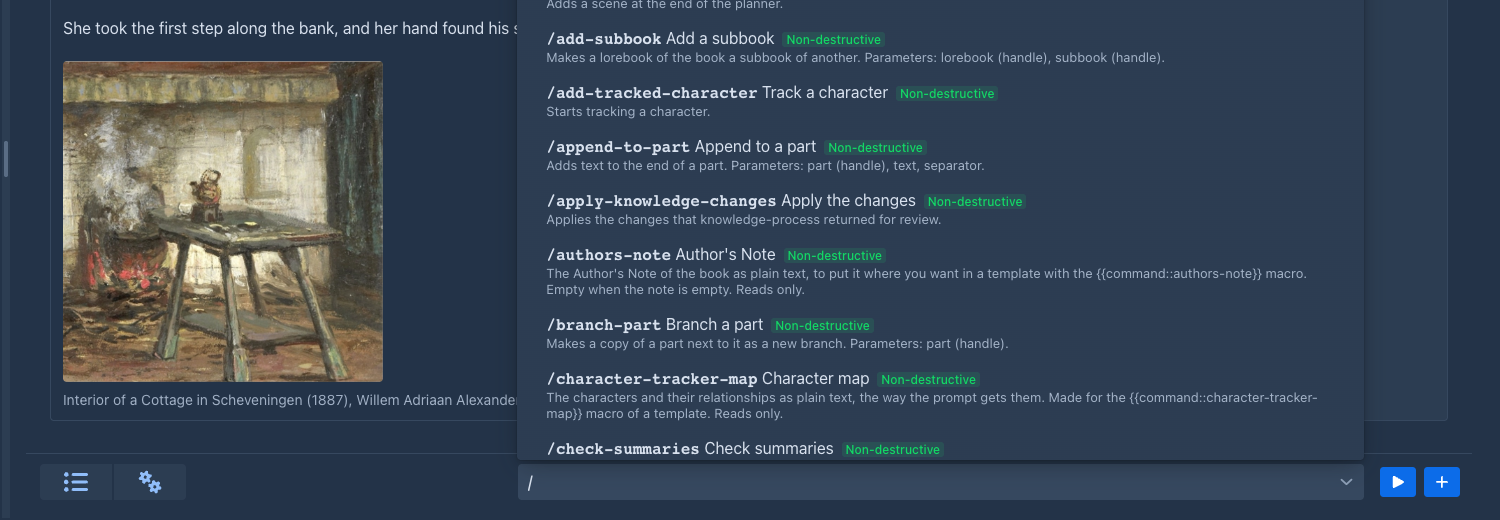
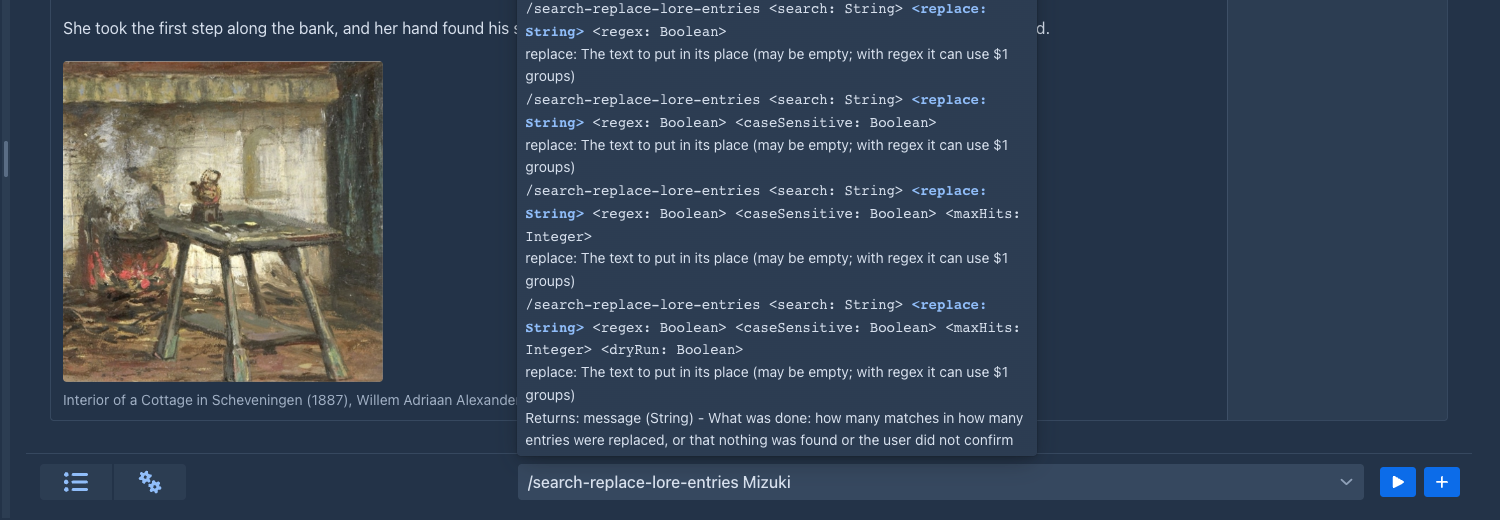
The list the bar shows when / is typed, and the help popover of a command while its arguments are typed:
Using it
CommandBar bar = new CommandBar();
bar.setResultTarget(result -> myField.setValue(result.text()));
layout.add(bar);
CommandBar is @Configurable: create it with new in a session; the services are injected. It implements HasEnabled
(the story part disables it while the story is frozen by a running generation).
Results are delivered, not displayed
The bar does not show what a command returned. It hands a CommandResult(commandName, humanName, value) to its
CommandResultTarget, an interface with:
-
onCommandResult(CommandResult)– called on the UI thread, inside the session, once for every command that finished (result.text()is the value as text, empty fornull), -
clearCommandResult()– the user started something new (typed, or ran another command), so a result that is still shown is out of date. Default: does nothing.
Each place implements the target as it needs: the story tab shows the result in a popover (CommandResultView), another
component could insert the text into a field, use the object as a value, or ignore it. Failures and stopped commands are
reported by the bar itself with notifications.
CommandResultView is a plain @Configurable class implementing the target; create(Component target) builds a Popover
above target (TOP_START) with a title, a close button and the body. It closes with the cross, with Esc and with a
click outside.
Layout rule: popovers, not rows
The help and the result are popovers over the target, so the bar is one row high and never changes the layout (an
earlier version put the help under the field and misaligned its neighbours). Popovers are opened and closed from the
server (setOpenOnClick/Focus/Hover(false), setModal(false)). The CSS classes are in shared-styles.css and MarginaliaCssStyles
(command-box, command-bar, command-help*, command-item-*, command-severity*, command-result*).
How the field works
The help
CommandHelp.of(allCommands, text, localizer) is pure (no UI; the localizer turns a LocalizationKey into the text of the user, the bar passes loc::getValue) and returns the typed name, the command, its forms that fit what is
typed, the index of the argument being typed and whether there are too many arguments. The bar renders: the description,
the description with the data severity label, the forms with the current parameter highlighted and its description, the return value, and an error line for too many
arguments, an unknown command or text without a slash. The texts are localization keys (LABEL_COMMAND_*,
HELP_COMMAND_*, ERROR_COMMAND_*); the Japanese and Chinese bundles carry them too.
The label of the data severity is a Span made by severityBadge, in the list and in the help:
red (command-severity-destructive) for DESTRUCTIVE, green (command-severity-non-destructive) for NON_DESTRUCTIVE, the
explanation in its title. The texts come from CommandDataSeverity.getLabel() and getDescription().
Running and asynchronous commands
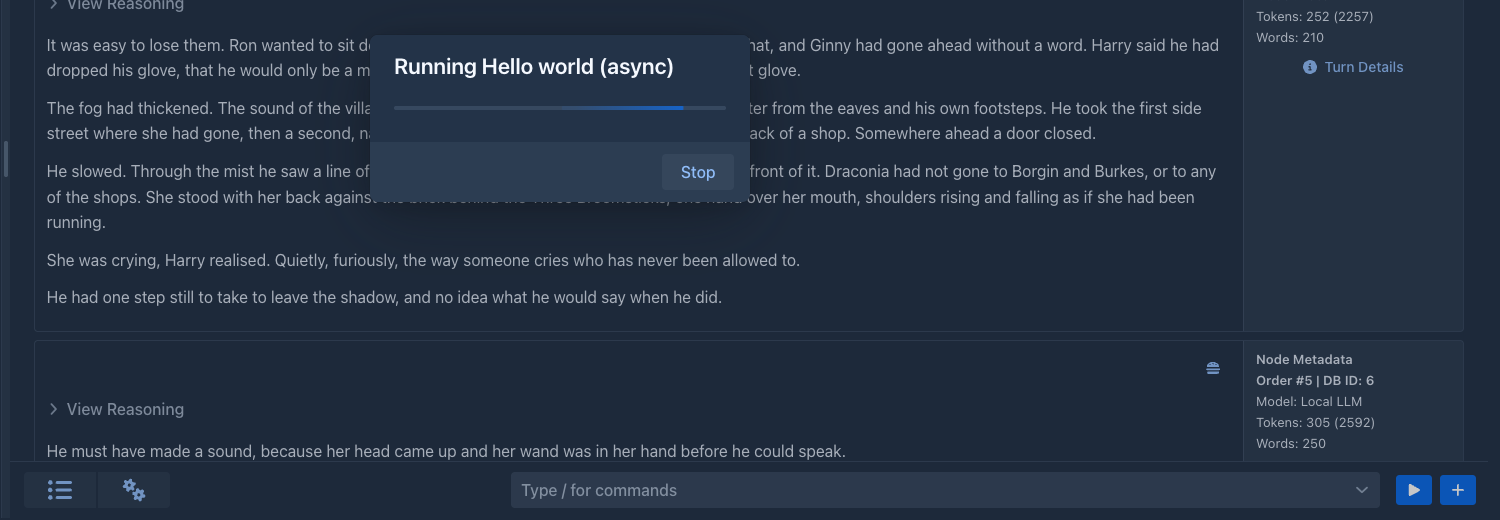
run(line) closes the help, clears the result (clearCommandResult()), empties the field (clearInput(); text that is not a known command returns earlier and stays) and calls commandService.executeLine. For a
command that completed (synchronous) the result is delivered at once. For an async command the bar opens a
CommandProgressDialog before it starts the command: an indeterminate ProgressBar, the two status lines of the command (setStatus,
setSubStatus; a line that is empty is hidden) and a Stop button whose handler cancels the future. The window is a
FloatingWindow (see UI): not modal, it stands at the side, its button folds it into the panel of the runs, and while the
command works it is a run of the registry. The bar starts the command with that run bound (try (Runs.Binding _ = dialog.bind())), and
CommandServiceImpl binds the command's worker thread to it (Runs.current() of the caller), so the requests the command makes report
to the run: the panel of every page of the user shows the command with what the model writes and its Stop. The bar feeds the
lines from CommandRun.addStatusListener through ui.access(...), after reading the status already set, and the state
of the button from addUninterruptableListener (disabled while the command is uninterruptable, setStopEnabled). When
the future completes, ui.access(...) (with the request scope and UIPushGuard.push) ends the window with finished() (also when it is
folded; a close() of a working floating window would only fold it) and delivers the result, or shows a notification for a stop, a CommandException or an IllegalArgumentException. This is why an async
command must react to isTerminated(): Stop only cancels the future.
Generations of the story. A command declared with progressInStory = true (/next, /swipe, /regenerate) gets no progress
window in a bar that has a host (setHost(CommandBarHost); the story tab gives it a StoryCommandBarHost around its GenerationView in
createCommandBox()). The bar runs the line in the host's scope(), there commandScopes.session(view), and takes the host's
holdForGeneration of the book until the generation starts, so the command finds the view in CommandScope.getGenerationView(), calls
show(book, request) before it starts the generation and hands the listener it returns to the generation besides its own: the part
streams into the story as for the round button (ManuscriptStoryPart.showCommandGeneration, the same StoryGenerationListener as
startGeneration, built by generationListener(ui, request, own)), the window holds what the generation holds, the round button stops
it (Runs.generationOf(book).stop()), and the run belongs to the page of the bar (GenerationOptions.withPage), so a closed page stops
it. A refused generation tells the listener onCancelled(null), which lets the window go. The bar keeps the result and the end as for any
command; a stopped generation ends the command with a CommandException whose cause is a CancellationException, shown as
MSG_COMMAND_STOPPED. While such a command runs, the bar refuses another one (ERROR_COMMAND_STILL_RUNNING, the text stays in the
field); the other commands run as before.
Adding the bar elsewhere
-
Create the
CommandBarwhere the component is built (a@Configurableclass or a plugin decorator) and set its result target. -
Give it a CSS class for sizing. Do not use inline styles;
command-box(flex 1 1 40%, minimum width 12 em) is the one the story tab uses. -
Disable it with
setEnabled(false)while something locks the UI. -
Decide what a result means there. Reuse
CommandResultViewif a popover fits.
In the story tab, ManuscriptStoryPart.createCommandBox() builds the bar and the result view and returns the bar;
setFrozen enables and disables it. The method is @Extendable/@PublicAPI (from 1.4.0), so a plugin can replace or wrap
the bar through a decorator on its return value (see Extendable classes).
Two setters turn the bar into the one of another place. setCommands(Supplier<List<CommandDefinition>>) makes it offer, and show the
help of, only those commands instead of all the registered ones, and setLineRunner(Consumer<String>) hands a line (the command
with its slash, a known one) to the runner in place of commandService.executeLine; the result and the progress are then the
runner's business and the result target is not used. The console of an agent uses both: it offers /compact,
/clear-workspace and the commands that only read or add, and runs them on the run, not on a book window.
The bar is not on the phone's story tab yet; only the desktop ManuscriptStoryPart has it.