# User interface
Marginalia's UI is written in Java with [Vaadin Flow](https://vaadin.com/docs/latest/flow) 25: the component tree
lives on the server, the browser renders it with Vaadin's web components (Lumo theme, dark color scheme) and sends
events back over HTTP and a push WebSocket. There is no hand-written frontend code apart from one CSS file and a small
connector for the story tree. This page explains how the UI code is organized and the conventions to follow when you
change it. The code is in `ui/`.
## Structure
```mermaid
flowchart TB
subgraph routes["Routes"]
Main["Main /"]
Viewer["Viewer /view, /view/<uuid>"]
end
Main -->|after login| WS["DesktopWorkspace HTabSheet with left-hand tabs"]
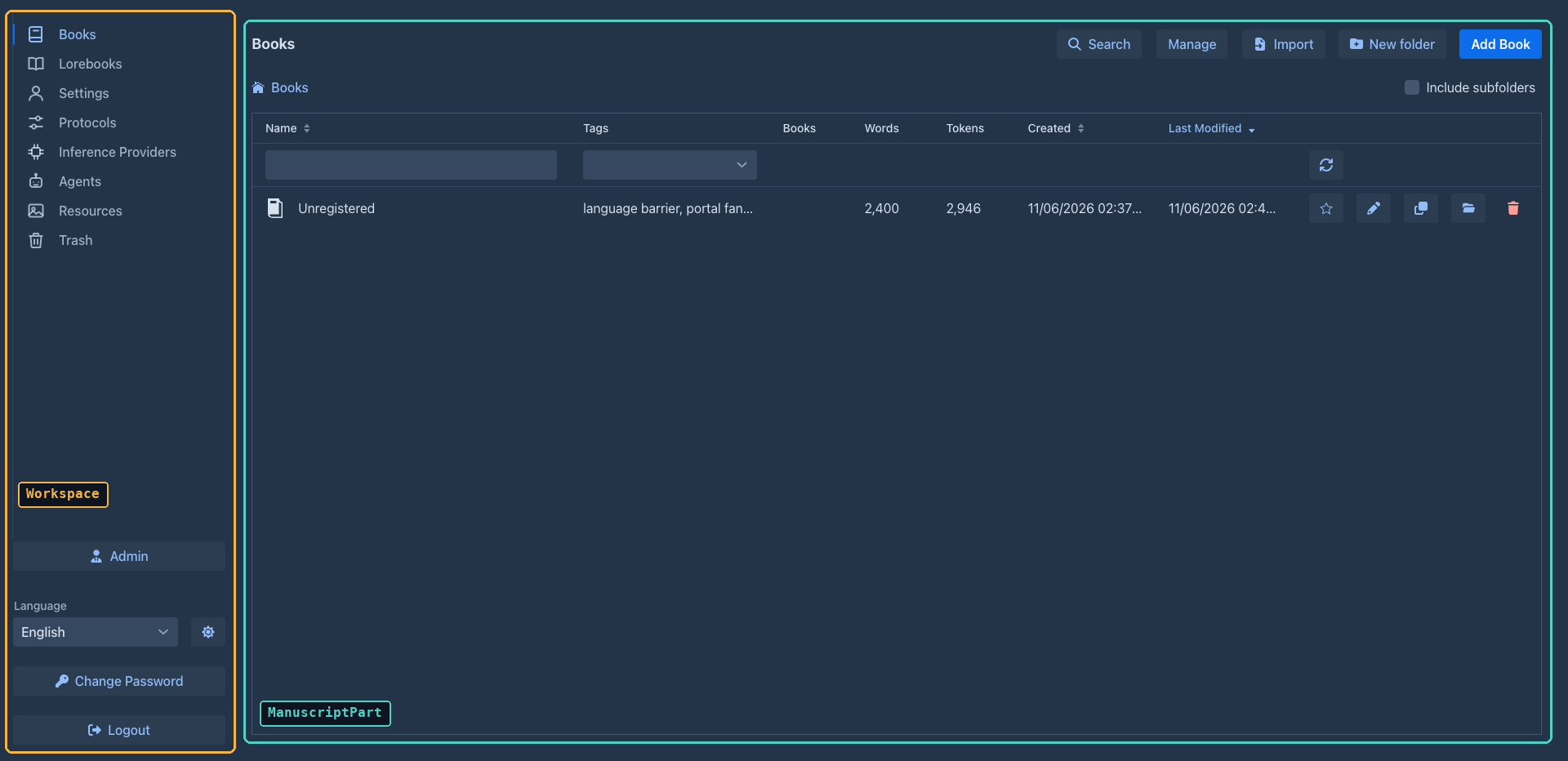
WS --> MP["ManuscriptPart - Books"]
WS --> LP["LorebookPart - Lorebooks"]
WS --> UP["UserPart - Settings"]
WS --> PP["ProtocolPart - Protocols"]
WS --> AP["AIPart - Inference Providers"]
WS --> RP["ResourcesPart - Resources"]
WS --> TrP["TrashPart - Trash"]
WS --> AdP["AdminPart - Admin (footer button)"]
AdP --> DBP["DatabaseBackupPanel"]
TrP --> TG["TrashGrid"]
AdP --> CP["CleanupPanel"]
CP --> TG
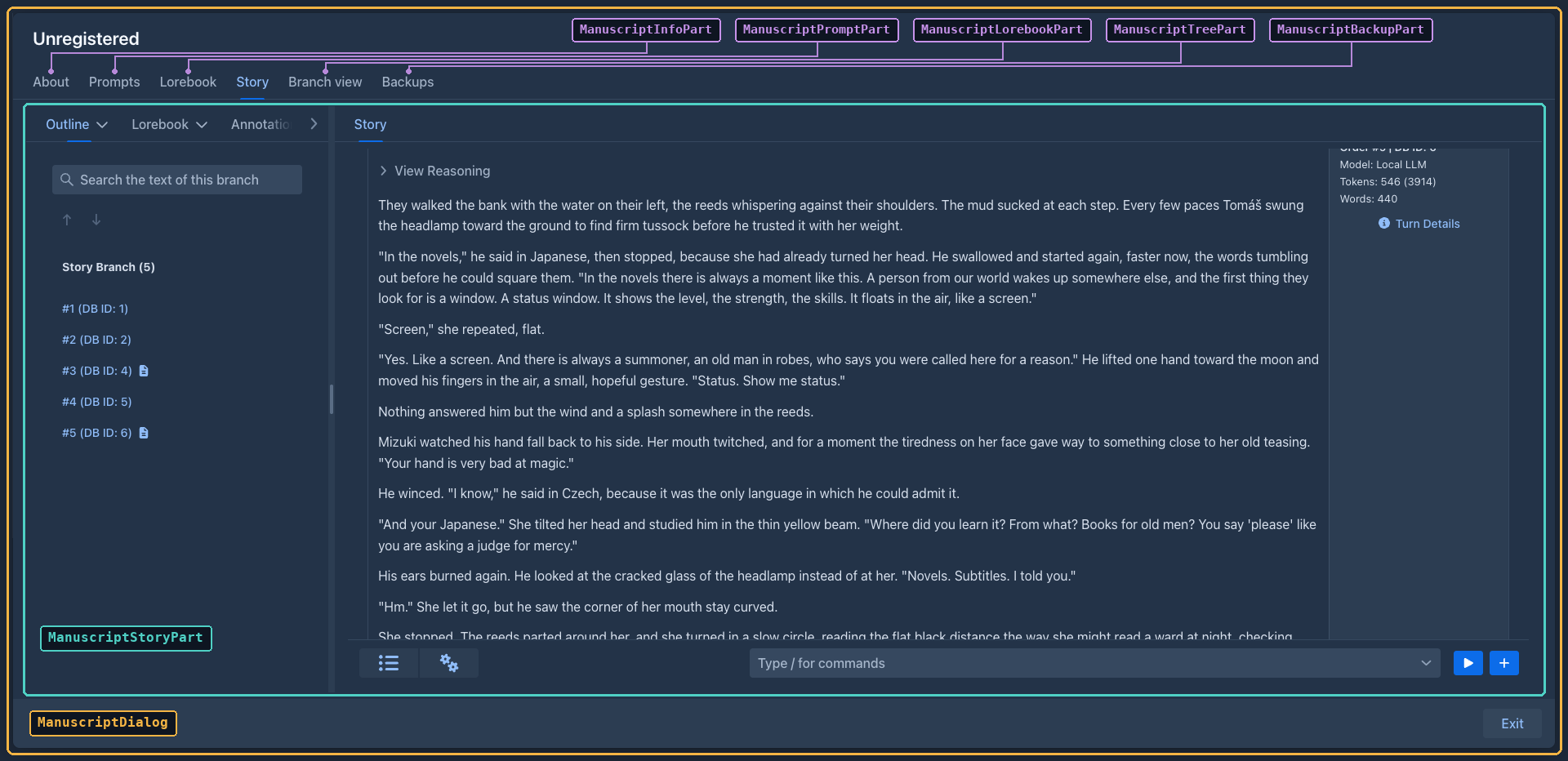
MP -->|open a book| MD["ManuscriptDialog VTabSheet"]
MD --> Info["ManuscriptInfoPart - About"]
MD --> Prompt["ManuscriptPromptPart - Prompts"]
MD --> Lore["ManuscriptLorebookPart - Lorebook"]
MD --> Story["ManuscriptStoryPart - Story"]
MD --> Tree["ManuscriptTreePart - Story tree"]
MD --> Backup["ManuscriptBackupPart - Backups"]
LP --> LV["LorebookView"]
Lore --> LV
```
| Package | Contains |
|---|---|
| `ui.main` | Servlet, app shell, routes, login (`LoginCheckRoute`). |
| `ui.workspace` | The `Workspace` interface, its `DesktopWorkspace` implementation and the `WorkspaceComponent` interface. |
| `ui.workspace.phone`, `.parts` | `PhoneWorkspace` and the phone specific tabs (`PhoneManuscriptPart`, `PhoneLorebookPart`, `PhoneProtocolPart`, `PhoneAIPart`, `PhoneSettingsPart`, `PhoneTrashPart`). |
| `ui.dialogs.phone`, `.manuscript` | `PhoneManuscriptDialog` and its tabs (`PhoneManuscriptInfoPart`, `PhoneManuscriptPromptPart`, `PhoneManuscriptLorebookPart`, `PhoneManuscriptStoryPart`, `PhoneManuscriptTreePart`, `PhoneManuscriptBackupPart`), the book dialog for phones. |
| `ui.workspace.parts`, `.admin` | The workspace tabs and the admin panels. |
| `ui.dialogs` | Entity dialogs, the book window and generic dialogs. |
| `ui.dialogs.manuscript` | The tabs of the book window (`ManuscriptDialogPart`). |
| `ui.components` | Larger reusable components: `LorebookView`, `PhoneLorebookView`, `LorebookPreview`, `InvalidExtensionsWarning`, `HelpAssistantWidget`, `RunCorner` and `PageRuns`, `RunsOnPage` and `LoreChangesOnPage`, `TreantTree`, `MessageImages`, `PartView`, `ThreadCopyRequestAttributes`. |
| `ui.widgets` | Small reusable widgets, among them `TrashGrid` (see [Trash](#trash)) and `WindowRun` (the request of a window the author waits in as a run of the panel, see [the runs](services.md#the-runs-and-what-they-hold)). |
## The shell, routes and login
- `AppShellConfig` (`AppShellConfigurator`) sets up the page once: `@Push`, Lumo stylesheet, `@ColorScheme(DARK)`,
full-viewport body, `shared-styles.css` (with the platform's `platform-styles.css`, see [Styles](#styles)), page title, PWA metadata.
- `MarginaliaServlet` is the `VaadinServlet` mapped to `/*` (with `asyncSupported` for push).
- There are four routes, all extending `LoginCheckRoute`:
| Route | Class | Shows |
|---|---|---|
| `/` | `Main` | The workspace. |
| `/view`, `/view/` | `Viewer` | The reader: a list of the user's own books, and a book's active branch as text (own or published books, by link). |
| `/reset` | `Reset` | No page: after the login it empties `UserSetting.workspaceState` and sends the browser to `/`, the way back into a workspace whose restored state freezes the browser. It builds no workspace. |
| `/jobs` | `JobsView` | The jobs that run now (`ActiveJobsGrid`, `ui.jobs`: who started them, how long they run, what they wait for; it reads `JobService.active()` again every few seconds while it is on the page, and `PolledRows` sends the grid a change only when what the rows show changed, as the page stays open for days), so an administrator sees at a glance whether the server is busy. It logs in like the other pages, builds no workspace and shows nothing to a user who is not an administrator. Not `@Extendable`. |
`LoginCheckRoute` runs in the route's constructor (`showLogin()`):
1. On an empty installation it opens `UserDialog` in *first time* mode (create the administrator) and reloads.
2. Otherwise it tries a user that is already logged in this session (`authenticatedSessionUser`, overridden by `Main`: the page was reloaded, e.g. by the language selector) and then the *Save login* cookies (`authenticateFromCookie`, rotating the secret on success).
3. Otherwise it shows a `LoginOverlay` (`PermissiveLoginOverlay` - allows empty passwords to reach the server-side
check) with the *Save login* checkbox.
The check passes the client address (`LoginCheckRoute.clientAddress()`) to `UserService.authenticate`, which
throttles failed logins per address (see [Login throttling](services.md#login-throttling)).
4. After a successful login it calls `VaadinService.reinitializeSession` (new session id) and the subclass's
`proceedWithLogin(login)`, which fills the session-scoped `user` bean, registers the login with
`SessionManager.userLoggedIn` (see [Sessions](architecture.md#sessions)), sets the language of the session from
the user's settings ([Localization](architecture.md#localization)) and builds the content.
Logout deletes the cookies, closes the Vaadin session, invalidates the HTTP session and redirects to the context
root. Cookie names include the context path and the route class (`root_Main_marginalia_rememberMe_login`...), so the workspace
and the viewer keep separate saved logins, and in front of them the application's namespace when one is set
(`getCookieNamespace()`, from `Configuration.cookieNamespace`; Marginalia has none by default): cookies are
scoped to the host, not the port, and two applications on the platform on one host would otherwise read and delete each
other's. The cookies are deleted only when this application's own cookies are there but wrong (a visit without them
sends no `Set-Cookie`), and *Save login* is ticked only by this page's own `wasSaved` cookie. The session cookie's name
is set by `SessionCookie.configure` in the application's initializer (`MARGINALIA_SESSION_COOKIE`, default `JSESSIONID`).
The title, the description and the line under the form are hooks of the subclass: `getAppTitle()`, `getAppDescription()`
and `getAppAdditionalInformation()` (default: `BuildInfo.current().getNamedShortText()`, `Marginalia 1.9.0 (93ec118)`).
## Building blocks
### Classes that build components
Most UI classes are **not** Vaadin components themselves. They are plain classes with a `create()` method that builds
and returns the component tree, and keep references to the fields they need later:
```java
@Configurable
@Extendable
public class ProtocolPart implements WorkspaceComponent {
@Autowired
private Localization loc;
@Autowired
private ProtocolService protocolService;
private Grid grid;
@Override
public Component create() throws Exception {
VerticalLayout layout = new VerticalLayout();
grid = new Grid<>();
...
return layout;
}
@Override
public void refresh() throws Exception { ... }
}
```
This shape is deliberate:
- **`@Configurable`** - the class is created with `new`, and the AspectJ-woven configurer injects its `@Autowired`
fields (services, `Localization`, the session `User`). See [AspectJ weaving](building.md#aspectj-weaving).
- **`@Extendable`** - the class is instrumented at startup so extensions can run code before and after any of its
methods and read its local variables (see [Extensions](#extension-points)). Small methods with descriptive local
variable names (`menu`, `toolbar`, `detailLayout`) are what make a class easy to extend.
Dialogs (`AIDialog`, `ProtocolDialog`, `UserDialog`, `LorebookDialog`, `ManuscriptDialog`...) extend Vaadin's `Dialog`
but follow the same pattern: construct with the entity, call `create()`, then `open()`.
### The workspace
`Workspace` is the interface of the top-level layout shown after login (`create`, `refresh`, `setNavigationLocked`,
`isNavigationLocked`, `getOnLogout`, `setOnLogout`). `Main`, the parts, `ApplicationPoint` and `SessionInformation`
only depend on this interface. `DesktopWorkspace` is the implementation (`@Configurable`, `@Extendable`): it builds an
`HTabSheet` (tabs on the left, a footer with *Admin*, the language selector, *Change Password*, *Logout*) and puts the red `InvalidExtensionsWarning` bar (`ui.components`; hidden while no installed extension is invalid, the administrator gets the names as its tooltip, other users a note to tell the administrator, from `OsgiService.getInvalidExtensions()`) above it - the phone workspace has it in the navbar - and creates all tab components up
front (the admin part is created, and refreshed, only when the user is an administrator, who has the *Admin* button: its panels refuse anybody else). The header of each tab starts with the line drawing of its part, the `PartIcon` enum (`ui.workspace`: SVG on a 24 x 24 grid, stroked in `currentColor` by the `workspace-part-icon` rule, so it follows the theme and the selected tab); a new part needs a constant there. Each tab is a `WorkspaceComponent`:
| Method | Called |
|---|---|
| `create()` | Once, when the workspace is built. |
| `refresh()` | To reload data (after login, after changes elsewhere). |
| `onTabSwitched()` | When the tab becomes active - parts reload their lists here. |
| `onTabClosed()` | When another tab is selected. |
`Workspace.setNavigationLocked(true)` disables the other tabs and the *Admin* and *Logout* buttons, so the user can't
leave the active tab. `UserPart` locks it while the settings have unsaved changes: it listens to every `HasValue`
in its layout (extension settings panels included; after every change it walks the layout again, `trackAllChanges`, so fields
built since are tracked too, and a form reports a change that is no value change with `SettingsChanges.changed`) and unlocks on
*Save*, *Discard Changes* or `refresh()`.
`Main.proceedWithLogin` picks `PhoneWorkspace` instead when the body of the page is narrower than 768 px
(`ExtendedClientDetails.getBodyClientWidth()`). The choice is made once per login: resizing or rotating the device
does not switch the workspace until the page is reloaded, and a tablet or a phone in landscape gets the desktop one. `PhoneWorkspace` replaces
the left-hand tab sheet with an `AppLayout`: the parts are listed in a drawer (opened with the toggle in the top bar)
whose footer holds the language selector, *Change Password* and *Logout*, and the active part fills the screen. There is no *Admin* button, the
administrator gets the **Admin tab** (`PhoneWorkspace.addAdminTab`, only for a user whose `isAdmin()` is true: the part is the desktop
`AdminPart` made with `new AdminPart(workspace, true)`, whose users and extensions are one card for each entry (`createUserCard`,
`createExtensionCard`), whose `DatabaseBackupPanel`, `CleanupPanel` and `ResourceGarbagePanel` take the same `phone` flag (cards for the backups, narrower
columns, the phone trash grid, wrapping toolbars) and whose content has the class `phone-page`: layouts and grids there shrink to the screen).
The services still check `AdminGuard.requireAdmin()` themselves. The user manual
describes this for users in [Using Marginalia on a phone](../user/phone.md). The book list, the lorebooks, the settings, the protocols, the models, the resources and the trash differ (`ResourcesPart(workspace, true)` has a card for each resource). `PhoneManuscriptPart` renders the book list
like the `Viewer` (stacked filters, sort buttons, one column) with the controls of `ManuscriptPart`; both share the
*Add Book* flow in `NewBookAction`. `PhoneLorebookPart` hosts `PhoneLorebookView`, the `LorebookView` in one column with the same abilities (not the *Only root
lorebooks* box and the selection of many entries): a `ContextMenu` of the **⋮** button (add, clone, delete, import, export, tags, description;
a pinned view has only export and description), a `Details` with the settings of the lorebook (name, sub lorebooks, tags, scan depth, sharing),
**Add Entry** and a menu of the mass edit and the entry tags, and an entry opens into the form of `createEntryFields` plus the content and the note, with
a *Delete entry* button. The lorebook that an agent locks (`lockedBy`) is read only as before: no menus, no settings, the entry settings as text (the desktop
`LorebookView` shows a `PhoneLorebookView(true)` for it). The plugins that decorate `LorebookView.create` / `createEntryDetailLayout` (Lorebook VCS, Lore Generator) decorate the phone view too.
`PhoneManuscriptPart` has the folder tools (the `FolderActions` and `FolderDialog` of the desktop, in the **⋮** of a folder row) and a **⋮** header menu of
*Organise* (`OrganiseDialog` puts its panes one over the other when `UIUtils.isPhone()`), the tags and the mass changes. `PhoneTrashPart`
hosts `PhoneTrashGrid` (see [Trash](#trash)). `PhoneProtocolPart` and `PhoneAIPart` replace the type, name and
action columns of their desktop lists with a text column (*Type:* and *Name:* on two lines) and a buttons column.
`PhoneSettingsPart` extends `UserPart` (so the extension settings panels that decorate `UserPart.refresh`/`save` keep
working) and only overrides `createHeader()`: the title, the unsaved changes hint and the *Discard*/*Save* buttons are
stacked, and *Import backup as new book* is left out. The other parts are the desktop ones.
Code that must not care which layout the user has works with the common interfaces: `ManuscriptWindow` (package `ui.dialogs`, implemented
by `ManuscriptDialog` and `PhoneManuscriptDialog`: the book, its model, open/close, the story tab, the state callbacks, `asDialog()`),
`ManuscriptSection` (package `ui.workspace`, implemented by `ManuscriptPart` and `PhoneManuscriptPart`: `getOpenWindow()`, the window of
the book that is open or `null`; `openBook(book, then)`, the book opened the way the list opens it and `then` run with its window, or
`false` and `MSG_CLOSE_OPEN_BOOK_FIRST` when another book is open in the page; plugins call it as `BookWindows.openHere(book, then)`,
which finds the workspace of the current page through `ApplicationPoint.getUIs()`) and `Workspace.getManuscriptSection()` / `getOpenManuscriptWindow()`. The session's `SessionPoint` holds the
workspace, and `CommandUtils` (package `utils`) reads it for commands: `getWorkspace()`, `getManuscriptSection()`, `getManuscriptWindow()`,
`getCurrentManuscript()` and `getCurrentAI()` return `null` when there is no session, workspace or open book. The book-related methods delegate to
`MarginaliaSessionPoint` (the bean `sessionPoint`; the platform's `SessionPoint` it extends knows only a `BaseWorkspace`, the languages, the help
chat, the problems and the plugin data): `getWorkspace()` as a `Workspace`, `getManuscriptWindow()`, `getCurrentManuscript()`, `getCurrentAI()`,
which `AgenticSessionPoint` overrides for a session without a browser: the book is held directly and there is no window. `ApplicationPoint`
maps a page to its `BaseWorkspace`.
**Command bar** (see [The command bar](commands/command-bar.md)). `CommandBar` (package `ui.components`, a `Composite`) is the input line for the commands of `CommandService`, to be placed anywhere:
a `ComboBox` with custom values, where the user types `/name arg arg`, plus a run button. The list is filled lazily from the registry (`CommandHelp.matchingNames`),
the help is a `Popover` above the bar (it covers what is above and moves nothing in the layout), rebuilt as the text changes (description, the forms that fit, the next parameter highlighted, the return value, "too many arguments"); it opens for the arguments, for text that is not a command and for a name nothing matches, and while the name is typed the list (with the descriptions) is the help;
picking a command writes `/name ` into the field, or runs it when it takes no arguments. The bar shows no results: it hands them to its
`CommandResultTarget` (`setResultTarget`), an interface (`onCommandResult`, and `clearCommandResult` when the user types or runs something else) that each place implements as it needs; the story tab (`ManuscriptStoryPart.createCommandBox()`, next to
the menu bar) uses `CommandResultView`, a popover above the bar with a close button, and other places can consume the value differently. An `async` command opens
`CommandProgressDialog` before it starts (the two status lines of the command, Stop cancels the future): a `FloatingWindow`, so it is not
modal, folds into the panel of the runs and is a run of the registry while the command works; the bar starts the command with that run
bound (`dialog.bind()`), and `CommandServiceImpl` binds the command's worker thread to the run its caller was bound to (`Runs.current()`),
so the panel shows what the model writes. The bar ends it with `finished()` (a `close()` of a working window would fold it). Failures and
stops are shown by the bar. A generation of the story
(`/next`, `/swipe`, `/regenerate`, `progressInStory`) does not: the story tab gives its bar a `GenerationView` and shows the generation as
one of the round button (see [The command bar](commands/command-bar.md#running-and-asynchronous-commands)). Not on the phone story tab yet.
Opening a book on a phone shows the `PhoneManuscriptDialog` (package `ui.dialogs.phone`) instead of `ManuscriptDialog`;
*Add Book* (`NewBookAction`) creates the book and hands it to `openManuscript` of the list, which opens the window of its layout and remembers it. It is a separate class, not a subclass, so extensions know
which dialog they decorate (decorators of `ManuscriptDialog` and the desktop parts do not run on a phone). It fills the
screen (the `phone-dialog` class), the exit button is an icon in the header and the tabs are one scrolling `Tabs` row
above the content of the selected tab. Every tab is a `PhoneManuscriptDialogPart` of `ui.dialogs.phone.manuscript`
(the desktop `ManuscriptDialogPart` without the tab sheet argument): `PhoneManuscriptInfoPart` and
`PhoneManuscriptPromptPart` (one column of fields), `PhoneManuscriptLorebookPart` (the lorebook of the book and
`PhoneLorebookView(true)`, which hides its own lorebook selection like the pinned `LorebookView`; both lorebook parts
have a second box, *Shown lorebook*, with the lorebook of the book and its subbooks (`LorebookService.getLorebookTree`, shown only when there is a subbook), which
sets the lorebook of the pinned view without touching `Manuscript.lorebook`: the desktop part also gets the click on a subbook chip through
`LorebookView.setOnOpenSubbook`, and both rebuild the box in `onTabEnter` as the subbooks can be changed in the view),
`PhoneManuscriptTreePart` (stacked search bar), `PhoneManuscriptBackupPart` (one row per backup) and
`PhoneManuscriptStoryPart`. The story is a single column in an `AppLayout`: the outline is its drawer (slid in by the
toggle in the navbar, which also holds the summaries/settings menu bar), the new turn button is at the bottom. Its
`ChatMessageCard` is only the text of the part under a small header line with two icons: the menu (with *Show Prompt* and *Compare Prompt*)
and a popover with the metadata of the inference (ids, model, protocol, tokens, words) and the turn details (the
right-hand column of the desktop card; on both cards the popover is filled by `createDetails` and opened by the server when its button is clicked, and the editing text area exists only while the part is edited, because the text areas of `TurnDetailsForm` measure their height as soon as they are in the page and hundreds of them freeze the browser). Its summaries item opens `PhoneSummariesDialog`, the `SummariesDialog` with a fixed 640 px, taller content column (the grid scrolls sideways anyway, so the summaries stay readable and editable). The fixed navbar and drawer of the
`AppLayout` are kept inside the dialog by the `phone-story-layout` class.
On the desktop the *Admin* button is only added for administrators; `AdminPart` shows the users grid and the
`DatabaseBackupPanel`, `CleanupPanel` and extensions tab (with the SHA-256 of each JAR behind a `#` button next to the version - tooltip, click copies it with
`JavascriptLibrary.copyToClipboard` - the verification report of each extension and, per
extension, the buttons *Stop* / *Start* (`OsgiService.stopExtension` / `startExtension`, state *Stopped*), *Log*
(`ExtensionLogDialog`: the end of the extension's log with refresh and clear) and *Unload*). Note that the admin UI being hidden is not a permission
check - the administrator-only services call `AdminGuard.requireAdmin()` themselves (see
[Services](services.md#administration)).
### The agents tab
`AgentPart` (`ui.workspace.parts`, a `WorkspaceComponent` like the others) is a table of the agents of the user (a card for each on the phone,
`new AgentPart(workspace, true)`): the name, the book, the status of the unfinished run (`Localization.getAgentRunStatus`) and when the newest run started (`AgentRunService.findForAgent`), with filter fields for the name and the book (every word must be contained, `AgentPart.containsWords`; a `ListDataProvider` filter), sortable columns (the phone has the `Sort` selector, `sortBy`), and a row of
buttons whose visibility follows the status of the run (**Start** with *Start immediately* / *Start in console*, **Resume**, **Pause**,
**Pause now**, **Stop**, the console, **Review changes**, **Edit**, **Clone**, **Delete**). They call `AgentRunService` and `AgentRunner`; the
refusals of the service (`IllegalStateException`, `SecurityException`, `IllegalArgumentException`) are shown as a warning with the text of the
exception, everything else as an internal error, and the table is read again after every action. `DesktopWorkspace.create` and
`PhoneWorkspace.addAgentsTab` build the tab only when `AgentService.isAllowed()`, once per login (a permission given or taken later shows after
the next login); a count of the agents that wait for the user is in the tab and, on the phone, in the top bar. **New agent** and **Clone** are
off when `AgentService.canCreate()` is false. The dialogs (the editor of an agent with the roles of commands and the models for sub-agents, the
console, the review of the result, the checkpoints...) are in `ui.dialogs.agent`; **they are described in [Agents](agents.md#the-screens)**,
with the services they call. The administrator's settings of agents are `AgentSettingsPanel` (`ui.workspace.parts.admin`, the *Agents* tab of
*Admin*: the default system prompt and compaction prompt of the application, and whether agents may send a message to a URL).
The settings of the `AGENTS` permission are edited by `AgentsPermissionComponent`, see [Permissions dialog](#permissions-dialog).
### Remembering where the user was
The workspace is autosaved so the next login opens it where it was left. Everything that has state worth coming back
to implements `Restorable` (`ui`): `JsonObject storeState()` serializes the state the class needs into a new object and
asks the children it has for theirs (nested under their own key), `restoreState(JsonObject self)` reads it back and
passes the nested objects on. `RestorableState` has the defensive readers (`string`, `bool`, `strings`, `object`) and
`put`, which leaves out an empty state. `Workspace`, `WorkspaceComponent` (default: no state), `ManuscriptDialogPart`
and `PhoneManuscriptDialogPart` (default: no state), both book dialogs, `LorebookView`/`PhoneLorebookView` and
`NewTurnForm` are `Restorable`. What is stored:
| Class | State |
|---|---|
| `DesktopWorkspace`, `PhoneWorkspace` | `tab` (`books`, `lorebooks`, `settings`, `protocols`, `models`, `resources`, `trash`) and `parts`, the state of each part under its tab name. The admin panel is not remembered. |
| `ManuscriptPart`, `PhoneManuscriptPart` | `filters` (`name`, `tags` as tag uuids), `folder` (the uuid of the current [folder](folders.md), gone when it was deleted: the list opens at the top level), `subfolders` (*Include subfolders*) and `dialog`, the state of the open book window. `organiseTarget` is the uuid of the folder the right pane of *Organise* was left on. |
| `ManuscriptDialog`, `PhoneManuscriptDialog` | `manuscript` (uuid), `tab` (`info`, `prompt`, `lorebook`, `story`, `tree`, `backup`) and `parts`, the state of the tabs. |
| `ManuscriptStoryPart`, `PhoneManuscriptStoryPart` | `newTurn`, the `NewTurnForm`: `scene`, `pov`, `present`, `instructions` and `edited`. The desktop part also stores `tabs`, the `TabDock` state: `selected`, the ids of the tab each panel shows. |
| `LorebookPart`, `LorebookView`, `PhoneLorebookView` and the lorebook tab of the book window | `lorebook` (uuid, not for the view pinned to the lorebook of a book), `rootOnly` (the *Only root lorebooks* box, `LorebookView` only, not when pinned) and `entries`, the uuids of the entries whose details are open. The lorebook tab of the book window (`ManuscriptLorebookPart`, `PhoneManuscriptLorebookPart`) adds `shown`, the uuid of the lorebook it shows when it is not the one of the book (see the lorebook parts above); it is restored before the rest, as the open entries are the ones of that lorebook. |
Everything is stored by uuid and looked up when it is restored (`findForUser`), so a book, lorebook, entry or tag that
is gone is skipped: a book that does not exist is not opened, the lorebook stays the default one. The state of an older
version is read the same way, unknown keys are ignored.
`WorkspaceAutosave` (`ui.workspace`, one per workspace) keeps the state in `UserSetting.workspaceState`, an
`@ExtendedAttribute(inject = true)` `JsonObject` (so no migration). `Workspace.autosave()` stores the state of the
whole workspace; the parts call it after the user did something worth coming back to - selected a tab, changed a filter,
opened or closed a book, selected a tab of the book window (`ManuscriptDialog.stateChanged()`), opened an entry or
chose a lorebook (`setOnStateChange` of the views), typed into the new turn form (`NewTurnForm.setOnChange`). It
writes nothing when the state did not change, and failures are only logged. `Main.proceedWithLogin` calls
`Workspace.restoreAutosaved()` after `create()` and `refresh()`: the autosave is **off until then**, because building
the workspace fires the same change events and would overwrite the stored state, and it stays off while restoring (the
restoring fires them too). The book window is restored after `open()`: `ManuscriptPart.openManuscript` is the one place
that creates and opens it, for the *Edit* button and for restoring. Code that saves a `UserSetting` must load it right
before, not hold on to one (`UserPart.save` does), or it writes back an older `workspaceState`.
A new part with state overrides the two methods and calls `workspace.autosave()` (or its owner's callback) when
the user changes the state; a new tab of a dialog needs a name in the `partsByKey` map of the dialog.
### The book window
Opening a book creates a `ManuscriptDialog` - a full-screen, strictly modal dialog with a `VTabSheet` of
`ManuscriptDialogPart`s.
**One window per book.** A book is open in one window only, for its user across all their pages (tabs, browsers, the phone).
`BookWindows.hold(window, book, closeHere)`, called from the constructors of `ManuscriptDialog` and `PhoneManuscriptDialog`, makes the
window a run of [`Runs`](services.md#the-runs-and-what-they-hold) (`BOOK_WINDOW`, the book in `OPEN`) from its opening to its closing
or detach. The screens of the workspace open a book through `new BookWindows().open(book, open, restoring)` (the edit button, the
search results, the statistics, the restored state; desktop and phone): it asks `AgentLockCheck` first, then whether another page holds
the book; if so it asks *Open it here and close it there?* (`MSG_BOOK_OPEN_ELSEWHERE`, `_GENERATING` when a generation runs there,
*Open here* stops it), and *Open here* stops the other window's run: its hold goes at once, and the window is closed in its own page
(`ui.access`, as by its exit button, with `MSG_BOOK_CLOSED_ELSEWHERE`). A page that does not answer cannot write, so nothing waits for
it. A restored workspace (`restoring`) never takes a book over: it leaves it closed and says so (`MSG_BOOK_OPEN_ELSEWHERE_NOT_RESTORED`).
The window of the current page is never in the way of the page itself (a window reopened after a restored backup, a restore from the
backup tab).
The parts of the window:
| Method | Purpose |
|---|---|
| `create(VTabSheet)` | Build the tab content and add the tab. |
| `load(Manuscript)` | (Re)load the part from the book; called for all parts when the dialog opens. |
| `onTabEnter()` / `onTabLeave()` | Tab switching - parts save pending edits on leave. |
| `setFrozen(boolean)` | Disable editing (the whole book is held). |
| `setHold(GenerationHold)` | What a generation of the book holds now, null when none runs; by default `setFrozen(hold != null)`. |
The dialog holds the book (`getManuscript()`, `refreshManuscript()` reloads it, `save()` saves it) and **follows the generation of its
book** in the `Runs`, whoever started it (the story, a command, a plugin): it listens while it is attached (`RunsOnPage.listen`) and
gives the tabs a `GenerationHold` (`getHold()`): `WHOLE` while the generation prepares its prompt (and from the click, `freeze()`, until
the run says more; `unfreeze()` when the story has shown the end), else the part being written and the branch above it. With `WHOLE`
the tabs of the sheet are disabled and every part waits, as the old freeze did; from the inference on the info, prompt and lorebook
tabs are free, the tree and backup tabs keep waiting (they change the active leaf or replace the book), and the story works on (see
below). The exit button is never disabled: while a generation runs it asks (`MSG_LEAVE_STOPS_GENERATION`) and stops it, the Stop the
author knows. When the window leaves its page (closed, or the page is gone: a closed tab, heartbeats that stopped),
`BookWindows.stopGenerationOf` stops a generation of the book that the page started, and while a generation runs the page has the
browser ask its own *Leave site?* (`JavascriptLibrary.warnOnLeave`). The phone window does the same.
**The story during the inference** (`ManuscriptStoryPart.setHold`, the phone twin alike): the round button stays Stop (it stops the
tab's own generation, else the one the window follows), the left bar, the menu bar and the command bar are enabled, and
`StoryCards.setHold` freezes only the card of the part being written; the other cards, all on the branch it continues, are *kept in
place* (`StoryCard.setKeptInPlace`): edit, annotate and redraft work, delete, merge and branch are off. Search and replace, the import
into the book and the mass delete wait (`StoryMenuRegistry.notGenerating`), and a second turn is not offered. The server refuses the
same (see *The runs and what they hold* in [services](services.md)), so a command or a plugin can't do what the window greys out.
`ManuscriptStoryPart` is the story editor and the largest UI class: the outline (one button per part), a
`ChatMessageCard` per part (Markdown view, edit mode, menu with Edit / Regenerate / Swipe / Branch / View prompt /
Summary / Delete), the *New Turn Instructions* popover, starting generations and applying the result, the automatic
book backups, and the menu bar of the bottom bar (see [The story menu bar](#the-story-menu-bar)).
`renderStoryContent()` redraws only the cards and the outline list: the left tab sheet is created once in `create()`
(so the selected tab and the tabs of extensions survive), and the reasonings that were open are reopened on the new
cards. `PhoneManuscriptStoryPart` does the same.
The whole desktop editor is one `TabDock` (`leftBar`, the name is older than the story tab): the outline, the lorebook preview,
the tabs of extensions and **the story itself** (`ManuscriptStoryPart.STORY_TAB`, `story`; its content is `centerLayout`: the
scroll panel with the cards and the bottom bar with the menus, the command line and the round button) are its tabs, so the
user arranges the whole screen. `TabDock` is a reusable widget: a row of columns, each a stack of tab sheets, whose
tabs the user can drag out into sheets of their own (a strip between the sheets of a column) or into a column of their own (a
strip between the columns and at the sides) and back (the drag and drop is Flow's `DragSource`/`DropTarget`, no JavaScript;
the strips show while a tab is dragged). The columns and the sheets of a column are separated by `SplitLayout`s the user can
resize; a split layout has two sides, so the cells of a row or column are a chain of nested split layouts, the position of each
being the share of its cell in what is left (`chain`, `shares`). When a splitter is dragged the shares of all cells are read
again and stored as `size` (percent of the dock / of the column) in the layout, `onLayoutChange` saves them; a cell without a
size gets the average. Tabs have a stable id (`add(id, caption, content)`, the
outline is `ManuscriptStoryPart.CHAPTERS_TAB`); the layout, `{"columns":[{"size":50,"groups":[{"size":50,"tabs":["id", ...]}, ...]}, ...]}` (`size` optional)
(`getLayout`/`setLayout`; a layout with `groups` at the top level, as the dock stored before it had columns, is one column), names tabs only by id and keeps the place of tabs that are not there now, because extensions add
their tabs late (a tab the layout does not know goes to the first sheet). `ManuscriptStoryPart` stores the layout in the
attributes of the manuscript under `$desktopManuscriptStoryPartTabsConfig` (`TABS_CONFIG_ATTRIBUTE`): `saveTabsConfig()` runs
after a drag or a resize, `applyTabsConfig()` in `load()` before the story is drawn. The selected tab of each sheet is not part of the
layout but the `Restorable` state of the dock (`storeState`/`restoreState`): it is in the workspace state, and
`ManuscriptStoryPart` also keeps it under `$desktopManuscriptStoryPartTabsState` (`TABS_STATE_ATTRIBUTE`), so a book that is closed
and opened again shows the tabs it was left with: `saveTabsState()` writes it (only when it changed) from the dock's state
listener, `applyTabsConfig()` restores it after the layout.
**Minimizing (1.6.0).** A tab of a detachable dock has a minimize button (`makeMinimizable`, in the `Tab` itself). `minimize(id)` adds
the id to the ordered set `minimized`; the tab keeps its place in `Group.ids` (so `restore(id)` puts it back where it was, and
a group whose tabs are all minimized is just not shown, like a group whose tabs are not there yet) but `presentEntries` leaves it
out, so `arrange()` takes its `Tab` out of the `TabSheet` and the content only lives in its `Entry`. `isMinimized(Entry)` is
`minimizable && minimized.contains(id)`; `setMinimizable(id, false)` (the story) is a set of ids of its own, `fixed`, which also
works for tabs that are not in the dock yet. `select(id)` of a minimized tab restores it. The dock is `body` (the columns from
`fill`) and `bar` in a flex container whose direction is the `DockSide` (`LEFT` is `row-reverse`, the bar being after the body in
the page; the classes `tab-dock-at-*`); `refreshBar` (run by every `arrange`) rebuilds the bar when the minimized tabs or the side
change: the move button (`setDockSide(side.next())`, one click goes clockwise; a `ContextMenu` or `MenuBar` there would need a
Vaadin session in the tests) and one icon button per minimized tab (the image is `TabDockIcons.dataUri(letters, id)`, an SVG circle
as a data URI whose color comes from the id; the tooltip and the aria label are `Restore:
`). `getLayout()` adds
`"minimized":["id",...]` (only when there are some) and `"dock":"top"` (only when not left) to the layout, `setLayout` reads
them, so `onLayoutChange` saves them with the book. The order of the icons is separate from `minimized` (the order of minimizing): `inBarOrder` sorts the minimized tabs by their
place in the list `barOrder` and puts the tabs that are not in it after them, alphabetically by caption (`Collator`), so a layout
without `barOrder` shows the bar alphabetically. Every icon is a `DragSource` and a `DropTarget` (`makeIconSortable`); `dropIcon`
puts the dragged icon at the place of the one it was dropped on and writes the result back into `barOrder`, the tabs that are not in
the bar keeping their slots. `getLayout()` adds `"barOrder":["id",...]` once the user has reordered, `setLayout` reads it. `add(id, caption, letters, content)` gives the letters of the icon, the
initials of the caption (`TabDockIcons.letters`) are the default.
**Closing (1.8.0).** A tab can be closable instead of minimizable: `setClosable(id, true)` (a set of ids, `closable`, like
`fixed`; it works for tabs that are not there yet) gives the tab a close button (`makeClosable`, made only when the tab becomes
closable, so a dock without closable tabs has no extra buttons) in place of the minimize button (`applyButtons` shows one or the
other), and `isMinimizable` is false for it, so a minimized tab that becomes closable comes back. `close(id)` (the button, or code)
removes the `Entry` and its `Tab`, takes the id out of its group (`takeOut`: an empty sheet and an empty column go), out of
`minimized` and `barOrder`, runs `layoutMoved` (so `onLayoutChange` hears of it) and then `onClose` (`setOnClose`, a
`Consumer` of the id). Unlike `remove(content)`, which keeps the place of the tab in the layout, a closed tab is gone from
it. `setCaption(id, caption)` renames a tab: `Tab.setLabel` sets the text of the element and so drops its children, the buttons are
added again after it. `getCurrentId()` is the tab the user (or `select`) showed last. `place(id, withId, rightOfId)`, called before `add`, puts a tab the layout does not know into the sheet of `withId` or into a new column right of the one of `rightOfId`.
**The full-screen lorebook editor (1.8.0).** `LorebookEditorDialog` (`ui.dialogs`, opened by **Full-screen editor** of
`LorebookView.openEditor`, hidden while an agent locks the lorebook) is a `TabDock` with a fixed tab (`LIST_TAB`, not minimizable,
not closable): a grid of the entries (enabled, name, order, *Open*, *Open in new tab*, *Delete*; double-click opens), the
`LorebookEntryFilter` boxes, **Add Entry**, **Refresh**. Every entry opens in a closable tab, a `LorebookEntryEditor`
(`ui.components`): name, order, enabled; a `Details` with the activation settings (the fields of
`LorebookView.createEntryDetailLayout`, and the condition of `LoreConditionField`); the content in a
[`MarkdownEditor`](custom-components.md#markdowneditor) and the note beside it (`Show note`); a footer with the token estimate and
the template error / unknown names, then *Mentioned in:* with a link button per entry whose content names this one. **Links
between entries:** `LorebookEntryEditor.setLinks(targets, open)` (the dialog passes its list `entries` and `openEntry`) makes
`MarkdownEditor`'s link clicks (Ctrl/Cmd+click, Shift = new tab) open the entry named at the clicked position
(`openLinkAt(text, position, newTab)`), and `showMentions` fill the footer; the dialog calls `showMentions` on every tab after
`entryChanged` and `loadEntries`. Both use `LoreMentions` (`domain.service`, static): an entry is named by its name and its plain
filter words (keywords, the whole text of a `TEXT` filter) as whole words ignoring case (no word boundary in Han, kana and Thai),
and by the matches of a `REGEX` filter up to 200 characters; `entryAt` takes the longest name covering the caret and never the
entry itself, `mentionedIn` the entries whose payload names it. **Images:** `storeImage(fileName, content)` (the
`MarkdownEditor` uploader; refused while read only) stores the image with `resourceService.uploadImage(..., LorebookEntry.class,
entry id)` and returns `LoreImages.markup(base name, uuid)`; `imageContent(uuid)` is the preview's image source (the user's
own images only). The story's `LorebookPreview.createDetails` shows the text without the images and the images under it
(`MessageImages`). Each change is saved at once (`lorebookEntryService.save`), invalid templates too. The tab ids
are slots (`entry-1`, `entry-2`...), not entries: `openEntry(entry, newTab)` selects the tab that has the entry, else shows it in
the slot the user had last (`recent`, kept up to date from `onStateChange` with `getCurrentId`; `add` with the same id replaces
the content where the tab is) or in a new slot; `TabDock.place(id, withId, rightOfId)` puts a new slot into the sheet of the entry tab used last, the first one into a new column right of the list's. The list and the tabs share the entry objects (`loadEntries(false)` puts the
tabs' objects into the list), so a change in a tab shows in the list (`entryChanged` refreshes it, the caption and the totals);
after a search and replace or **Refresh** the list is loaded from the database and `reloadTabs` gives every tab its fresh entry
(`LorebookEntryEditor.reload`: `copyFields` into the tab's object, then `showFields` sets the values of the existing components, nothing is built again; the list takes the tab's object back) or closes it. The token counts
of the view and of the editor are one class, `LorebookTokens` (`of`, `recount`, `ofEnabled`, `withSubbooks`, `format`).
The arrangement is kept in the lorebook, the attribute `LorebookEditorDialog.CONFIG_ATTRIBUTE` (`$lorebookEditor`:
`{"layout": TabDock.getLayout(), "state": TabDock.storeState(), "tabs": [{"tab": "entry-2", "entry": ""}, ...]}`, the tabs
most recently used first), so it travels with backups (a clone copies it, but its entries have other uuids, so its tabs are
skipped). `saveConfig` runs after a change of the layout (`setOnLayoutChange`), after a tab is opened or closed and when the dialog
closes (the selected tabs are saved only then); it writes into the lorebook as `lorebookService.findForUser` returns it, not into
the copy of the dialog, which may be older. `restoreConfig` (in `create`, after the entries are loaded) applies the layout, opens
the stored tabs whose entries still exist (from the least recently used, so `recent` ends in the stored order; `nextTab` goes past
the stored slot numbers) and the selection. `create` reloads the lorebook first, and `LorebookView.editorClosed` reloads it after
the dialog, so a later save of the view (a rename) does not write the old attributes back.
Saves are per field: `LorebookEntryEditor.saveField(getter, setter, value, guarded, after)` loads the entry
(`lorebookEntryService.find`), sets the one field and saves that, then copies the stored state into the tab's object
(`copyFields`: the list, the tag box and the Lorebook VCS revision bar hold it, so it is never swapped for another) and
shows the stored state in the fields (`showFields`) when another field differed (changed elsewhere). The content and the note are `guarded`: when the stored
value is neither what the tab had nor what was typed, nothing is saved and the footer's conflict bar offers *Keep my text*
(the save again, unguarded) and *Load the saved text* (`reloadFromDatabase`). A deleted entry calls `setOnGone` (the dialog
closes the tab), a save refused with a `LockedException` (an agent's lock or a run's hold) calls `setOnLocked`. The dialog's `checkLock`
(`AgentRunService.findLockingRun`; in `create`, on every tab switch, before *Add Entry* and *Delete*, and from the lock bar's
*Check again*) shows the lock bar and makes every tab `setReadOnly(true)` (the header but *Show note*, the settings, the
content, the note), and when the run is gone makes them editable and calls `refresh`.
While a conflict waits (`keepMine` set) an unguarded save of another field keeps the tab's texts in its object and does not
show the fields again, so the typed text stays; *Keep my text* clears the conflict before it saves.
**Density.** The dialog has the theme `no-padding` and its content and header the class `compact-sizes` (`CssStyles.COMPACT_SIZES`): it scales the Lumo size, space, font and icon properties down for everything inside and takes the padding off the `TabDock` panels; the list's tools but *Add Entry* are icon buttons with a tooltip, the entry settings are a wrapping `FlexLayout` (`createSettings` returns it, a `CssStyles.FLEX_BREAK` div ends the first line): the modes, the parts and the message range have fixed narrow widths, the filter, the tags and the condition grow into the rest of their line; the grid rows, field labels and `Details` lose their padding in `compact-sizes`. The mode of the `MarkdownEditor` (`getMode`, `addModeChangeListener`: the mode buttons of `markdown-editor.tsx` send the state `preview`) is kept per tab id (`LorebookEntryEditor.setEditorMode` / `setOnModeChange`, the `mode` of a tab in `$lorebookEditor`, saved when it changes); the list's enabled column has no title and is as wide as its mark, the row buttons are `LUMO_TERTIARY_INLINE` a few pixels apart.
**Live changes.** `JpaLorebookEntryRepository.changed` (every save and delete of an entry) reports to `LoreChanges`
(`domain.service`, static like `Runs`): the writes of one transaction become one `Change(lorebookIds, entryUuids, source)` after
the commit (nothing on a rollback), `source` the `UI` that wrote them (`UI.getCurrent()`, `null` for a worker). The dialog
listens while attached through `LoreChangesOnPage.listen(ui, ...)` (`ui.components`): the page's own changes are left out, the
rest run in the page with its request scope (`RunsOnPage.inPage(..., later = true)`: `ui.access` and a push, after the request
that is going on, also when that request holds the session, since the change may be told in the middle of a `saveField`).
`loreChanged(lorebookIds, entryUuids, byWorker)` calls `LorebookEntryEditor.changedElsewhere` on the tabs of those entries
(nothing while a conflict waits; nothing but the attributes when the fields the tab shows are the same, which is the tab's own
save; else `copyFields` and `showFields`), `checkLock` for a worker's change, and `loadEntries(false)`.
The list tab also opens `LorebookMassEditDialog`, `MultiTagDialog` (both `refresh` the dialog after) and
`LorebookActivationPreviewDialog`; the entry tab's eye opens the preview with `focus(entry)` (the row selected, a line with
the verdict of that entry). `showEntry(entry)` opens a tab on an entry the way *Open* does (the row button of `LorebookView`,
`openEditorOn`).
**Sub lorebooks.** *Include sub lorebooks* (kept as `subbooks` in `$lorebookEditor`) loads the entries of every lorebook below
(`collectBooks`, breadth first, each once) and keeps the lorebook of every entry (`lorebookOf(entry)`, public: the entry's own
reference is lazy); the editor of a tab gets that lorebook, the caption and the name cell name it, *Add Entry* uses `targetBook`,
the header total counts this lorebook only, `loreChanged` listens to all of them. `getBook` / `setBook` is the book the editor was
opened for (`LorebookPreview.setBook`, given by the story part), which the Lore Generator prefers to the book on the origin view.
The content's `MarkdownEditor.localize(loc)` sends the toolbar tooltips (state `labels`, by command name).
For extensions: `getLorebook`, `getOrigin` (the `LorebookView` it was opened from, the workspace's or the one of a book's
*Lorebook* tab; the Lore Generator reads the book it put on that view), `refresh` (list and tabs from the database) and
`reloadEntry(entry)` (one entry changed elsewhere: its tab reloads, the list keeps sharing the tab's object);
`LorebookEntryEditor.reloadFromDatabase` and `getLorebook` (the dialog's lorebook, the entry's own is a lazy reference). `build` runs once per tab: a reload only puts the new values into the fields, so what a decorator of `build` adds (the locals
`header`, `body`, `footer`) stays and keeps the tab's entry object, which is updated in place. The plugins hook `createList` (local `list`, field `grid`) and `LorebookEntryEditor.build`: Lorebook VCS puts
its history panel above the list and the revision bar under the header, the Lore Generator a wand column into the grid and a
wand button into the header.
**Redrawing the story.** `StoryEditor.reloadStory()` (public since 1.7.0, a private method of `ManuscriptStoryPart` and `PhoneManuscriptStoryPart` before) loads the story again from the database: the mass delete uses it, and so does an extension that changed the text of parts behind the editor's back (the Conlang Translator after a range run).
**Mass delete.** The settings menu item `StoryMenuKeys.MASS_DELETE` (`StoryEditor.toggleMassDelete` / `isMassDelete`, a check box
item, also on the phone) turns on the mass delete of `StoryMassDelete` (`ui.dialogs.story`, shared by the desktop and the phone
story tab, one instance per tab). The tab adds its bar (`getBar`, hidden while off) between the story and the bottom controls, and
every card has a check box (`StoryCard.showMassDelete(shown, selected)`; the tab calls it on its cards when the mode changes, a new
card asks `isActive` / `isSelected` in its constructor). The selection is a set of message ids, not cards, because
`StoryLazyLoader` drops and makes cards while the user scrolls; `renderStoryContent` calls `setBranch`, which keeps the ids of the branch in
story order and forgets the selected ones that left it. A click with Shift ticks or clears the range between the part and the one
clicked last (`clicked`, using that order, so it covers parts that have no card). The box is a `MassDeleteBox` (`ui.widgets`), a plain
`` whose one `click` event carries both the new `checked` state and `shiftKey` (the Vaadin `Checkbox` sends the
click and the value change as separate events, so the Shift state reached the server one click late); it also writes `checked` back
to its element so a later `setChecked` is not skipped as unchanged. `listenTo(panel)` only stops the browser from selecting the text
between two clicks (`JavascriptLibrary.noTextSelectionOnShiftClick`).
*Delete* asks (`ConfirmDialog`), then a `ProgressBarDialog` without Stop soft deletes on its worker thread: it loads the branch
and calls `ChatMessageService.deleteNodeAndMigrateChildren` for the selected parts **from the last part back**, passing along the
book it returns, so a part is always deleted while the entities before it are what the database has (from the first part on, the
children of a deleted part would be moved to the deleted parent of a later one). After it the mode is off and the tab loads the
book again. `load` of another book and a generation (`setFrozen(true)`) turn it off.
**The default layout of the user.** *Save layout as my default* (`StoryMenuKeys.SAVE_LAYOUT_AS_DEFAULT`,
`StoryEditor.saveLayoutAsDefault`) stores `TabDock.getLayout()` in `UserSetting.defaultStoryLayout` (an extended attribute, no
migration). `applyTabsConfig` takes it for a book that has no `$desktopManuscriptStoryPartTabsConfig` of its own (and does not
write it into the book), and so does *Restore default layout*. `PhoneManuscriptStoryPart` uses `new TabDock(false)`, one plain sheet.
`StoryDockLayout` (`ui.dialogs.story`) holds the layouts: `defaultLayout` (the outline and the lorebook in a column of 20 %
on the left, the story in a column of 80 %), and `migrate`, which turns what a book stored before the story was a tab into a
layout that has it. That is a layout without the `story` id: its columns keep their order and share the width the old
splitter gave the sidebar (`$desktopManuscriptStoryPartSplitPosition`, `SPLIT_POSITION_ATTRIBUTE`, 20 % when the book never
stored one), and the story gets a column of its own at the right; a book with nothing stored gets the default layout.
Nothing is written back by `load()`; the next `saveTabsConfig()` stores the layout with the story and removes the old
attribute. *Restore default layout* (settings menu of the story, `restoreDefaultLayout`) removes both attributes and applies
the default layout.
Two things about `TabDock` that the story relies on. A `TabSheet` disables the content of the tabs it does not show
(`Element.isEnabled()` is false for it, so the story ignores events from the page while another tab of its sheet is selected;
what the server changes in it still reaches the page) and keeps it in the page, hidden, so the scroll position survives a switch
of tabs. Moving the tab to another sheet attaches the content anew, and the scripts that watch the edges for the lazy
loading are lost, as is the scroll position: `StoryLazyLoader.reattached()` (called by an attach listener of `centerLayout`) arms
them again and has the story scroll to its end before the response goes out (`beforeClientResponse`), unless a render or a scroll to
a part of the same request decided where the story is (they clear `bottomOnReattach`), so entering the story tab from the tree
still lands on the part that was asked for. And `setTabsEnabled(enabled, exceptId)` disables the tabs and the contents of all tabs but one (while a generation prepares
the story stays enabled: its stop button; `setFrozen` calls it) and only touches the contents the sheet does not manage
itself. `TabDock.select(id)` selects a tab in whichever sheet it is; `ManuscriptStoryPart.showStory()` does it for the story,
and the code that is about to show a part calls it: an entry of the outline, a hit of the search, `startGeneration`, the next
`onTabEnter` when `scrollToMessageOnNextRender` asked for a part, and `ManuscriptDialog.selectStoryPart` (what the tree calls
when the user chooses a branch).
The tab with the id `ManuscriptStoryPart.LOREBOOK_TAB` (`lorebook`) of the left bar is the `LorebookPreview` (`ui.components`),
a preview of the lore of the book with a search box (`LorebookEntryFilter`) and, after `setEditable(true)` (the story tabs do it, the shared-import preview does not), with `setFullScreenEditor(true)` (the desktop story only) an expand button next to the search box and in every row, `openEditor(book, entry)` (`LorebookEditorDialog` without origin, then `showEntry`; the preview is refreshed when it closes), and a pen per entry that opens `LorebookEntryEditDialog` (`ui.dialogs`: name, enabled, filter and mode, content, note; not while `AgentRunService.findLockingRun` says an agent works on the lorebook). The desktop story and the drawer of `PhoneManuscriptStoryPart` both have it (the book window of the phone has the `PhoneLorebookView`). It is a `TreeGrid` of
`Row`s (a lorebook or one of its entries) over a `TreeData` it rebuilds in `refresh(lorebook)`: with the *Include sub
lorebooks* checkbox the lorebook and every lorebook below it (found breadth first like `ProcessLorebookStep` does, each
once, so a cycle ends) are the top level rows and their entries the children, otherwise the entries of the lorebook are the
top level rows. The item details of an entry row show the content, rendered with a `Markdown` component, and the filtering (text or pattern). It saves nothing;
the opened entries and the lorebooks the user closed are kept (as uuids) over a refresh. `ManuscriptStoryPart.load()`
refreshes it, and `onTabEnter()` calls `load()`, so the lore is read again every time the user returns to the Story tab. Like
the other views of this kind the components are built in `create()`, the injected services are not there in the constructor.
What the desktop and the phone story editor have in common lives in `ui.dialogs.story`, so the two classes keep only
their layout and the methods extensions decorate (`renderStoryContent`, `createSidebarButton`, `populateMenuBar`,
`createCogsMenuItem`, the card's `createMenuItems`, `refreshSummaryMenuItems`, `autosaveAndSwapToMarkdown`):
| Class | Does |
|---|---|
| `StoryHost` | What a story tab needs from its dialog (`refreshManuscript`, `save`, `freeze`, `unfreeze`); `ManuscriptDialog` and `PhoneManuscriptDialog` implement it (through `ManuscriptWindow`). |
| `StoryCard`, `StoryCards` | The card interface both `ChatMessageCard` classes implement, and the registry of the cards of the branch and the streaming one (opened reasonings, last flags, freezing, autosave; `getOffset` is how many parts of the branch have no card because they are before the first one, `prependAll` puts earlier cards in front; the loader sets the offset after it drops cards at the start). |
| `LazyBranch`, `StoryLazyLoader`, `ReaderLazyLoader` | Lazy loading of the parts, a window that slides over the branch. `LazyBranch` is the plain logic without UI: the size of the window is `UserSetting.storyPartsLimit` (empty loads everything), a chunk is half of it; `tail` starts the story with the last parts, `head` the reader with the first ones, `loadEarlier` / `loadLater` extend the window by a chunk and `trimLater` / `trimEarlier` drop the parts at the other end, `centerOn(id)` moves it around a part that is not loaded, `moveToTail` back to the end, `refresh` swaps in the instance a card holds now (an edit saves a new one). `StoryLazyLoader` fills the panel of a story tab with the cards of the window and answers `edge-top` / `edge-bottom` of the panel: it adds the chunk, drops the other end (an edited card is saved first; nothing is dropped while a part is generated, because the streaming card is the last one and the branch does not have it) and puts the visible part back in place. `scrollTo(id)` is the outline (moves the window when the part is not loaded), `showTail()` is called before a generation starts, so the new part is added after the last one. `ReaderLazyLoader` does the same for the reader (`Viewer`) with plain parts that carry `data-message-id`. Both put a `LazyLoadIndicator` in the header and footer of the `ScrollPanel` (`setHeader` / `setFooter`) while there is more to load at that edge, so a user who outruns the loading sees it. |
| `OutlineSummaryMarks` (`ui.dialogs.story`) | The icon after the text of an outline button that tells the part has a summary (tooltip *Summary*). `init(button, message, partId, loc)` is called when the outline button of the desktop and of the phone story is made, `refresh(outline, branch, loc)` after a summary is made, edited away or deleted (`refreshOutlineSummaryMarks`, from `refreshSummariesMenuItem`). The icon is the icon of the button, not part of its text, so a plugin that changes the text (Chapter Marker) keeps it. |
| `StoryBranchSearch` | The search field of the outline of both story tabs: parses a `FulltextQuery`, finds every occurrence (`SearchHighlighter.count` in the `response` of the branch, which it reads through a `BranchSource`, because the browser's search cannot see parts that are not loaded), numbers them through the branch and keeps the current one (previous / next, Enter / Shift+Enter, status text and progress bar). The cards draw their response through `mark(messageId, text)` (`SearchHighlighter` wraps the matches in ``, the current one also `search-match-current`, and leaves the `` tags of *Highlight Generated Text* alone), so `StoryCard.renderResponse` is the one place the text is set; `StoryLazyLoader.showMatch` moves the window to the part, redraws the card and `JavascriptLibrary.scrollToSearchMatch` scrolls to the mark. `refresh(branch)` is called when the story is drawn again. |
| `StoryActivity` | The time the book is open and edited, for the [writing statistics](domain-model.md#writing-statistics-manuscriptstatistic-activityinterval-manuscriptsize). Each story tab (desktop and phone) holds one for its panel (`centerLayout`) and tells it the book in `load`: while the panel is attached it takes a `BookPresence` from the `ActivityTracker` (the book is open), `JavascriptLibrary.watchPageVisibility` reports `marginalia-visibility` (a hidden page does not count), and the card's editor tells it (`editorOpened` / `editorClosed`, from `toggleEdit`, `closeEditor` and `autosaveAndSwapToMarkdown`) which text areas to watch: `watchTyping` reports `marginalia-typing` only on a change (a key after the idle time, idle 5 minutes after the last key) and once a minute while the keys go on. A helper, so no `@Extendable` method changed. |
| `ManuscriptSearchDialog` | The advanced search of the book list (the *Search* button of `ManuscriptPart` and the magnifier of `PhoneManuscriptPart`, which pass the callback that opens a found book after the `AgentLockCheck`). It builds a `ManuscriptSearchCriteria` from the fields (a *to* date becomes the start of the next day, the end is exclusive) and lists the result of `ManuscriptService.searchAdvanced`: `ManuscriptRepository.searchManuscripts(criteria, …)` does name, tags (one `EXISTS` per tag; include all/any, exclude any/all), dates and the number of parts in one JPQL query, then `ChatMessageService.findManuscriptsWithText` keeps the books that have a part with all the words (`_fulltext` `LIKE`s, as in `searchFulltext`), restricted to the active branch (`ChatMessageRepository.findActiveBranchIds`) unless *all branches* is on. |
| `CloneNameDialog` (`ui.dialogs`) | Static helper, not `@Extendable`: a `TextInputDialog` that asks for the name of a copy (the original's name and *(Copy)*, required) and calls back with it. Used by the clone buttons of `LorebookView`, `ProtocolPart` / `PhoneProtocolPart` and `AIPart` / `PhoneAIPart`, which call `LorebookService.cloneLorebook`, `ProtocolService.cloneProtocol` and `AIService.cloneAI` (the `PhoneLorebookView` has no clone). |
| `StoryGenerationListener` | The `GenerationListener` of a story tab: creates and fills the cards while a generation streams, redraws the story at its end. The tab reacts through `Callbacks`. |
| `NewTurnForm`, `TurnDetailsForm`, `MessageMetrics` | The fields of the *New Turn Instructions* popover, the turn details of a part, the metadata lines of a part. `NewTurnForm.setOnImpersonate` shows the *Draft Instructions* button (the story parts set it to open the `ImpersonateDialog`), `setInstructions`, `setPovCharacter` and `setPresentCharacters` put a text into the field as if typed (the Character Tracker plugin gives the two character fields a picker button). |
| `ImpersonateDialog` (`ui.dialogs.story`) | The window of the *Draft Instructions* button of the new turn form (desktop and phone) and of extensions that know the plan of the story: `ImpersonateDialog.open(book, turn, outline, onUse)`. The guidance (starts as the typed instructions), the read only `outline`, `ImpersonateService.impersonate` streamed into a text field the author may change; `onUse` gets the text. Nothing is stored. |
| `StoryBackup`, `StorySupport` | The automatic backup after N parts / minutes, the limit of parts to load (`partsLimit`) and the saving of an edited part (`saveEditedResponse`, with `revalidateSummaries` it also revalidates the summaries the edit made outdated; `outdatedSummaries` asks `ChatMessageService.outdatedByEdit` what a save would outdate). The *Save* of a card (`StoryCard.saveEdit`: the menu, the shortcut) calls `outdatedSummaries` first and, when summaries would become outdated, opens `OutdatedSummariesDialog` (back to editing / save anyway / save and revalidate); the choices end in `autosaveAndSwapToMarkdown`, which stays the plain save (the automatic saves of `StoryCards` and `StoryLazyLoader` never ask, and the decorators of plugins on it fire only when the text is really saved; the revalidate choice sets the card's `revalidateSummariesOnSave` for it). The story does not remember a scroll position: it always opens at the bottom. |
The helpers are `@Extendable` instances (the tabs create them with `new`, `StoryBackup` and `StorySupport` are
`@Configurable`), so a decorator of one of their methods applies to the desktop and the phone tab alike. The inner
card classes stay inner classes of the tabs: extensions reach the outer part through `this$0`.
### The story menu bar
The bottom bar of the story editor has a `MenuBar` with two items, built by small methods so that extensions can add
to it (see [Extending the UI](plugins/ui-extensions.md#the-story-menu-bar)):
| Method | Builds |
|---|---|
| `createMenuBar()` | The bar: calls the three methods below. Stored in the field `menuBar`. |
| `createSummariesMenuItem(bar)` | The **Summaries** item (field `summariesMenuItem`), which opens `SummariesDialog`. Its tooltip shows the tokens of the summaries in use (`refreshSummariesMenuItem()`, run when the story is loaded, after a summary is deleted and when a summary dialog is closed). |
| `createCogsMenuItem(bar)` | The settings item (field `cogsMenuItem`, local `cogs`); its sub menu is built from the registry (`MenuKind.TOOLS`), the actions are the public methods of `StoryEditor` (`openSearchReplaceDialog`, `openArchiveImportDialog` (an `ArchiveUploadDialog`, then `ArchiveImportRunner.appendParts`), `openBranchTokensDialog`, `openStatisticsDialog`, `openExportDialog`, `toggleBookStyles`, `setShowGeneratedDiff`, `setAnnotationsInMargin`, `confirmRestoreDefaultLayout`). The phone tab has the same items without the desktop only ones (highlight, margin, restore layout) |
| `populateMenuBar(bar)` | Empty, runs last: the hook for new items of the bar. |
The checkable **Highlight Generated Text** item is the diff view: `setShowGeneratedDiff(show)` stores the flag (a field
of the tab, not saved) and calls `ChatMessageCard.renderResponse()` of every card, which sets the content of the
response `Markdown` - with the flag on, the ranges of the words a model wrote, from `CardAuthorship.marks` (it asks
`MessageRevisionService.authorship(part)`, which merges the versions of the history, see [Who wrote the words](version-history.md#who-wrote-the-words),
and keeps the result for the text it was worked out for; while the part is being generated all of the text is marked), wrapped in ``
of `MarginaliaCssStyles.GENERATED_TEXT` by `TextMarkup`. The card calls
`renderResponse()` whenever its response changes (construction, streaming, end of an edit), and
`StoryGenerationListener.onResponseChunk` copies `originalResponse` into the card's own `ChatMessage` while streaming.
The phone tab has the same switch (`PhoneManuscriptStoryPart`).
The **Info** tab of the book (`ManuscriptInfoPart`, `PhoneManuscriptInfoPart`) has the `AuthorshipField`: the share of the words of the active branch that the author wrote and a model generated
(`BookAuthorship`, from `MessageRevisionService.authorship(parts)`). It reads every version of every part, so it is done by its **Calculate** button.
### The summaries overview
`SummariesDialog` shows the summaries of the active branch (`SummaryService.collectTree`) in a `TreeGrid`:
the summaries generation uses are the top level, the summaries a meta summary stands in for are its children
(including the summary it replaced, read from `replacedSummary`, which has no id). Columns: database id (the
hierarchy column), message id, order in the branch, content, tokens, a checkbox and a delete button. Checkboxes,
delete buttons and the edit pencil exist only on the top level - the text of the merged summaries is part of the hash
of their meta summary, so editing them one by one would invalidate it (the search and replace works them out again).
A summary that no longer describes the story (`SummaryNode.isValid()` false: the hash of the block it stands for changed) has the grid part name `MarginaliaCssStyles.SUMMARY_OUTDATED` (another background) and, on the top level, a **Revalidate** button (`createRevalidateButton`); the menu bar has **Revalidate all summaries**. Both call `revalidate(part or null)`, which is `SummaryService.revalidateActiveBranch`: the hash of the story is stored again, the author says the summary still fits. The valid ones only are summed in the token total of the story tab. `PhoneSummariesDialog` has the same.
The menu bar above the grid (`populateMenuBar(bar)`, also where extensions add items) has *Search and Replace*, *Revalidate all summaries*, *Resummarize all summaries*, *Export Summaries* and
*Import Summaries*: *Create summaries...* opens `CreateSummariesDialog` (`ui.dialogs.manuscript`, `new CreateSummariesDialog(book, onClosed).show()`: the options and a preview from `planSummaries`, then the progress of `createSummaries` with Stop; also `StoryEditor.openCreateSummariesDialog` in the settings menu, `StoryMenuKeys.CREATE_SUMMARIES`), *Resummarize* is added by `ResummarizeDialog.addMenuItem` (a confirmation with the number of summaries, then a modal progress dialog with Stop; not `@Extendable`), the last two by `SummariesImportDialog.addMenuItems`, both shared with `PhoneSummariesDialog`. The export is an
`Anchor` with an `InputStreamDownloadHandler` over `SummaryService.exportSummaries`; the import dialog reads the uploaded file
(`InMemoryUploadHandler`), calls `SummaryService.analyzeImport` (again when *Match by position* is toggled), lists the `ImportEntry`s with
their status and writes with `applyImport` on *Import*, then runs the callback that loads the overview again. `PhoneSummariesDialog` puts
the menu bar in a row of its own (next to the token count and the meta summary button it was squeezed to no width).
- **Content** (`SummaryContent`): reasoning (a `Details` with `Markdown`, reasoning is mostly markdown), badges (*Meta summary*, *Replaced*) and the text as
plain text (`white-space: pre-wrap`, summaries are not markdown and the model's single line breaks must show), in a scrolling `Div` of a fixed height, so all rows have the same height. The pencil is in a gutter next
to the scroll area (not over the text); it swaps the text for a `TextArea` of the same size and the buttons for a
green check (`SummaryService.updateSummaryText`) and a red trash icon (back to the Markdown).
- **Delete** goes through `SummaryRemoval.confirmAndRemove`, shared with the part menu of the story editor: a normal
summary is confirmed with yes/no, a meta summary asks *Unwind* / *Delete* / *Cancel* (`ConfirmDialog` with custom
button labels).
- **Create meta summary** takes the ticked summaries, uses the newest as `from` and the oldest as `to` and opens
`SummaryDialog` with a meta request (`createMetaSummary`); it needs at least two.
- **Search and Replace** (menu bar, `openSearchReplaceDialog()`): the search and replace of the summaries only, see `SearchReplaceDialog` below for the dialog; it also changes the summaries a meta summary stands in for and the summary a meta summary replaced, and keeps the hash of the meta summaries valid (`ManuscriptReplaceService`).
- The grid is reloaded after every change (`refresh()`): editing, deleting, replacing, and closing the dialog of a meta summary.
`SummaryDialog` is the dialog of one summary: it generates it (`startGeneration`, streaming into a read-only text area,
with a *Stop* button), or shows the existing one. It is created with the part, and with the oldest part of the range
for a meta summary. It was an inner class of `ManuscriptStoryPart`; both the story editor and the overview open it now.
Both dialogs are `@Configurable(preConstruction = true)` (they use injected services in their constructors) and
`@Extendable`; the overview's menu bar above the grid is empty, `populateMenuBar(bar)` is where extensions add tools.
### Grids
Lists of entities use Vaadin `Grid` with a lazy data provider. `BackendTableProviderBase` (in `ui.widgets`) is the
common base: the owning part searches for the ids to show (`ManuscriptService.searchManuscripts(...)` returns ids,
already filtered and sorted), passes them with `setIds(ids)`, and the provider loads only the entities of the visible
page (`service.find(id)`) and wraps them in a `BackendTableItem` subclass. It also tracks checked rows.
### Widgets
| Widget | Used for |
|---|---|
| `HTabSheet` | The workspace's left-hand tab sheet with a footer area. |
| `ThemeSwitch` | The button next to the `LanguageSelector` in the workspace footers: toggles `UserSetting.themeMode` (`ThemeMode` DARK / LIGHT, dark when not chosen) and applies it with `Page.setColorScheme`; `ThemeSwitch.apply` is also called by `Main.proceedWithLogin`, so the scheme is set when the workspace opens. Only the current page changes at once. |
| `PromptComparisonDialog` (`ui.dialogs`) | The *Compare Prompt* item of the part menu (`StoryCard.comparePrompt()`): the built prompt of the part against the one of the part before it, as a prefix cache would see it (`PromptComparison`), the message where they first differ marked. |
| `PartHistoryDialog`, `ClearHistoryDialog`, `BookHistoryActions` (`ui.dialogs.story`) | The *History (n)* item of the part menu (`StoryCard.openHistory()`, `getHistoryCount()` for the label) and the *Clear history of the book* / *Empty trash of the history* items of the settings menu, see [Version history](version-history.md#the-windows). |
| `HistoryLimitField` (`ui.widgets`), `VersionHistoryPermissionComponent` | The *Versions kept per part* field of the settings of the book (`ManuscriptInfoPart`, `PhoneManuscriptInfoPart`), the folder (`FolderDialog`) and the user (`UserPart`), with the inherited limit as its hint; the number of the permission `VERSION_HISTORY` in the permissions dialog. |
| `RedraftDialog` (`ui.dialogs.story`) | The *Redraft* item of the part menu of `ManuscriptStoryPart` / `PhoneManuscriptStoryPart` (the method `redraft` of the card): the instructions of the author, the length (`RedraftService.Length`: the same, shorter or longer; the snippet of that setting goes after the instructions, read-only while it runs), the redraft streamed by `RedraftService.redraft` into a text field that can still be edited (a `ResizableTextArea`, value change mode `LAZY`), a `WordDiffView` of the changes (an automatic redraft has two tabs: the redrafted text, and the original text with the annotations it deals with; worked out again from the text whenever the author edits it, not while the model streams), and *Apply*, which stores the text with `ChatMessageService.updateResponse` and hands the saved part to the card (it draws the response and the metrics again). When `ChatMessageService.isSummarized` says a summary describes the part, the window has the checkbox *Revalidate the summaries this redraft makes outdated* (off at first): *Apply* then passes the summaries of `PartEdit.outdated()` to `SummaryService.revalidate`, so the edit does not leave them outdated. `RedraftDialog.open(book, part, passage, onApplied)` redrafts a selected `RedraftService.Passage` only: the selected text is shown, the diff is against it, and *Apply* (`replacePassage`, which keeps the whitespace at the edges of the passage) puts the text in the passage after checking that the stored text is still the one the passage was selected in. A redraft of the whole part makes the same comparison (`partChanged`): when the part was changed after the window was opened, the `WordDiffView` shows the stored text against the redraft and a `ConfirmDialog` asks (*Apply anyway* / *Cancel*); a redraft that applies itself (`apply(false, true)`) only warns and waits. A part that is gone (deleted) is not written to: `MSG_RUN_PART_GONE` and the window closes. The window is a `FloatingWindow` (below), so it does not hold the page. It is offered by the right click menu of the text of a card (`CardAnnotations`, which finds the selection and gives the passage to the card's `redraftSelection`; the menu ☰ is not used because it takes the selection away). Closing the dialog while it works folds it into the panel of the runs (the redraft goes on); Stop stops it. Not `@Extendable`. Opened by `openAuto` (the automatic annotation) the dialog puts the redraft (reasoning, text field, `WordDiffView`) into a `TabSheet` tab and the part as it was in a second tab, `TextMarkup.apply` over `StoryAnnotations.marks` (the marks of the story, read-only), with the open notes listed under it as read-only `div`s wired with `JavascriptLibrary.linkMarginNotes` / `fireAnnotationClickEvent` / `flashMarginNote` (no popover: it would open behind the modal window); only the selected tab's content is attached, so find the second one with `TabSheet.getComponent`. |
| `StatisticsDialog`, `GlobalStatisticsDialog`, `PhoneStatisticsDialog`, `PhoneGlobalStatisticsDialog` (`ui.dialogs`, `ui.dialogs.phone`; `@Extendable`) | The [writing statistics](domain-model.md#writing-statistics-manuscriptstatistic-activityinterval-manuscriptsize) of one book (the item *Statistics* of the settings menu, `StoryEditor.openStatisticsDialog`, `MenuKind.TOOLS`) and of all books (the button *Statistics* in the header of `ManuscriptPart` / `PhoneManuscriptPart`, which open a book when a line of the list is clicked: `openManuscriptByUuid`). Each is a window around one `StatisticsView` (`ui.dialogs.statistics`; `compact` for the phone twins: fewer columns, smaller charts), which holds the range (presets of `StatisticRange` or two date pickers), the side switch *All / Me / Agents* and the tabs: the grid by day, the charts of words, time, tokens and size (a switch words / tokens, with the growth bars under the size), and for all the books the list of the books (the check box for the deleted ones, a *Share* column of the words only because the times of the books overlap, the name with a badge of the first 8 characters of the uuid for two lines alike and a badge for a deleted book) and the chart by book. The data is one `StatisticReportService.report` per change of the range or the side; a chart is drawn when its tab is selected (a chart in a hidden tab has no size). `StatisticCharts` builds the Chart.js configurations from the report (pure functions, `StatisticChartsTest`): the days without a row are filled with zero, a range over 90 days is grouped by week and over a year by month, the removed words are negative, the four kinds of time are grouped (not stacked) bars in hours, the size is a step line with the days of a branch change marked, and the chart by book has the first ten and *Other* (not for a time). | Their `StatisticsView` has a last tab *Calendar*, `ActivityCalendarView` (a contribution calendar of the last 53 weeks, 20 on a phone: a square per day shaded by the words written or the editing time, laid out by `ActivityCalendarGrid`; the current and longest streak, the days worked on and, for all the books, the progress of today towards the daily goals set in the user settings and the goal streak); independent of the range. The window has **Clear the statistics of this book** (all books: **Clear all statistics**) after a question, the list of books has **Forget** for a book in the trash or gone, and the window says when nothing new is counted (`StatisticsPolicyService.isRecording`).
| `LoreUsageDialog`, `BookLoreUsageDialog` (`ui.dialogs`) | The *Lore Usage* item of the *Inspect* sub menu of a part (`StoryCard.showLoreUsage`, the entries one part used) and of the *Analysis* group of the settings menu (`StoryEditor.openLoreUsageDialog`, the report of the book: scope select, `From part` / `To part` fields and a *Show* filter that call `LoreUsageService.forManuscript` again or filter the last result; a grid sorted by the service, the most used first). Shared by the desktop and the phone story parts, not `@Extendable`. |
| `BranchTokensDialog` (`ui.dialogs`) | The *Branch Tokens* item of the settings menu of `ManuscriptStoryPart` / `PhoneManuscriptStoryPart`: a stacked bar (`ChartJs`) and a table of `ChatMessageService.getBranchTokens` against `TokenLimits.promptTokens` of the book's model and protocol. Not `@Extendable`. |
| `LanguageSelector` | The language combo box of the workspace footers: saves the choice in `UserSetting.language`, sets `SessionPoint.language` and reloads every page of the user ([Localization](architecture.md#localization)). |
| `TagsView` (`ui.components`) | The Tags tab of `UserPart`: a grid of the tags with their relation counts, rename (a name that exists asks to merge) and delete. It acts at once and is not tracked as an unsaved setting. |
| `LLMInteract` / `LLMSnapshot` (`ui`) | What the help assistant's model can read of the screen, see [Letting the help assistant see the UI](#letting-the-help-assistant-see-the-ui). |
| `BuildInfoFooter` | The version text (`Marginalia 1.5.0 (93ec118)`) as a `Span` fixed in the bottom left corner (`CssStyles.BUILD_INFO_FOOTER`, 10 px, faded, outside the layout); the tooltip has the full commit id, the commit time and the build time. Added to `Main` after the workspace (the phone layout has it too). The login overlay shows the same text as `LoginI18n.additionalInformation` (`LoginCheckRoute.getAppAdditionalInformation`). The values come from `utils.BuildInfo`, see [Building](building.md#building-the-application): its name is `Marginalia` and its version the `marginalia-version` of `build-info.properties` unless an application on the platform installs its own at its start (`BuildInfo.install(BuildInfo.load(name, buildResource, keyPrefix, gitResource, classLoader))`), which the footer, the login page and `GET /api/v1/version` (`application`) then show. |
| `FloatingWindow` (`ui.widgets`, for plugins too), `PageRuns`, `RunCorner` (`ui.components`) | The windows of a model run are not modal (step 3 of `TODO.CONCURRENCY.md`): `AnnotateDialog`, `RedraftDialog`, `SummaryDialog`, `CreateSummariesDialog`, `ResummarizeDialog` and the generator windows of the plugins (Reviewer, book description, lore generator, the Arc Outline `GeneratorDialog`s, image and manga generators, the Beta Readers `PersonaDialog`). `new FloatingWindow(dialog, source, label, stop)` sets that up: on the desktop `ModalityMode.MODELESS`, draggable, resizable, at the right on its first opening (`size(width, height)` for a fixed size); on the phone (`UIUtils.isPhone`) still `STRICT`. It adds the fold button (⌄, `LABEL_MINIMIZE`, shown only when the page has a corner) to the header: folding closes the dialog with a flag, so the opened-change listener does not stop the run, and `open()` brings it back (the dialog keeps its components and its run). **Close and Stop are apart:** the window tells it whether the model works (`setRunning`); a close while it works folds the window instead of ending it (`foldedByClose`; not on a page without a corner), so the request goes on in the queue of the model. A close when it does not work, `closeForGood()` (the panel's *Close*, a window that closes itself at the end of its work) and the detach of the book window it was opened from (`bookWindow`: the open `ManuscriptWindow` of the page, never another modal such as the summaries overview it may have been opened over; also while it is folded) or of its page (`UI` detach: a closed tab, heartbeats that stopped; a folded window has no detach of its own) end it and call its `stop`. Windows that override `close()` call `FloatingWindow.closed()` after `super.close()`: a folded dialog is not open, so closing it ends the run by hand. `addEndListener` runs when it ends (not on a fold; `SummaryDialog.onClosed` uses it). A folded dialog is detached from the page: a window that stopped its work in `onDetach` checks `isMinimised()` first (Reviewer, image and manga generators). Vaadin attaches a dialog opened over a modal to that modal; when the modal closes it takes the window out of the page while it is still open, so a detached window that is still open is closed as by its Close (folded while it works, else ended), unless it has ended or its page is closing. The place: `top` is 64px, less for a tall window (`max(0px, min(64px, calc(100vh - height - 16px)))`, a height that is not a length keeps 64px), `left` at the right (`max(0px, calc(100vw - width - 24px))`); `size()` after the first opening places it again for the new size unless the user dragged it (the window grows from its form into the progress). The run of the registry: a window that holds parts (`setParts`: `STRUCTURE`, cards busy; `holdParts(book, parts, mode)`, `READ` is `quiet`) has it from its opening to its end; any other window only while its model works (started by `setRunning(true)`, `bind()` or `getRun()`, ended by `setRunning(false)`), so an idle window is not in the panel of other pages. `bind()` binds it to the thread that sends the request, `getRun()` gives it to a worker thread; a request sent before the window opens is bound too. `follow(run)` / `follow(source)` makes the window the entry of a run a service started (the summary batches, source `summaries`) instead of one of its own. `isLive()` (open or folded) replaces `isOpened()` where the window acts at the end of its run. `PageRuns.of(ui)` is the list of these windows of the page for the corner (kept with `ComponentUtil.setData` on the UI, touched on its thread only): label, running, folded, open / stop / close. What a window holds is a run of [`Runs`](services.md#the-runs-and-what-they-hold) (source `story-window`, its parts in `STRUCTURE`: a delete of them is refused), started when the window opens and ended with it. The cards of both story tabs listen to the runs (`RunsOnPage.listen`, attach / detach listeners) and show `Runs.busyWith(partId)` as a `PART_BUSY` badge (also *Translating…* while a translator writes the part); `StoryCard.getBusyWith()` (a default method, `@PublicAPI` 1.8.0 on the cards) turns off *Regenerate*, *Swipe*, *Redraft*, *Annotate with AI*, *Merge into previous*, *Delete* and *Redraft selection* (`enabledWhen` in `StoryMenuRegistry`; the shortcuts ask the same). A window links its `PageRuns.Run` to its run of the registry (`setRegistryRun`), and its stop runs in its own page (`ui.access` when the panel of another page stops it). `RunCorner` (added to `Main` after the help widget) is **the panel of the runs** (step 6 of `TODO.CONCURRENCY.md`): every run of the [`Runs`](services.md#the-runs-and-what-they-hold) of the session's user (`getOwnerId()`) or of this page, except the window of a book, from any page, command or plugin, each with the window of this page that holds it, plus the folded windows without a run. Collapsed (`RUN_CORNER_CHIP`) it shows the first running item, `MSG_RUN_MORE` and a bar; a click on the chip opens the list (`RUN_CORNER_LIST`), and it opens by itself when a window is folded. An entry has the label, the book (`getBookName()`), the state (`MSG_RUN_STOPPING`, `MSG_RUN_WAITS_FOR_YOU` for `isWaitingForUser()` or a window whose model is done, `MSG_WAITING_FOR_MODEL_AHEAD` from `getText().getWaiting()`, `MSG_RUN_WRITING` / `MSG_RUN_THINKING` / `MSG_RUN_WORKING`) with the time since the start (`JobFormat.duration`), the end of the answer or the reasoning (`RUN_CORNER_TEXT`, 600 characters, `scrollToBottom`), and *Open* (a folded window of this page, or a run with `getOnOpen()`: *Review* while it waits for the author, else *Open*), *Stop* (`run.stop()` or the window's stop) or *Close*. The label, the book, the state and the text are lines of their own (`RUN_CORNER_BODY`), the label wraps to two lines and ends with an ellipsis. It listens with `RunsOnPage.listen` (rebuilds the list), `listenText` (only the state and text of the entries, at most every 500 ms) and `listenEnd`: a run with a `Notice` whose page is gone (closing, or out of its session) ends, and the first live page of its user that `claimNotice()`s sends the `DesktopNotifier` notification (not for `STOPPED`). On the desktop `JavascriptLibrary.makeDraggable` moves it by its grip (`RUN_CORNER_GRIP`) and keeps the place in `localStorage` (`marginalia.runCorner`): held by its bottom edge in the lower half of the window (it grows upwards when expanded, as in its corner) and by its top edge in the upper half, kept inside the window when it grows (a `ResizeObserver`) and back at its place when it shrinks; `data-dragging` is on the panel during a drag. On the phone it is a bar of the whole width above the navigation. It ignores the inert state of a strict dialog and goes to the top layer with `JavascriptLibrary.keepOnTopOfDialogs`, as the help widget. Below the runs it lists the runs of the user that ended lately (`Runs.finishedOfUser`; not one a window of this page follows) with the outcome (`ENUM_JOB_STATUS_COMPLETED` / `FAILED` / `CANCELLED`) and the time they took, and *Close* (`dismiss()`). `FloatingWindow.blocksGeneration()` makes the window's run refuse a new generation of its book while the window is there (`RedraftDialog`); the trackers' `ProgressPanel` (`story-tracker-common`) is a `FloatingWindow` that `follow`s its `TrackerRun.getRegistryRun()` with no stop of its own. A command of the bar that generates (`progressInStory`) is held by `CommandBar.holdForGeneration` (`Runs.GENERATION_COMMAND` on the book of `GenerationView.getBook()`) from its start to the start of its generation. `ActiveJobsGrid` shows the book of a job's run and its *Stop* (`Jobs.stop`). `RunsGrid` (`ui.jobs`, on `/jobs` below the active jobs) lists all the runs for an administrator, the state as the panel says it (the stage of a generation after it; the hold of a book window is blank), with *Stop* and *End* (`run.end()` after `MSG_RUN_END_CONFIRM`, for a run that never ends). What follows a generated part ([After the part](plugins/after-part.md)) is one entry: the runs its steps start (`getParent()`) are not listed apart, a result that waits for the author has **Review** (`Run.getOnOpen()`, run in this page), the panel opens by itself when a run starts to wait for the author, and **Stop** stops the run of the registry first (a window that is a part of the phase, `FloatingWindow.partOf`, stops all of it). |
| `HelpAssistantWidget` | The help chat: a round robot `Button` fixed in the bottom right corner (`MarginaliaCssStyles.HELP_FAB`) opening a fixed panel above it (`HELP_PANEL`: header with clear and close, which AI answers, a warning when `Info.metered()`, the check box *Let the assistant look at my books* with its notice (`booksBox`, read by `loadBooksAllowed` when the panel opens and saved by `saveBooksAllowed` through `HelpAssistantService.setBooksAllowed`), the messages, an input row whose send button turns into stop). Added to `Main` after the workspace, so the phone layout has it too; while the panel of the runs stands where the button is (over a book both are in the bottom left corner, or the panel was dragged there) the button and its panel step aside, to the right of it (to the left when there is no room), and come back when the place is free: `JavascriptLibrary.keepClearOf(root, fab, ".run-corner")` sets `--keep-clear-shift` on the root, which the stylesheet applies as a `translate`; it measures the button without the shift (`offsetLeft`) and waits while the panel carries `data-dragging`; hidden unless `HelpAssistantService.isAvailable()` when the page is built, the panel reads `getInfo()` at each opening. Answers stream into a `Markdown` card with `ui.access` + `UIPushGuard.push`; the conversation is `SessionPoint.getHelpChat()` (the widget keeps the list, the callbacks have no session). A request that fails or is refused (limit) takes the question back into the input field and shows the reason in the card. Reasoning chunks are not shown. |
| `LorebookEntryFilter` | The filter of the entry lists of `LorebookView` and `PhoneLorebookView`: the text of the search box, a tag (`loadTags` / `tagNames` read them for the listed entries in one go through `TagRelationService.getTagsForObjects`) and a `Status` (all, enabled, disabled, constant); `matches(entry)` is the data provider filter. |
| `LorebookPreview` | The *Lorebook* tab of the story editor (desktop and the phone drawer): a tree grid of the lorebook (optionally with its sub lorebooks as top level rows) and its entries, opening to the content and the text activation. `create()`, then `refresh(lorebook)`; `setSubbookFilter` limits the sub lorebooks shown (*Import from other user* passes `Lorebook::isShared`). |
| `SharedImportDialog` (`ui.dialogs`) | *Import from other user*, not `@Extendable`: a generic dialog (`forLorebooks`, `forProtocols`) with a grid of what other users share (`LorebookService.findAllShared`, `ProtocolService.findAllShared`): a toggle that opens the row to a `LorebookPreview` of the shared sub lorebooks or the settings of the protocol, name, author (`User.fullName`, else `login`), description (lorebooks) and an **Import** button (`importShared`, then the callback gets the copy). An item that is not shared any more is refused by the service (`IllegalArgumentException`), the dialog says so and reloads. Opened from the import menu of `LorebookView` and the buttons of `ProtocolPart` / `PhoneProtocolPart`. |
| `DescriptionDialog` (`ui.dialogs`) | Static helper, not `@Extendable`: a dialog with a text area for the description of a lorebook (`LorebookView.editDescription`); the description is shown by `LorebookView` in a `CssStyles.CLIPPED_LINE` span with the whole text as `title`. The *Share with other users* box of `LorebookView` (`changeShared`) asks through `ConfirmDialog` whether to share the sub lorebooks that are not shared. |
| `TagMultiComboBox` | Tag selection with lazy search (`TagService.searchTagsForUser`) and creation of new tags. |
| `LorebookActivationPreviewDialog` (`ui.dialogs`) | The *Preview activation* of `LorebookView` and `PhoneLorebookView`: a text area (lazy value change), an optional book to take the tags from (`TagRelationService.getTagsForObject`) and a grid of `LorebookEntryVerdict`s from `LorebookActivationService.evaluateAll(root, collectLorebooks(root), tags, text, parts, position)` (`parts`: `recentParts` of the active leaf of the picked book, as many as `partsNeeded` says, none without a book; `position`: `turnPosition` of that leaf - the number of the next part - for the entries limited to a range of parts, only when `positionNeeded` and a book is picked, else null and the ranges are not checked) - the used mark, name, lorebook, order, scan pass and the localized reason (`Localization.getActivationReason`, keys `ENUM_ACTIVATION_REASON_*`) with its detail. The summary counts the used entries and their tokens (`TokenizerService.countTokensApprox` of the raw payload). The conditions of the entries are rendered with a `LoreConditions` made from the typed text (the instructions) and, with a book, its variables and the POV, present characters and scene of its last part (the commands of a condition are not run). Read only, nothing is saved, no events: what extensions change in a generation is not shown. |
| `LoreConditionField` (`ui.components`, package private) | The **Condition** of a lorebook entry in the details of `LorebookView` and `PhoneLorebookView`: a text area (`ResizableTextArea`, the tooltip `HELP_ACTIVATION_CONDITION`) that saves the entry on every change of the user and checks the template while the author types (`TemplateService.isValidTemplate(condition, "lorebookCondition", LorebookTemplateData.class)`): a template that does not parse, or a name that does not exist, turns the field red and is saved anyway, the entry then counts as not used (see the lorebook step of the [generation pipeline](generation-pipeline.md)). |
| `ChatImportFormat` (`ui.dialogs`) | The programs whose saved chats become a new book in the import window (`ChatSource` of `BookImportDialog`): `SILLYTAVERN` (`.jsonl`, `SillyTavernChats::parse`) and `LMSTUDIO` (`.conversation.json`, `LmStudioChats::parse`), each with the texts of the dialog, the file types of the upload and the `RevisionDetail` that marks the imported parts. Both parsers give a `SillyTavernChats.Chat`; `SillyTavernChats.merge` and `SillyTavernImportService` do the rest ([Services](services.md#books-and-the-story)). `SillyTavernImportRunner` stores the result. |
| `AfterImportDialog`, `LoreNotesAgent` (`ui.dialogs.bookimport`) | What is offered once parts are in a book: `AfterImportDialog.show(book, onChanged)` (*Import finished*: *Create summaries...* opens `CreateSummariesDialog`, *Take lore notes with an agent...* `startLoreNotes`) is shown by `NewBookAction.runImport` after it opened the new book and by `openArchiveImportDialog` of both story parts when the import ran (`imported != null`, also a stopped one). `LoreNotesAgent` (`@Configurable`, not a service) `check(book)` says what stops it (`Problem.NOT_ALLOWED` for `AgentService.isAllowed`, `NO_MODEL` without an AI or protocol, `HAS_AGENT` for the book has one) and `start(book)` makes a lorebook for the book when it has none, an `Agent` named `Defaults.agentLoreNotesName()` (the model of the book as `overseer`, `Defaults.agentLoreNotesInstructions()`, `COMMANDS`: the commands that read the story and the lorebooks and write entries, none that deletes) and hands `agentRunService.start(agent)` to `AgentRunner.run`; the console opens (`AgentConsoleDialog`). The item of the settings menu (`StoryEditor.openLoreNotesDialog`, `StoryMenuKeys.LORE_NOTES`) asks first with `ConfirmDialog`. |
| `BookImportDialog`, `BookImportSource` (`ui.dialogs.bookimport`) | The one window that makes a new book of something that exists: `NewBookAction.runImport()` opens it from the **Import** button of the list of books (desktop and phone). A `ComboBox` picks a `BookImportSource` (package private, one is made for each dialog and holds the state of its uploads): `ArchiveSource` (zip of `.md` files, no options), `ChatSource` (a `ChatImportFormat`, many files, the merge checkbox) and `DocumentSource` (`utils.docimport`, any `DocumentFormat`: Word, LibreOffice, RTF, Markdown, text, EPUB, and through its factories `obsidian(loc)` and `scrivener(loc)` the zip of a vault or a project: the private record `Kind` holds what differs, label, texts, accepted types and the reader; words per part and the chapter heading level, both change the status line `MSG_DOCUMENT_READY`, which is computed by `PartSplitter` on every change). A source says its label, text, accepted file types, whether more files are used (`multiple`), its `options()` component (null for none), `read(data, fileName)` (an `IllegalArgumentException` is a warning, `invalid(fileName)`, and what was read before stays), `status()`, `ready()` (enables **Import**), `suggestedName()` and `prepare()`, which returns a `BookImportDialog.Run`: what stores the parts in a book behind a progress dialog (`ArchiveImportRunner`, `SillyTavernImportRunner` or `DocumentImportRunner`). The `Handler` of `NewBookAction` makes the book and runs it, so a new source is one more subclass in the list of the dialog. Changing the source drops the uploads of the one before it. `Run.run(manuscript, Insertion place, afterwards)` also gets where the parts go (`Insertion.END` for a new book). `BookImportDialog.showInto(book, afterwards)` is the dialog for a book that has a story: no name field, the sources that are `insertable()` (not `ChatSource`: a tree of branches), an `ArchiveSource` with the text for a book, and an `InsertionPicker` (a radio group *At the end / Before a part / After a part* and a `ComboBox` of the parts of the active branch; `insertion()` is null while a part is still to be picked, which keeps **Import** disabled). **Import** runs the `Run` on the book read again, so the end is where the active leaf is now. The **Import** item of the story menu (`StoryMenuKeys.IMPORT_ARCHIVE`, `StoryEditor.openArchiveImportDialog`, the old names are kept for the menus and plugins) opens it from the desktop and phone story tabs and shows the story again afterwards. |
| `LorebookMassEditDialog` (`ui.dialogs`) | The *Mass edit* of `LorebookView`: one `Grid` with the entries of a lorebook and of its subbooks (`LorebookService.getLorebookTree`, the lorebook first, each once), sorted by `LorebookEntry.order`, then by the position of the lorebook in the tree, then by name. A `Row` is an entry with the lorebook it is in and whether that lorebook is locked (`AgentRunService.findLockingRun(Lorebook)`, asked for each lorebook of the tree, as a subbook can be used by another book than the root). The cells change the enabled flag, name, order (the grid is sorted again), tags, filtering mode, filtering, insertion mode, negative tags, activation context, parts, range of parts and note (the fields of the detail row of `LorebookView`) in place through `LorebookEntryService.save`; *Delete checked* asks and calls `LorebookEntryService.delete` for the checked entries of the lorebooks that are not locked; the lorebook cell and the *Move checked* button call `LorebookEntryService.move`, which refuses (`LorebookLockedException`, shown by `UIUtils.internalServerError` as a warning) both a locked source and, since this dialog, a locked target lorebook. The text is `StringUtils.abbreviate`d to `CONTENT_PREVIEW_LENGTH` and kept on one line by `MarginaliaCssStyles.MASS_EDIT_CONTENT`. Locked rows use `MarginaliaCssStyles.MULTI_TAG_LOCKED` and are never targets. The `onChange` runnable (the view's `refreshEntries`) runs when the dialog is closed after a change. |
| `MultiTagDialog` (`ui.dialogs`) | Puts one tag on many books, lorebooks or the entries of a lorebook (`Kind.BOOKS`, `Kind.LOREBOOKS`, or the constructor with a `Lorebook`), opened from `ManuscriptPart` and `LorebookView`. A `ComboBox` (an unknown typed value is made with `TagService.getOrCreateForUser`) and a grid of rows (check box, name, chips of the tags with the picked one marked, apply / remove buttons); the rows with the picked tag sort first. The tags of all rows come from one `TagRelationService.getTagsForObjects`; apply and remove go through `createRelation` / `removeRelation` with the class of the entity (`Manuscript`, `Lorebook`, `LorebookEntry`), positive relations only. A row is locked when `AgentRunService.findLockingRun` returns a run (an entry is locked with its lorebook); locked rows are grayed out (`MarginaliaCssStyles.MULTI_TAG_LOCKED`), can not be ticked and are skipped when the change is made, which asks the lock again as the run may have started since the list was read. The tag relations themselves are not guarded by the services, so the lock is checked here. |
| `ManuscriptCloneDialog` (`ui.dialogs`) | The clone button of the book list (`ManuscriptPart`, `PhoneManuscriptPart`): the name of the copy (the book's name and *(Copy)*) and **Only current branch**; **Clone** calls `BackupService.cloneManuscript(source, name, onlyCurrentBranch)` and gives the new book to `setOnClone`, which the book list uses to read itself again. The lorebook is linked, not copied. |
| `ArchiveUploadDialog`, `ArchiveEntryNamesDialog`, `ArchiveImportRunner` (`ui.dialogs`) | The pieces of the import of `.md` archives (story part, new book, lorebook; the service is `ArchiveImportService`). `ArchiveUploadDialog.show(title, message, handler)` takes a zip file in memory and calls the `Handler`; an `IllegalArgumentException` of the handler (not a usable archive) is a warning and the dialog stays. `ArchiveEntryNamesDialog.show(content, onConfirm)` lists the files with the entry name each would get (`names.txt`, the first heading, the file name) in an editable grid and hands the names over in the order of the files. `ArchiveImportRunner` runs the import behind a progress dialog with **Stop** (what was imported stays, the user is told how much). |
| `LazyContextMenu` (`ui.widgets`) | A `ContextMenu` whose items are made when it opens: the constructor takes the target and a `beforeOpen` runnable that `onBeforeOpenMenu` runs before Flow sends the menu. The menu of a story card is one (see `createHamburgerMenu` / `prepareMenu` of the cards), so a story of hundreds of parts does not create the items of all of them. |
| `FolderDialog`, `FolderActions`, `FolderClashDialog`, `OrganiseDialog` (`ui.dialogs`), `PromptSettingsForm`, `ExtensionSettingsForm` (the *Extension Settings* section below it: an `Accordion` with one closed panel per extension, the first one that has a value set open, and a panel per export format with its templates, see [Inherited settings](plugins/inherited-settings.md)), `InheritedLanguageCombo`, `FolderBookProvider`, `FolderBookRow`, `BookLabels` (`ui.widgets`) | The folders of the book list: the rows of the grid, the settings of a folder and of a book (`PromptSettingsForm` is the *Prompts* tab of the book, desktop and phone, and the body of `FolderDialog`), the two-pane *Organise* window, the question of a name clash and the names of books in combo boxes. All described in [Folders](folders.md#the-lists-and-windows). The grid of `ManuscriptPart` holds `FolderBookRow`s (a folder or a book), so a plugin that read its items as `Manuscript` must read `FolderBookRow.getBook()`. |
| `MassChangeModelProtocolDialog` (`ui.dialogs`) | Puts a model and/or a protocol on many books, opened from the **Manage → Mass changes** menu (`MenuBar`, item **Mass Change Model/Protocol**) of `ManuscriptPart`. A `ModelProtocolPicker` whose empty boxes show *Do not replace* (`setPlaceholder`) and a grid of rows (check box with a *check all* box in its header, name with a name filter in the header row, model, protocol) from `ManuscriptService.findAllRegularForUser`, sorted by name. The filter keeps `shown`, and a book it hides is unchecked, so **Replace and exit** changes only what is visible; the *check all* box ticks the shown, unlocked rows. `replace()` loads each book again by uuid, sets only the model and the protocol that are picked, saves it through `ManuscriptService.save` and calls the `onChange` callback (the book list refreshes). Locked rows (`AgentRunService.findLockingRun`) are grayed out (`MarginaliaCssStyles.MULTI_TAG_LOCKED`), can not be ticked and are skipped, the lock is asked again at the change. |
| `MassChangeLanguageDialog` (`ui.dialogs`) | Puts a language on many books, the item **Mass Change Language** of the same menu of `ManuscriptPart`. The same list as `MassChangeModelProtocolDialog` (check boxes with *check all*, name with the name filter, language), a `ComboBox` instead of the picker, and a `replace()` that sets `Manuscript.language` (an extended attribute, so it is saved through `ManuscriptService.save`) on the checked, shown, unlocked books. |
| `MassRenameDialog` (`ui.dialogs`), `MassRename` (`utils`) | Renames many books, the item **Mass Rename** of the same sub menu of `ManuscriptPart` and the action `ORGANISE_MASS_RENAME` (`Shift+n`) of `OrganiseDialog`. The same list as `MassChangeLanguageDialog` (check boxes with *check all*, name with the name filter, locked rows grayed out) with a `RadioButtonGroup` (`PREFIX`, `POSTFIX`, `REPLACE`, `NUMBER`) that shows the fields of the way and a column *New name*. `MassRename` is the pure part: `prefix`, `postfix`, `replace` (the text is quoted, not a regular expression) and `number(pattern, start, step, digits)` (`{name}` and `{n}` are replaced in one pass, so a name that contains `{n}` is kept) each give an instance whose `rename(name, index)` is the new name without the spaces around it. `preview()` works the new names of the checked, unlocked, shown rows (the index of a numbering is the place among them) and refreshes only the rows that changed; `problem()` is the message for incomplete settings (no text, no `{n}`). `rename()` refuses when no name would change or one would be empty (nothing is renamed then), and renames through `ManuscriptService.update` (only the name is written, a book an agent started on meanwhile is skipped) and calls `onChange`. |
| `ModelProtocolPicker` | A model and a protocol combo box (the AIs and protocols of the user, the protocol optional) for a dialog that runs the model with a choice of its own: `setSelection(ai, protocol)` / `getAi()` / `getProtocol()` / `addSelectionListener(Runnable)` / `setPlaceholder(text)`. Used by the generator dialogs of the Lore Generator and the Arc Outline. On a phone the two boxes are full width, the protocol under the model. |
| `ToolSelectionButton` (`ui.widgets`), `ToolSelectionDialog` (`ui.dialogs`) | The common way to let the user choose the tools the model may use (`ToolService`). The button keeps a `ToolSelection` (`setValue` / `getValue` / `addValueChangeListener`, the listener gets the new choice when the user saves), shows `Tools (n)` with the number of things that are on, hides itself while no suite is installed (`refresh()` looks again; it also does on attach) and opens the dialog. The dialog has a `Details` section for each `ToolProviderInfo` under its human name with the number checked: a lazy multi-select grid with a filter field of its own (the checked items stay whatever the filter says; *Check shown* / *Uncheck shown* instead of a select-all, which would check the hidden rows) for a suite with items, one check box for a suite without, and a collapsed text area for the hint of the suite (its placeholder is the default hint). It edits a copy and gives the new `ToolSelection` to its callback on *Save*. Used by the Lore Generator and the Arc Outline generators. |
| `TextAreaPopoverComponent`, `TextFieldPopOverComponent` | Prompt fields with a hints popover. |
| `TemplateHints` | Content of the hints popover: *Insert Default Template*, the template's variables (from `@MarginaliaTemplateDescription` / `@LocalizedTemplateDescription`, read by `LocalizedAnnotations`) and the macros (from `Macros.hints()`). |
| `ScrollPanel`, `HtmlText` | Scrollable container; text with HTML. |
| `ResizableTextArea` | `ResizableTextArea.install(loc, textArea, "160px")` on long prompt and description fields: a corner icon toggles between the fixed height (with a scrollbar) and a height that fits the whole content. On a phone the height is the one of the field (CSS class `resizable-text-area-field`, the variables `--resizable-text-area-height` and `--resizable-text-area-min-height`), not of the whole component: the helper text of a narrow screen would eat it. |
| `GraphView` | A [Cytoscape.js](https://js.cytoscape.org/) graph with rings around a center node and re-centering by double click, see [Custom components](custom-components.md#graphview). |
| `UpdatePanel` (`ui.workspace.parts.admin`) | The *Update* tab of `AdminPart`: the running version (`BuildInfo`), the branch and the newest remote commit the update watcher of a Docker server reported, the state (not set up, up to date, available, requested, running) and the result of the last update, all from `UpdateService.getStatus()`. *Update and restart* confirms (with the number of `JobService.active()` jobs the restart would stop) and calls `requestUpdate()`; *Log* shows `readLog` in a dialog. Nothing is pushed: `refresh()` (the button, and `AdminPart.refresh`) reads the status again. |
| `StatisticsPanel` (`ui.workspace.parts.admin`) | The *Statistics* tab of `AdminPart`: the check box *Record writing statistics* and *Keep statistics for (months)* of the installation (`StatisticsPolicyService.setInstance`), and a user list with *Clear the statistics of the user* / *Clear the statistics of everybody* (after a question). `UserPart` has the user's own two fields in the general settings (saved with the rest, then the policy cache is invalidated and the user pruned). |
| `JobsPanel` (`ui.workspace.parts.admin`) | The *Jobs* tab of `AdminPart`: the log of the jobs that ended, `JobHistoryGrid` (`ui.jobs`): a list filtered by user, kind, status and age (*older than* a number of days) and read page by page (`JobService.search` / `count`), a job opens into its calls (`JobService.calls`), and *delete* removes the jobs the filter matches for good (`JobService.purge`; the log is never cleaned by itself). `JobFormat` formats the times, durations and statuses of both job lists. What runs now is on the page `/jobs`, see [Jobs](services.md). The panel implements `LLMInteract`; it and the two grids are not `@Extendable`. |
| `GpuPanel` (`ui.workspace.parts.admin`), `GpuDialog`, `GpuLockDialog`, `GpuStepDialog` (`ui.dialogs`), `GpuLockSelect` (`ui.widgets`) | The *GPUs* tab of `AdminPart`: the GPUs with what each holds now (`GpuService.statuses()`), their locks and the steps, each edited in its dialog (a lock orders its acquire and release steps). `GpuLockSelect` is the picker of a lock in `AIDialog` and in the settings of the backends of extensions, hidden while no lock exists. See [GPU locks](plugins/gpu-locks.md). |
| `ChartJs` | A [Chart.js](https://www.chartjs.org/) chart: `setChartConfig(json)` takes a Chart.js configuration (`type`, `data`, `options`) as JSON and draws it responsively into the element (height 320px, the `chart-js` style). Used by `TokenUsageDialog` (doughnut of the prompt sections, bar chart of the payload messages), opened from *Token Usage* in the part menu of the desktop and phone story editors, and by the statistics windows (`StatisticCharts`). |
| `TrashGrid` | Deleted objects with a restore button and a button that deletes parts and entries for good, see [Trash](#trash). |
| `Notification` | `Notification.success(...)` / `warning(...)` / `error(...)` with Marginalia's durations and variants; an error stays until the user closes it (its duration is ignored). |
### Trash
`TrashGrid` is a self-contained widget (`@Configurable`, create it with `new TrashGrid(allUsers).create()`) over
`TrashService`: a lazy multi-select `Grid` (items identified by their `EntityKey`, so the selection
survives paging), a filter by type (names from `Localization.localizeDomainObject(Class)`) and, with `allUsers`, a
filter by owner and an owner column. `allUsers` only decides what the widget shows; the service decides what the
current user may see and restore. *Restore Selected* confirms and calls `TrashService.restore`; when it returns
blockers the widget shows them in a dialog (nothing was restored), otherwise it refreshes and runs the listeners from
`addRestoreListener` (`TrashPart` uses it to refresh the whole workspace). *Delete Permanently* (`createDeleteButton`,
the field `deleteButton`) is enabled while the selection has only types of `TrashService.getPermanentlyDeletableTypes()`
(story parts, lorebook entries), confirms and calls `TrashService.deletePermanently`, shows the reasons in a dialog when
it is blocked and refreshes the table otherwise (nothing to refresh elsewhere, nothing came back). The *Extended Content* link opens the JSON
from `TrashService.getExtendedContent` in a read-only text area. `TrashPart` (the *Trash* tab, `allUsers` for
administrators) and `CleanupPanel` (a `Details` section, created when first opened) both use it.
`PhoneTrashGrid` (used by `PhoneTrashPart`) subclasses it through the `createToolbar()` (it adds the same `createDeleteButton()`) and `addColumns()` hooks: the
filters are stacked over the whole width, the description is behind an info button (a `Popover`) instead of above the
table (`createDescription()`), and the table has only the check box column and one content column that
shows name, type, owner (`allUsers`), delete time and the *Extended Content* link below each other.
Generic dialogs: `ConfirmDialog.show(message, onYes)`, `TextInputDialog.Builder`, `ListSelectDialog`,
`ErrorDialog` (message and expandable stack trace), `ProgressBarDialog`, `SearchReplaceDialog`. `DialogFocus.onOpen(dialog, field)` (`ui.widgets`) puts the cursor into the field a dialog is about every time it opens, so the user can type at once; the form dialogs (`AIDialog`, `ProtocolDialog`, `UserDialog`, `ExportDialog`, `TextInputDialog`, `ListSelectDialog`, `AILimitEditDialog`, `SearchReplaceDialog`) call it. `DialogShortcuts.submitWith(button, fields...)` (`ui.widgets`) makes the dialog's main button (Save, Generate, Send; never a destructive one) fire from the keyboard while one of the fields has the focus: Enter in a single line field, Ctrl/Cmd+Enter in a text area (and in a single line field too); the focus is reset first so the typed value is on the server. Every dialog with an input uses it (the Mass* bulk dialogs and read-only areas excepted), plugins too; the arc-outline `GeneratorDialog` subclasses call `generateOnShortcut(fields)`. `ExtensionLogDialog.show(bundle, name)` is the
read-only, monospace view of an extension's log. `UsageDialog.show()` is the read-only table of every user's `Usage` (administrators). `AILimitsDialog.show(ai)` is the table of the limits of a shared AI with add / edit (`AILimitEditDialog`) / delete, `AILimitInfoDialog.show(ai)` the current user's limit and usage of it.
`SearchReplaceDialog` (`ui.dialogs.search`) is the search and replace window without any knowledge of what it searches.
A subclass supplies the title, its own options (`createOptions()`, shown next to the regex option and locked with it)
and `createSearcher(SearchRequest)`, which runs on the UI thread (the place to read the options) and returns a `Searcher`
for the worker thread; that gives a `SearchResult` (the rows as `SearchReplaceItem`s with their `TextHit`s, an optional
warning to confirm before the replace, and the `Replacer` that does the work). The dialog goes through the states
`INPUT` → `SEARCHING` (inputs frozen, only Stop works) → `PREPARED` (inputs locked, Search is Search again, which drops
the result, and Replace works; a warning goes through `confirm`) → `REPLACING` (everything frozen) → `INPUT`; the work
runs on a `ThreadAccessDialog` thread and reports to the progress bar through `TaskProgress`. The constructor flag `phone`
selects the layout (the fields and buttons below each other, one column in the table), so one class serves both
layouts. `ManuscriptSearchReplaceDialog` adds the summaries and all branches options and calls `ManuscriptReplaceService`;
the story parts of both layouts open it from the settings menu and show the story again when `onReplaced` fires. The third constructor argument `summariesOnly` is for the summaries overview (`SummariesDialog` and `PhoneSummariesDialog` open it from their menu bar item *Search and Replace*, `openSearchReplaceDialog()`, and load the overview again on `onReplaced`): it has no *Search in summaries* box and calls the service with `Options.summariesOnly`, so the story is not searched. `LorebookSearchReplaceDialog` is the second subclass, for the entries of a lorebook (no extra options, `getIdColumnHeader()` makes the table show entry names); `LorebookView` has a button for it after *Add Entry* and `PhoneLorebookView` an icon button.
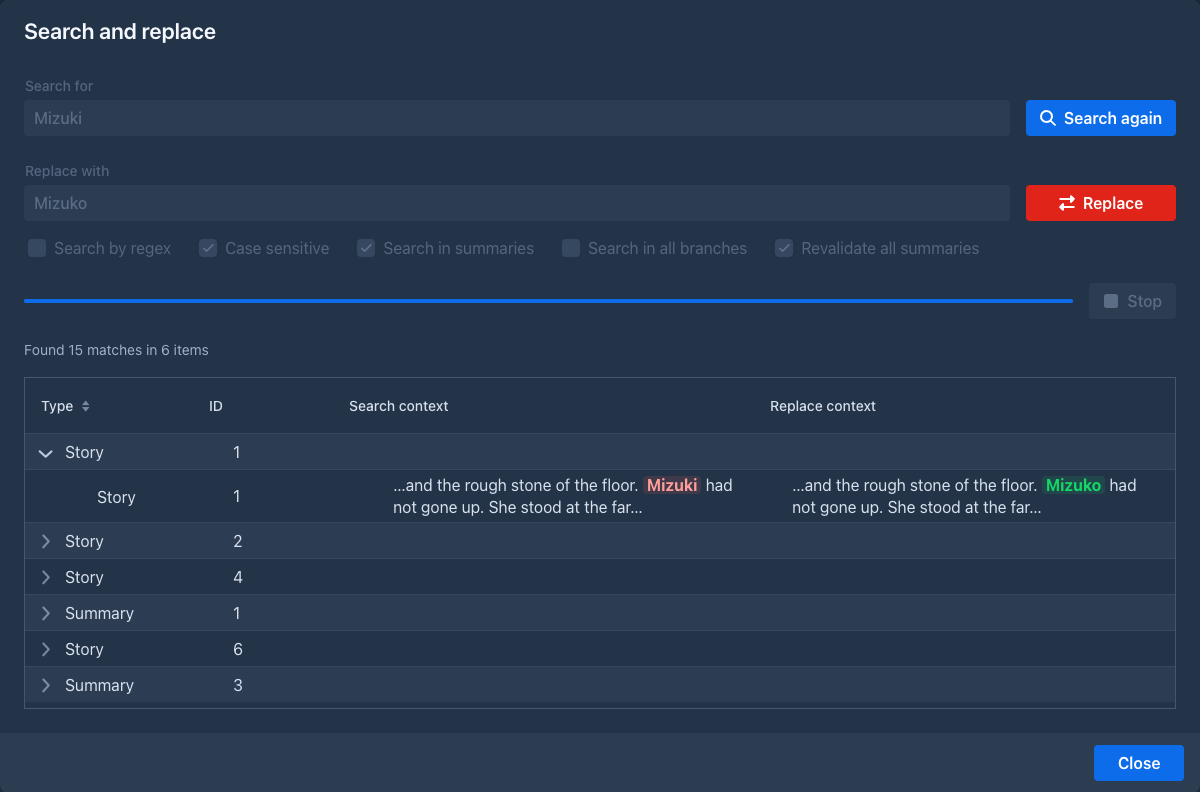
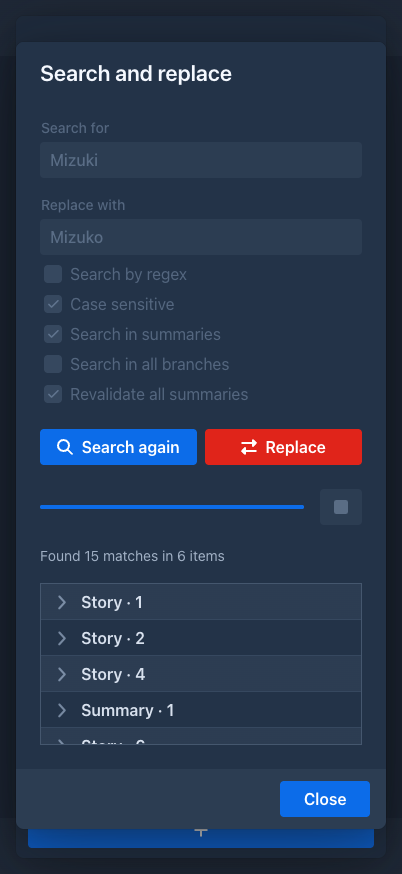
## Conventions
### Text
Never hard-code user-visible text. Add a key to `loc/M_L.java` and the text to `MarginaliaLocalizationBundleEN` (and the `JP`, `FR`, `ES`, `DE`, `KO` and `IT` ones), and use
`loc.getValue(M_L.KEY)` (`Localization` is injected into every UI class); a text of the platform's screens (login,
users, models, settings) is an `L` key in the `LocalizationBundle*` classes
instead. A field or parameter that holds keys of both enums is a `LocalizationKey`. Date formats come from the same bean
(`loc.getDateFormat()`...). The name of a kind of entity (book, lorebook...) is `loc.localizeDomainObject(entityClass)`; it falls back to the closest known superclass, then to the simple class name, so a new entity type needs a mapping in `LocalizationImpl.loadMaps()`. The texts are in the language of the user's session, so never keep a text in a field that outlives the page or the request - look it up when you show it ([Localization](architecture.md#localization)).
### Errors
Wrap event handlers in `try`/`catch` and report unexpected exceptions with
`UIUtils.internalServerError(loc, e)` - it logs the exception and opens an `ErrorDialog` with the stack trace.
Expected problems (validation, missing configuration) are shown with `Notification.error(...)` (an error stays until the user closes it) or a message next to
the field; `UIUtils.showValidationErrors(loc, e)` formats a binder's `ValidationException`. Failures of a request to the
model API (`InferenceException`: wrong key, wrong URL, timeout...) go through `UIUtils.inferenceError(loc, e)`, which
shows the localized cause (`InferenceErrors`) as a notification and falls back to `internalServerError` for anything
else. `AIDialog` has, for the type *Extension* (offered while an extension provides AIs), a *Provider* selector and the settings form of the chosen `ExtensionAIFactory` (see [Inference providers from a plugin](plugins/ai-providers.md)); the type of an existing AI is read-only. Its general settings have the *GPU lock* of the AI (`GpuLockSelect`, shown only when a lock exists or one is chosen). An application adds its own fields by a subclass: `createApplicationFields(ai)` returns them (shown under the name and the type, filled from the AI, which is `null` for a new one) and `applyApplicationFields(ai)` copies them onto the AI right before the dialog's save, usually into `getAttributes()` (`AIDialogApplicationFieldsTest`). It has the *Test Connection* button (`InferenceService.testConnection()` with the values of the form) and, for administrators only, the *Shared with all users* checkbox. The API key stays editable when its tab is not the one shown (the tab sheet disables the hidden tabs, so the dialog keeps its own `apiKeyEditable` flag), and *Refresh* of the model list keeps the model that was selected.
`AIPart` / `PhoneAIPart` (the type column shows the name of the extension's provider, `AITypes.label`) list the user's AIs and the shared ones with the user's own `Usage` (tokens sent / generated); the edit and delete buttons are only shown for AIs the user owns (`AIService.isOwnedByCurrentUser`) and the add button only when `AIService.canCreate()`. The service refuses the same things itself. Rows of shared AIs have an *info* button (`AILimitInfoDialog`), and the owning administrator a *Limits* button (`AILimitsDialog`, `AILimitService`). `AIPart` also has a *Usage per user* button, visible to administrators only, that opens `UsageDialog` (`UsageService.findAllUsages()`: user, model, tokens sent / generated, requests, last used); the service checks the administrator itself.
### Saving
Most forms save automatically: value change listeners call an `autosave()` method of the part (guarded so that
loading values into the fields doesn't trigger a save). The story editor saves an edited part when the edit is
closed (`autosaveAndSwapToMarkdown`) and before a generation starts (`autosaveAndSwapAllToMarkdown`). Entities held
by the UI are detached copies - reload them through the service before changing them, and keep the object returned
by `save`.
### Background work and push
Vaadin component state may only be touched on a thread holding the session lock. The rules:
- Long work (generation, summaries, backups, imports) runs on another thread; the UI thread returns immediately.
- Updates from that thread go through `ui.access(() -> ...)`, with the `UI` captured on the UI thread
(`UI.getCurrent()` is `null` elsewhere). `UIPushGuard.push(ui)` sends them right away.
- Service calls on that thread need the user's request scope - capture `ThreadCopyRequestAttributes.create()` on the
UI thread and wrap the work in `InRequestScope` (see [The current user](services.md#the-current-user)).
- `ThreadAccessDialog` packages all of this for dialogs: `run()` starts `runInThread()` on a new thread in the
request scope, and `vaadinLocked(...)` / `vaadinLockedSync(...)` run UI updates with `ui.access` /
`ui.accessSynchronously` and push. `ProgressBarDialog` builds on it.
The story editor is the main example: `startGeneration` freezes the book window (until the run of the generation reaches its
inference, see the book window above), calls
`StoryGenerationService.generateNextTurn` with a `GenerationListener`, and every callback (`onNodeCreated`,
`onResponseChunk`, `onComplete`...) updates the cards inside `ui.access(...)` and pushes.
### Browser-side code
Prefer Java components. When the browser has to do something (scroll positions, element sizes), the script is a
static method of `ui.JavascriptLibrary` - UI classes don't call `executeJs` themselves. The element is passed
explicitly (`$0`, not `this`): `$0`, `$1`... are the arguments after the script, not the element `executeJs` is called on, so
the element is passed again as the first argument (`panel.executeJs("const panel = $0, handle = $1 ...", panel, handle)`; a script
that reads one argument too many gets `undefined` and fails silently in the browser), and a script that returns a value returns the `PendingJavaScriptResult`, read with
`.then(...)`; see `UIUtils.getPositionAndSizeOfElement`, `JavascriptLibrary.watchEdge` (fires `edge-top` /
`edge-bottom` when a scroll element gets close to that edge, with the distance of the opposite edge in `detail.far`; it remembers the part the user sees first, and `restoreAnchor` puts it back after the server added or dropped parts, which keeps the position while the lazy loading of the story and the viewer works; the story and the reader panels set `overflow-anchor: none` so the browser does not correct it a second time),
`JavascriptLibrary.rememberReaderPosition` / `readReaderPosition` (the viewer keeps the id of the first visible part per book uuid in the `localStorage` of the browser, key `marginalia.reader.position.`; the server only reads it once when the book opens, it is never stored in the database) and
`JavascriptLibrary.scrollTextAreaToBottom` (the extension log is shown scrolled to its newest line),
`JavascriptLibrary.selectionOwner` / `mostVisible` (which of some elements the user means: the one that holds the selected text, else the most visible one, the largest part inside the viewport and the scrolling areas around it; the keys of a part act on that part, `ManuscriptStoryPart.runOnCard`; `StoryLazyLoader` uses `mostVisible` too) and `removePageStyleUnlessUsed` (removes the `