User interface
Marginalia's UI is written in Java with Vaadin Flow 25: the component tree
lives on the server, the browser renders it with Vaadin's web components (Lumo theme, dark color scheme) and sends
events back over HTTP and a push WebSocket. There is no hand-written frontend code apart from one CSS file and a small
connector for the story tree. This page explains how the UI code is organized and the conventions to follow when you
change it. The code is in ui/.
Structure
flowchart TB
    subgraph routes["Routes"]
        Main["Main  /"]
        Viewer["Viewer  /view, /view/<uuid>"]
    end
    Main -->|after login| WS["DesktopWorkspace<br/>HTabSheet with left-hand tabs"]
    WS --> MP["ManuscriptPart - Books"]
    WS --> LP["LorebookPart - Lorebooks"]
    WS --> UP["UserPart - Settings"]
    WS --> PP["ProtocolPart - Protocols"]
    WS --> AP["AIPart - Inference Providers"]
    WS --> RP["ResourcesPart - Resources"]
    WS --> TrP["TrashPart - Trash"]
    WS --> AdP["AdminPart - Admin (footer button)"]
    AdP --> DBP["DatabaseBackupPanel"]
    TrP --> TG["TrashGrid"]
    AdP --> CP["CleanupPanel"]
    CP --> TG
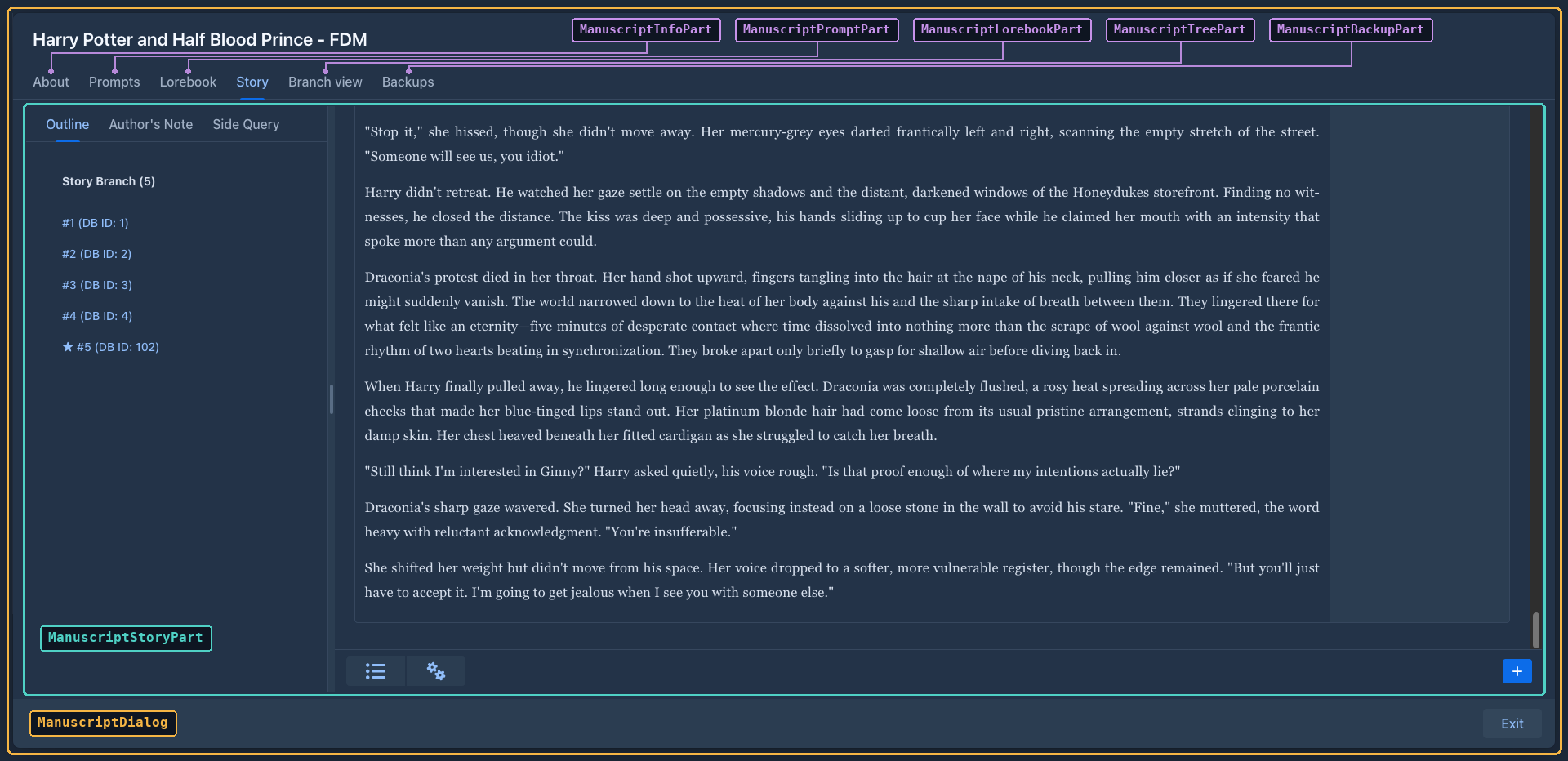
    MP -->|open a book| MD["ManuscriptDialog<br/>VTabSheet"]
    MD --> Info["ManuscriptInfoPart - About"]
    MD --> Prompt["ManuscriptPromptPart - Prompts"]
    MD --> Lore["ManuscriptLorebookPart - Lorebook"]
    MD --> Story["ManuscriptStoryPart - Story"]
    MD --> Tree["ManuscriptTreePart - Story tree"]
    MD --> Backup["ManuscriptBackupPart - Backups"]
    LP --> LV["LorebookView"]
    Lore --> LV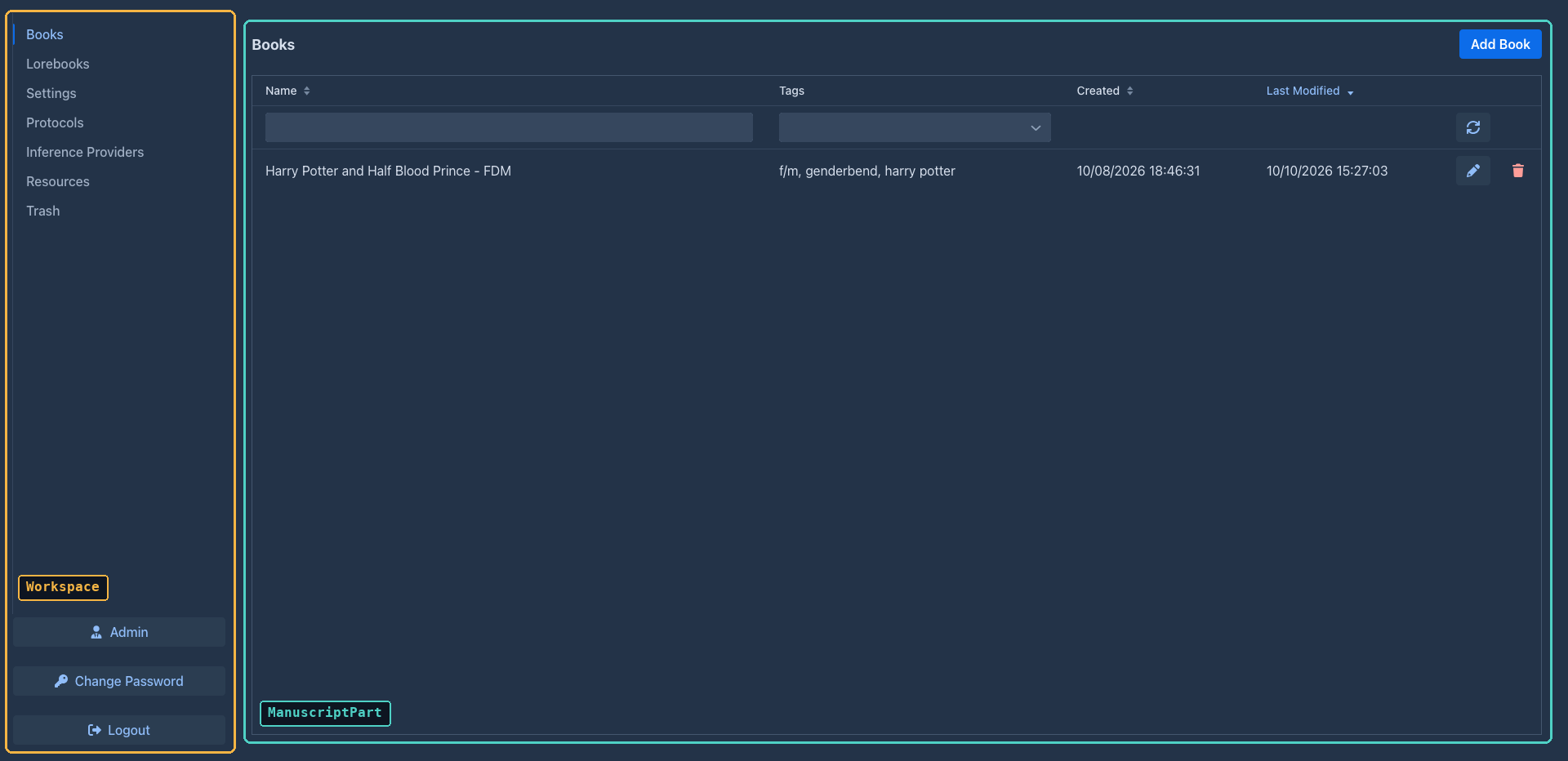
The shell, routes and login
AppShellConfig(AppShellConfigurator) sets up the page once:@Push, Lumo stylesheet,@ColorScheme(DARK), full-viewport body,shared-styles.css, page title, PWA metadata.MarginaliaServletis theVaadinServletmapped to/*(withasyncSupportedfor push).-
There are three routes, all extending
LoginCheckRoute:
LoginCheckRoute runs in the route's constructor (showLogin()):
-
On an empty installation it opens
UserDialogin first time mode (create the administrator) and reloads. -
Otherwise it tries a user that is already logged in this session (
authenticatedSessionUser, overridden byMain: the page was reloaded, e.g. by the language selector) and then the Save login cookies (authenticateFromCookie, rotating the secret on success). -
Otherwise it shows a
LoginOverlay(PermissiveLoginOverlay- allows empty passwords to reach the server-side check) with the Save login checkbox. The check passes the client address (LoginCheckRoute.clientAddress()) toUserService.authenticate, which throttles failed logins per address (see Login throttling). -
After a successful login it calls
VaadinService.reinitializeSession(new session id) and the subclass'sproceedWithLogin(login), which fills the session-scopeduserbean, registers the login withSessionManager.userLoggedIn(see Sessions), sets the language of the session from the user's settings (Localization) and builds the content.
Logout deletes the cookies, closes the Vaadin session, invalidates the HTTP session and redirects to the context
root. Cookie names include the context path and the route class (root_Main_llllm_rememberMe_login...), so the workspace
and the viewer keep separate saved logins.
Building blocks
Classes that build components
Most UI classes are not Vaadin components themselves. They are plain classes with a create() method that builds
and returns the component tree, and keep references to the fields they need later:
@Configurable
@Extendable
public class ProtocolPart implements WorkspaceComponent {

    @Autowired
    private Localization loc;

    @Autowired
    private ProtocolService protocolService;

    private Grid<Protocol> grid;

    @Override
    public Component create() throws Exception {
        VerticalLayout layout = new VerticalLayout();
        grid = new Grid<>();
        ...
        return layout;
    }

    @Override
    public void refresh() throws Exception { ... }
}
This shape is deliberate:
-
@Configurable- the class is created withnew, and the AspectJ-woven configurer injects its@Autowiredfields (services,Localization, the sessionUser). See AspectJ weaving. -
@Extendable- the class is instrumented at startup so extensions can run code before and after any of its methods and read its local variables (seeExtensions ). Small methods with descriptive local variable names (menu,toolbar,detailLayout) are what make a class easy to extend.
Dialogs (AIDialog, ProtocolDialog, UserDialog, LorebookDialog, ManuscriptDialog...) extend Vaadin's Dialog
but follow the same pattern: construct with the entity, call create(), then open().
The workspace
Workspace is the interface of the top-level layout shown after login (create, refresh, setNavigationLocked,
isNavigationLocked, getOnLogout, setOnLogout). Main, the parts, ApplicationPoint and SessionInformation
only depend on this interface. DesktopWorkspace is the implementation (@Configurable, @Extendable): it builds an
HTabSheet (tabs on the left, a footer with Admin, the language selector, Change Password, Logout) and puts the red InvalidExtensionsWarning bar (ui.components; hidden while no installed extension is invalid, the administrator gets the names as its tooltip, other users a note to tell the administrator, from OsgiService.getInvalidExtensions()) above it - the phone workspace has it in the navbar - and creates all tab components up
front (the admin part is created, and refreshed, only when the user is an administrator, who has the Admin button: its panels refuse anybody else). Each tab is a WorkspaceComponent:
Workspace.setNavigationLocked(true) disables the other tabs and the Admin and Logout buttons, so the user can't
leave the active tab. UserPart locks it while the settings have unsaved changes: it listens to every HasValue
in its layout (extension settings panels included) and unlocks on Save, Discard Changes or refresh().
Main.proceedWithLogin picks PhoneWorkspace instead when the body of the page is narrower than 768 px
(ExtendedClientDetails.getBodyClientWidth()). The choice is made once per login: resizing or rotating the device
does not switch the workspace until the page is reloaded, and a tablet or a phone in landscape gets the desktop one. PhoneWorkspace replaces
the left-hand tab sheet with an AppLayout: the parts are listed in a drawer (opened with the toggle in the top bar)
whose footer holds the language selector, Change Password and Logout, and the active part fills the screen. There is no Admin button
and no AdminPart on a phone: the administration (users, database backups, cleanup, extension install) is only
reachable in the desktop layout. The services still check AdminGuard.requireAdmin() themselves. The user manual
describes this for users in Using Marginalia on a phone. Only the book list, the lorebooks, the settings, the protocols, the models and the trash differ. PhoneManuscriptPart renders the book list
like the Viewer (stacked filters, sort buttons, one column) with the controls of ManuscriptPart; both share the
Add Book flow in NewBookAction. PhoneLorebookPart hosts PhoneLorebookView, a reduced LorebookView: lorebooks can
only be selected (no add, delete, import or export, no new entries) and only the enabled flags and the content of an
entry are editable, every other setting of the lorebook and of an expanded entry is shown as text. PhoneTrashPart
hosts PhoneTrashGrid (see PhoneProtocolPart and PhoneAIPart replace the type, name and
action columns of their desktop lists with a text column (Type: and Name: on two lines) and a buttons column.
PhoneSettingsPart extends UserPart (so the extension settings panels that decorate UserPart.refresh/save keep
working) and only overrides createHeader(): the title, the unsaved changes hint and the Discard/Save buttons are
stacked, and Import backup as new book is left out. The other parts are the desktop ones.
Code that must not care which layout the user has works with the common interfaces: ManuscriptWindow (package ui.dialogs, implemented
by ManuscriptDialog and PhoneManuscriptDialog: the book, its model, open/close, the story tab, the state callbacks, asDialog()),
ManuscriptSection (package ui.workspace, implemented by ManuscriptPart and PhoneManuscriptPart: getOpenWindow(), the window of
the book that is open or null) and Workspace.getManuscriptSection() / getOpenManuscriptWindow(). The session's SessionPoint holds the
workspace, and CommandUtils (package utils) reads it for commands: getWorkspace(), getManuscriptSection(), getManuscriptWindow(),
getCurrentManuscript() and getCurrentAI() return null when there is no session, workspace or open book. The book-related methods delegate to
SessionPoint (getManuscriptWindow(), getCurrentManuscript(), getCurrentAI()), which AgenticSessionPoint overrides for a session without
a browser: the book is held directly and there is no window.
Command bar (see The command bar). CommandBar (package ui.components, a Composite) is the input line for the commands of CommandService, to be placed anywhere:
a ComboBox with custom values, where the user types /name arg arg, plus a run button. The list is filled lazily from the registry (CommandHelp.matchingNames),
the help is a Popover above the bar (it covers what is above and moves nothing in the layout), rebuilt as the text changes (description, the forms that fit, the next parameter highlighted, the return value, "too many arguments"); it opens for the arguments, for text that is not a command and for a name nothing matches, and while the name is typed the list (with the descriptions) is the help;
picking a command writes /name into the field, or runs it when it takes no arguments. The bar shows no results: it hands them to its
CommandResultTarget (setResultTarget), an interface (onCommandResult, and clearCommandResult when the user types or runs something else) that each place implements as it needs; the story tab (ManuscriptStoryPart.createCommandBox(), next to
the menu bar) uses CommandResultView, a popover above the bar with a close button, and other places can consume the value differently. An async command opens
CommandProgressDialog (modal, the two status lines of the command, Stop cancels the future); failures and stops are shown by the bar. Not on the phone story tab yet.
Opening a book on a phone shows the PhoneManuscriptDialog (package ui.dialogs.phone) instead of ManuscriptDialog;
Add Book (NewBookAction) creates the book and hands it to openManuscript of the list, which opens the window of its layout and remembers it. It is a separate class, not a subclass, so extensions know
which dialog they decorate (decorators of ManuscriptDialog and the desktop parts do not run on a phone). It fills the
screen (the phone-dialog class), the exit button is an icon in the header and the tabs are one scrolling Tabs row
above the content of the selected tab. Every tab is a PhoneManuscriptDialogPart of ui.dialogs.phone.manuscript
(the desktop ManuscriptDialogPart without the tab sheet argument): PhoneManuscriptInfoPart and
PhoneManuscriptPromptPart (one column of fields), PhoneManuscriptLorebookPart (the lorebook of the book and
PhoneLorebookView(true), which hides its own lorebook selection like the pinned LorebookView; both lorebook parts
have a second box, Shown lorebook, with the lorebook of the book and its subbooks (LorebookService.getLorebookTree, shown only when there is a subbook), which
sets the lorebook of the pinned view without touching Manuscript.lorebook: the desktop part also gets the click on a subbook chip through
LorebookView.setOnOpenSubbook, and both rebuild the box in onTabEnter as the subbooks can be changed in the view),
PhoneManuscriptTreePart (stacked search bar), PhoneManuscriptBackupPart (one row per backup) and
PhoneManuscriptStoryPart. The story is a single column in an AppLayout: the outline is its drawer (slid in by the
toggle in the navbar, which also holds the summaries/settings menu bar), the new turn button is at the bottom. Its
ChatMessageCard is only the text of the part under a small header line with two icons: the menu (with Show Prompt and Compare Prompt)
and a popover with the metadata of the inference (ids, model, protocol, tokens, words) and the turn details (the
right-hand column of the desktop card; on both cards the popover is filled by createDetails and opened by the server when its button is clicked, and the editing text area exists only while the part is edited, because the text areas of TurnDetailsForm measure their height as soon as they are in the page and hundreds of them freeze the browser). Its summaries item opens PhoneSummariesDialog, the SummariesDialog with a fixed 640 px, taller content column (the grid scrolls sideways anyway, so the summaries stay readable and editable). The fixed navbar and drawer of the
AppLayout are kept inside the dialog by the phone-story-layout class.
On the desktop the Admin button is only added for administrators; AdminPart shows the users grid and the
DatabaseBackupPanel, CleanupPanel and extensions tab (with the SHA-256 of each JAR behind a # button next to the version - tooltip, click copies it with
JavascriptLibrary.copyToClipboard - the verification report of each extension and, per
extension, the buttons Stop / Start (OsgiService.stopExtension / startExtension, state Stopped), Log
(ExtensionLogDialog: the end of the extension's log with refresh and clear) and Unload). Note that the admin UI being hidden is not a permission
check - the administrator-only services call AdminGuard.requireAdmin() themselves (see
Services).
The agents tab
AgentPart (ui.workspace.parts, a WorkspaceComponent like the others) is a table of the agents of the user (a card for each on the phone,
new AgentPart(workspace, true)): the name, the book, the status of the unfinished run (Localization.getAgentRunStatus) and when the newest run started (AgentRunService.findForAgent), with filter fields for the name and the book (every word must be contained, AgentPart.containsWords; a ListDataProvider filter), sortable columns (the phone has the Sort selector, sortBy), and a row of
buttons whose visibility follows the status of the run (Start with Start immediately / Start in console, Resume, Pause,
Pause now, Stop, the console, Review changes, Edit, Clone, Delete). They call AgentRunService and AgentRunner; the
refusals of the service (IllegalStateException, SecurityException, IllegalArgumentException) are shown as a warning with the text of the
exception, everything else as an internal error, and the table is read again after every action. DesktopWorkspace.create and
PhoneWorkspace.addAgentsTab build the tab only when AgentService.isAllowed(), once per login (a permission given or taken later shows after
the next login); a count of the agents that wait for the user is in the tab and, on the phone, in the top bar. New agent and Clone are
off when AgentService.canCreate() is false. The dialogs (the editor of an agent with the roles of commands and the models for sub-agents, the
console, the review of the result, the checkpoints...) are in ui.dialogs.agent; they are described in Agents,
with the services they call. The administrator's settings of agents are AgentSettingsPanel (ui.workspace.parts.admin, the Agents tab of
Admin: the default system prompt and compaction prompt of the application, and whether agents may send a message to a URL).
The settings of the AGENTS permission are edited by AgentsPermissionComponent, see
Remembering where the user was
The workspace is autosaved so the next login opens it where it was left. Everything that has state worth coming back
to implements Restorable (ui): JsonObject storeState() serializes the state the class needs into a new object and
asks the children it has for theirs (nested under their own key), restoreState(JsonObject self) reads it back and
passes the nested objects on. RestorableState has the defensive readers (string, bool, strings, object) and
put, which leaves out an empty state. Workspace, WorkspaceComponent (default: no state), ManuscriptDialogPart
and PhoneManuscriptDialogPart (default: no state), both book dialogs, LorebookView/PhoneLorebookView and
NewTurnForm are Restorable. What is stored:
Everything is stored by uuid and looked up when it is restored (findForUser), so a book, lorebook, entry or tag that
is gone is skipped: a book that does not exist is not opened, the lorebook stays the default one. The state of an older
version is read the same way, unknown keys are ignored.
WorkspaceAutosave (ui.workspace, one per workspace) keeps the state in UserSetting.workspaceState, an
@ExtendedAttribute(inject = true) JsonObject (so no migration). Workspace.autosave() stores the state of the
whole workspace; the parts call it after the user did something worth coming back to - selected a tab, changed a filter,
opened or closed a book, selected a tab of the book window (ManuscriptDialog.stateChanged()), opened an entry or
chose a lorebook (setOnStateChange of the views), typed into the new turn form (NewTurnForm.setOnChange). It
writes nothing when the state did not change, and failures are only logged. Main.proceedWithLogin calls
Workspace.restoreAutosaved() after create() and refresh(): the autosave is off until then, because building
the workspace fires the same change events and would overwrite the stored state, and it stays off while restoring (the
restoring fires them too). The book window is restored after open(): ManuscriptPart.openManuscript is the one place
that creates and opens it, for the Edit button and for restoring. Code that saves a UserSetting must load it right
before, not hold on to one (UserPart.save does), or it writes back an older workspaceState.
A new part with state overrides the two methods and calls workspace.autosave() (or its owner's callback) when
the user changes the state; a new tab of a dialog needs a name in the partsByKey map of the dialog.
The book window
Opening a book creates a ManuscriptDialog - a full-screen, strictly modal dialog with a VTabSheet of
ManuscriptDialogParts:
The dialog holds the book (getManuscript(), refreshManuscript() reloads it, save() saves it) and
freeze() / unfreeze(), which disable the tabs, the exit button and every part during generation.
ManuscriptStoryPart is the story editor and the largest UI class: the outline (one button per part), a
ChatMessageCard per part (Markdown view, edit mode, menu with Edit / Regenerate / Swipe / Branch / View prompt /
Summary / Delete), the New Turn Instructions popover, starting generations and applying the result, the automatic
book backups, and the menu bar of the bottom bar (see
renderStoryContent() redraws only the cards and the outline list: the left tab sheet is created once in create()
(so the selected tab and the tabs of extensions survive), and the reasonings that were open are reopened on the new
cards. PhoneManuscriptStoryPart does the same.
The whole desktop editor is one TabDock (leftBar, the name is older than the story tab): the outline, the lorebook preview,
the tabs of extensions and the story itself (ManuscriptStoryPart.STORY_TAB, story; its content is centerLayout: the
scroll panel with the cards and the bottom bar with the menus, the command line and the round button) are its tabs, so the
user arranges the whole screen. TabDock is a reusable widget: a row of columns, each a stack of tab sheets, whose
tabs the user can drag out into sheets of their own (a strip between the sheets of a column) or into a column of their own (a
strip between the columns and at the sides) and back (the drag and drop is Flow's DragSource/DropTarget, no JavaScript;
the strips show while a tab is dragged). The columns and the sheets of a column are separated by SplitLayouts the user can
resize; a split layout has two sides, so the cells of a row or column are a chain of nested split layouts, the position of each
being the share of its cell in what is left (chain, shares). When a splitter is dragged the shares of all cells are read
again and stored as size (percent of the dock / of the column) in the layout, onLayoutChange saves them; a cell without a
size gets the average. Tabs have a stable id (add(id, caption, content), the
outline is ManuscriptStoryPart.CHAPTERS_TAB); the layout, {"columns":[{"size":50,"groups":[{"size":50,"tabs":["id", ...]}, ...]}, ...]} (size optional)
(getLayout/setLayout; a layout with groups at the top level, as the dock stored before it had columns, is one column), names tabs only by id and keeps the place of tabs that are not there now, because extensions add
their tabs late (a tab the layout does not know goes to the first sheet). ManuscriptStoryPart stores the layout in the
attributes of the manuscript under $desktopManuscriptStoryPartTabsConfig (TABS_CONFIG_ATTRIBUTE): saveTabsConfig() runs
after a drag or a resize, applyTabsConfig() in load() before the story is drawn. The selected tab of each sheet is not part of the
layout but the Restorable state of the dock.
Minimizing (1.6.0). A tab of a detachable dock has a minimize button (makeMinimizable, in the Tab itself). minimize(id) adds
the id to the ordered set minimized; the tab keeps its place in Group.ids (so restore(id) puts it back where it was, and
a group whose tabs are all minimized is just not shown, like a group whose tabs are not there yet) but presentEntries leaves it
out, so arrange() takes its Tab out of the TabSheet and the content only lives in its Entry. isMinimized(Entry) is
minimizable && minimized.contains(id); setMinimizable(id, false) (the story) is a set of ids of its own, fixed, which also
works for tabs that are not in the dock yet. select(id) of a minimized tab restores it. The dock is body (the columns from
fill) and bar in a flex container whose direction is the DockSide (LEFT is row-reverse, the bar being after the body in
the page; the classes tab-dock-at-*); refreshBar (run by every arrange) rebuilds the bar when the minimized tabs or the side
change: the move button (setDockSide(side.next()), one click goes clockwise; a ContextMenu or MenuBar there would need a
Vaadin session in the tests) and one icon button per minimized tab (the image is TabDockIcons.dataUri(letters, id), an SVG circle
as a data URI whose color comes from the id; the tooltip and the aria label are Restore: <caption>). getLayout() adds
"minimized":["id",...] (only when there are some) and "dock":"top" (only when not left) to the layout, setLayout reads
them, so onLayoutChange saves them with the book. The order of the icons is separate from minimized (the order of minimizing): inBarOrder sorts the minimized tabs by their
place in the list barOrder and puts the tabs that are not in it after them, alphabetically by caption (Collator), so a layout
without barOrder shows the bar alphabetically. Every icon is a DragSource and a DropTarget (makeIconSortable); dropIcon
puts the dragged icon at the place of the one it was dropped on and writes the result back into barOrder, the tabs that are not in
the bar keeping their slots. getLayout() adds "barOrder":["id",...] once the user has reordered, setLayout reads it. add(id, caption, letters, content) gives the letters of the icon, the
initials of the caption (TabDockIcons.letters) are the default.
Mass delete. The settings menu item StoryMenuKeys.MASS_DELETE (StoryEditor.toggleMassDelete / isMassDelete, a check box
item, also on the phone) turns on the mass delete of StoryMassDelete (ui.dialogs.story, shared by the desktop and the phone
story tab, one instance per tab). The tab adds its bar (getBar, hidden while off) between the story and the bottom controls, and
every card has a check box (StoryCard.showMassDelete(shown, selected); the tab calls it on its cards when the mode changes, a new
card asks isActive / isSelected in its constructor). The selection is a set of message ids, not cards, because
StoryLazyLoader drops and makes cards while the user scrolls; renderStoryContent calls setBranch, which keeps the ids of the branch in
story order and forgets the selected ones that left it. A click with Shift ticks or clears the range between the part and the one
clicked last (clicked, using that order, so it covers parts that have no card). The box is a MassDeleteBox (ui.widgets), a plain
<input type="checkbox"> whose one click event carries both the new checked state and shiftKey (the Vaadin Checkbox sends the
click and the value change as separate events, so the Shift state reached the server one click late); it also writes checked back
to its element so a later setChecked is not skipped as unchanged. listenTo(panel) only stops the browser from selecting the text
between two clicks (JavascriptLibrary.noTextSelectionOnShiftClick).
Delete asks (ConfirmDialog), then a ProgressBarDialog without Stop soft deletes on its worker thread: it loads the branch
and calls ChatMessageService.deleteNodeAndMigrateChildren for the selected parts from the last part back, passing along the
book it returns, so a part is always deleted while the entities before it are what the database has (from the first part on, the
children of a deleted part would be moved to the deleted parent of a later one). After it the mode is off and the tab loads the
book again. load of another book and a generation (setFrozen(true)) turn it off.
The default layout of the user. Save layout as my default (StoryMenuKeys.SAVE_LAYOUT_AS_DEFAULT,
StoryEditor.saveLayoutAsDefault) stores TabDock.getLayout() in UserSetting.defaultStoryLayout (an extended attribute, no
migration). applyTabsConfig takes it for a book that has no $desktopManuscriptStoryPartTabsConfig of its own (and does not
write it into the book), and so does Restore default layout. PhoneManuscriptStoryPart uses new TabDock(false), one plain sheet.
StoryDockLayout (ui.dialogs.story) holds the layouts: defaultLayout (the outline and the lorebook in a column of 20 %
on the left, the story in a column of 80 %), and migrate, which turns what a book stored before the story was a tab into a
layout that has it. That is a layout without the story id: its columns keep their order and share the width the old
splitter gave the sidebar ($desktopManuscriptStoryPartSplitPosition, SPLIT_POSITION_ATTRIBUTE, 20 % when the book never
stored one), and the story gets a column of its own at the right; a book with nothing stored gets the default layout.
Nothing is written back by load(); the next saveTabsConfig() stores the layout with the story and removes the old
attribute. Restore default layout (settings menu of the story, restoreDefaultLayout) removes both attributes and applies
the default layout.
Two things about TabDock that the story relies on. A TabSheet disables the content of the tabs it does not show
(Element.isEnabled() is false for it, so the story ignores events from the page while another tab of its sheet is selected;
what the server changes in it still reaches the page) and keeps it in the page, hidden, so the scroll position survives a switch
of tabs. Moving the tab to another sheet attaches the content anew, and the scripts that watch the edges for the lazy
loading are lost, as is the scroll position: StoryLazyLoader.reattached() (called by an attach listener of centerLayout) arms
them again and has the story scroll to its end before the response goes out (beforeClientResponse), unless a render or a scroll to
a part of the same request decided where the story is (they clear bottomOnReattach), so entering the story tab from the tree
still lands on the part that was asked for. And setTabsEnabled(enabled, exceptId) disables the tabs and the contents of all tabs but one (while a generation runs
the story stays enabled: its stop button; setFrozen calls it) and only touches the contents the sheet does not manage
itself. TabDock.select(id) selects a tab in whichever sheet it is; ManuscriptStoryPart.showStory() does it for the story,
and the code that is about to show a part calls it: an entry of the outline, a hit of the search, startGeneration, the next
onTabEnter when scrollToMessageOnNextRender asked for a part, and ManuscriptDialog.selectStoryPart (what the tree calls
when the user chooses a branch).
The tab with the id ManuscriptStoryPart.LOREBOOK_TAB (lorebook) of the left bar is the LorebookPreview (ui.components),
a read only preview of the lore of the book, desktop only (the phone has the PhoneLorebookView). It is a TreeGrid of
Rows (a lorebook or one of its entries) over a TreeData it rebuilds in refresh(lorebook): with the Include sub
lorebooks checkbox the lorebook and every lorebook below it (found breadth first like ProcessLorebookStep does, each
once, so a cycle ends) are the top level rows and their entries the children, otherwise the entries of the lorebook are the
top level rows. The item details of an entry row show the content, rendered with a Markdown component, and the filtering (text or pattern). It saves nothing;
the opened entries and the lorebooks the user closed are kept (as uuids) over a refresh. ManuscriptStoryPart.load()
refreshes it, and onTabEnter() calls load(), so the lore is read again every time the user returns to the Story tab. Like
the other views of this kind the components are built in create(), the injected services are not there in the constructor.
What the desktop and the phone story editor have in common lives in ui.dialogs.story, so the two classes keep only
their layout and the methods extensions decorate (renderStoryContent, createSidebarButton, populateMenuBar,
createCogsMenuItem, the card's createMenuItems, refreshSummaryMenuItems, autosaveAndSwapToMarkdown):
The helpers are @Extendable instances (the tabs create them with new, StoryBackup and StorySupport are
@Configurable), so a decorator of one of their methods applies to the desktop and the phone tab alike. The inner
card classes stay inner classes of the tabs: extensions reach the outer part through this$0.
The story menu bar
The bottom bar of the story editor has a MenuBar with two items, built by small methods so that extensions can add
to it (see Extending the UI):
The checkable Highlight Generated Text item is the diff view: setShowGeneratedDiff(show) stores the flag (a field
of the tab, not saved) and calls ChatMessageCard.renderResponse() of every card, which sets the content of the
response Markdown - with the flag on, the text from GeneratedTextHighlighter.highlight(response, originalResponse, CssStyles.GENERATED_TEXT), which diffs both texts word by word and wraps the shared words in <mark>. The card calls
renderResponse() whenever its response changes (construction, streaming, end of an edit), and
StoryGenerationListener.onResponseChunk copies originalResponse into the card's own ChatMessage while streaming.
The phone tab has no diff view.
The summaries overview
SummariesDialog shows the summaries of the active branch (SummaryService.collectTree) in a TreeGrid<SummaryNode>:
the summaries generation uses are the top level, the summaries a meta summary stands in for are its children
(including the summary it replaced, read from replacedSummary, which has no id). Columns: database id (the
hierarchy column), message id, order in the branch, content, tokens, a checkbox and a delete button. Checkboxes,
delete buttons and the edit pencil exist only on the top level - the text of the merged summaries is part of the hash
of their meta summary, so editing them one by one would invalidate it (the search and replace works them out again).
-
Content (
SummaryContent): reasoning (aDetailswithMarkdown, reasoning is mostly markdown), badges (Meta summary, Replaced) and the text as plain text (white-space: pre-wrap, summaries are not markdown and the model's single line breaks must show), in a scrollingDivof a fixed height, so all rows have the same height. The pencil is in a gutter next to the scroll area (not over the text); it swaps the text for aTextAreaof the same size and the buttons for a green check (SummaryService.updateSummaryText) and a red trash icon (back to the Markdown). -
Delete goes through
SummaryRemoval.confirmAndRemove, shared with the part menu of the story editor: a normal summary is confirmed with yes/no, a meta summary asks Unwind / Delete / Cancel (ConfirmDialogwith custom button labels). -
Create meta summary takes the ticked summaries, uses the newest as
fromand the oldest astoand opensSummaryDialogwith a meta request (createMetaSummary); it needs at least two. -
Search and Replace (menu bar,
openSearchReplaceDialog()): the search and replace of the summaries only, seeSearchReplaceDialogbelow for the dialog; it also changes the summaries a meta summary stands in for and the summary a meta summary replaced, and keeps the hash of the meta summaries valid (ManuscriptReplaceService). -
The grid is reloaded after every change (
refresh()): editing, deleting, replacing, and closing the dialog of a meta summary.
SummaryDialog is the dialog of one summary: it generates it (startGeneration, streaming into a read-only text area,
with a Stop button), or shows the existing one. It is created with the part, and with the oldest part of the range
for a meta summary. It was an inner class of ManuscriptStoryPart; both the story editor and the overview open it now.
Both dialogs are @Configurable(preConstruction = true) (they use injected services in their constructors) and
@Extendable; the overview's menu bar above the grid is empty, populateMenuBar(bar) is where extensions add tools.
Grids
Lists of entities use Vaadin Grid with a lazy data provider. BackendTableProviderBase (in ui.widgets) is the
common base: the owning part searches for the ids to show (ManuscriptService.searchManuscripts(...) returns ids,
already filtered and sorted), passes them with setIds(ids), and the provider loads only the entities of the visible
page (service.find(id)) and wraps them in a BackendTableItem subclass. It also tracks checked rows.
Widgets
Trash
TrashGrid is a self-contained widget (@Configurable, create it with new TrashGrid(allUsers).create()) over
TrashService: a lazy multi-select Grid<TrashItem> (items identified by their EntityKey, so the selection
survives paging), a filter by type (names from Localization.localizeDomainObject(Class)) and, with allUsers, a
filter by owner and an owner column. allUsers only decides what the widget shows; the service decides what the
current user may see and restore. Restore Selected confirms and calls TrashService.restore; when it returns
blockers the widget shows them in a dialog (nothing was restored), otherwise it refreshes and runs the listeners from
addRestoreListener (TrashPart uses it to refresh the whole workspace). Delete Permanently (createDeleteButton,
the field deleteButton) is enabled while the selection has only types of TrashService.getPermanentlyDeletableTypes()
(story parts, lorebook entries), confirms and calls TrashService.deletePermanently, shows the reasons in a dialog when
it is blocked and refreshes the table otherwise (nothing to refresh elsewhere, nothing came back). The Extended Content link opens the JSON
from TrashService.getExtendedContent in a read-only text area. TrashPart (the Trash tab, allUsers for
administrators) and CleanupPanel (a Details section, created when first opened) both use it.
PhoneTrashGrid (used by PhoneTrashPart) subclasses it through the createToolbar() (it adds the same createDeleteButton()) and addColumns() hooks: the
filters are stacked over the whole width, the description is behind an info button (a Popover) instead of above the
table (createDescription()), and the table has only the check box column and one content column that
shows name, type, owner (allUsers), delete time and the Extended Content link below each other.
Generic dialogs: ConfirmDialog.show(message, onYes), TextInputDialog.Builder, ListSelectDialog,
ErrorDialog (message and expandable stack trace), ProgressBarDialog, SearchReplaceDialog. DialogFocus.onOpen(dialog, field) (ui.widgets) puts the cursor into the field a dialog is about every time it opens, so the user can type at once; the form dialogs (AIDialog, ProtocolDialog, UserDialog, ExportDialog, TextInputDialog, ListSelectDialog, AILimitEditDialog, SearchReplaceDialog) call it. ExtensionLogDialog.show(bundle, name) is the
read-only, monospace view of an extension's log. UsageDialog.show() is the read-only table of every user's Usage (administrators). AILimitsDialog.show(ai) is the table of the limits of a shared AI with add / edit (AILimitEditDialog) / delete, AILimitInfoDialog.show(ai) the current user's limit and usage of it.
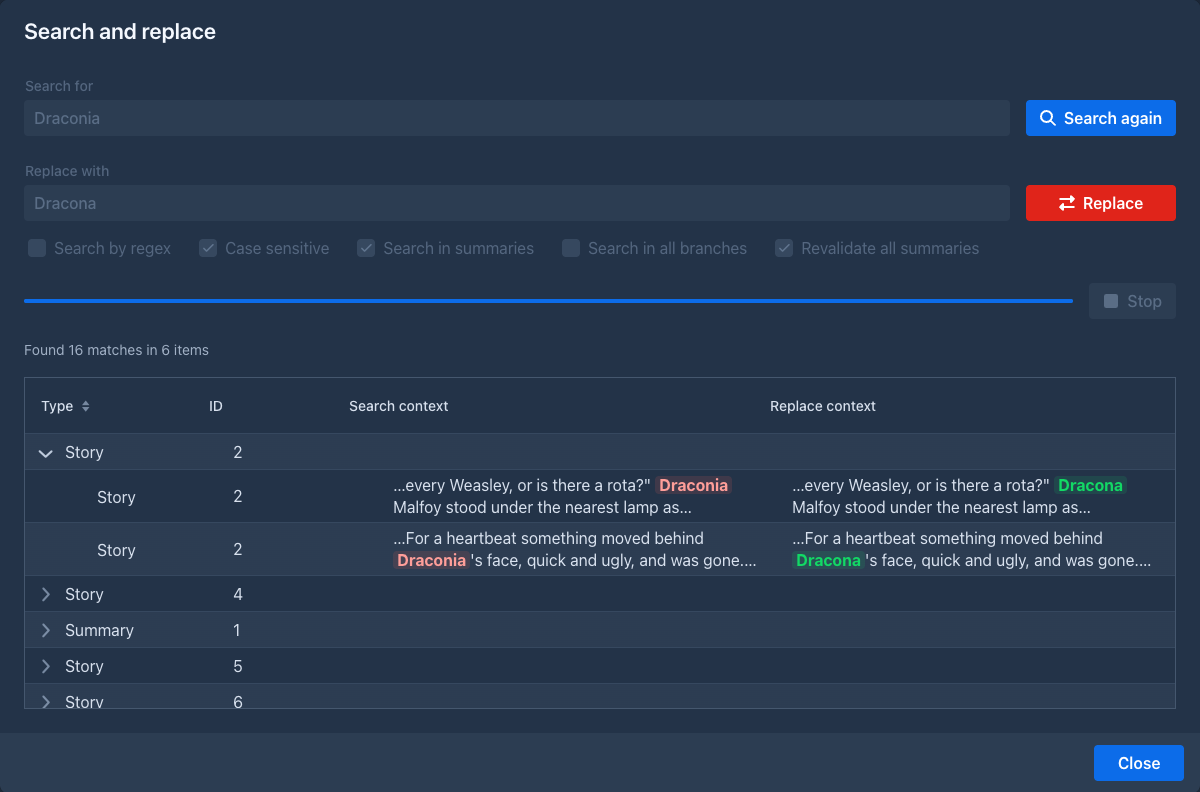
SearchReplaceDialog (ui.dialogs.search) is the search and replace window without any knowledge of what it searches.
A subclass supplies the title, its own options (createOptions(), shown next to the regex option and locked with it)
and createSearcher(SearchRequest), which runs on the UI thread (the place to read the options) and returns a Searcher
for the worker thread; that gives a SearchResult (the rows as SearchReplaceItems with their TextHits, an optional
warning to confirm before the replace, and the Replacer that does the work). The dialog goes through the states
INPUT → SEARCHING (inputs frozen, only Stop works) → PREPARED (inputs locked, Search is Search again, which drops
the result, and Replace works; a warning goes through confirm) → REPLACING (everything frozen) → INPUT; the work
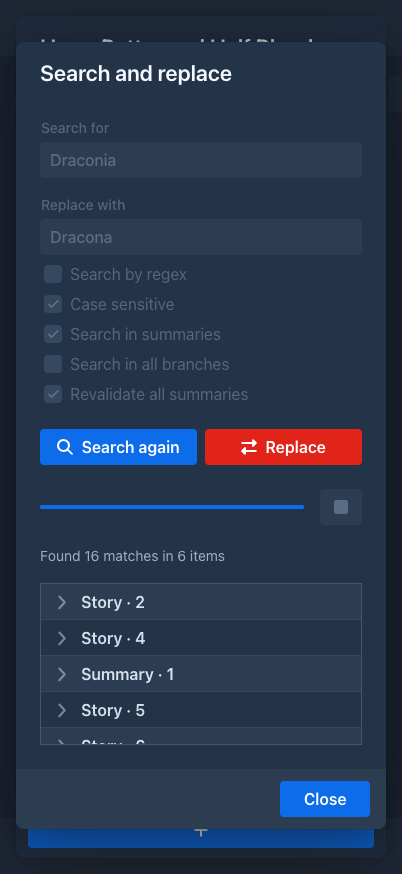
runs on a ThreadAccessDialog thread and reports to the progress bar through TaskProgress. The constructor flag phone
selects the layout (the fields and buttons below each other, one column in the table), so one class serves both
layouts. ManuscriptSearchReplaceDialog adds the summaries and all branches options and calls ManuscriptReplaceService;
the story parts of both layouts open it from the settings menu and show the story again when onReplaced fires. The third constructor argument summariesOnly is for the summaries overview (SummariesDialog and PhoneSummariesDialog open it from their menu bar item Search and Replace, openSearchReplaceDialog(), and load the overview again on onReplaced): it has no Search in summaries box and calls the service with Options.summariesOnly, so the story is not searched. LorebookSearchReplaceDialog is the second subclass, for the entries of a lorebook (no extra options, getIdColumnHeader() makes the table show entry names); LorebookView has a button for it after Add Entry and PhoneLorebookView an icon button.
Conventions
Text
Never hard-code user-visible text. Add a key to loc/L.java and the text to LocalizationBundleEN (and LocalizationBundleJP), and use
loc.getValue(L.KEY) (Localization is injected into every UI class). Date formats come from the same bean
(loc.getDateFormat()...). The name of a kind of entity (book, lorebook...) is loc.localizeDomainObject(entityClass); it falls back to the closest known superclass, then to the simple class name, so a new entity type needs a mapping in LocalizationImpl.loadMaps(). The texts are in the language of the user's session, so never keep a text in a field that outlives the page or the request - look it up when you show it (Localization).
Errors
Wrap event handlers in try/catch and report unexpected exceptions with
UIUtils.internalServerError(loc, e) - it logs the exception and opens an ErrorDialog with the stack trace.
Expected problems (validation, missing configuration) are shown with Notification.error(...) or a message next to
the field; UIUtils.showValidationErrors(loc, e) formats a binder's ValidationException. Failures of a request to the
model API (InferenceException: wrong key, wrong URL, timeout...) go through UIUtils.inferenceError(loc, e), which
shows the localized cause (InferenceErrors) as a notification and falls back to internalServerError for anything
else. AIDialog has, for the type Extension (offered while an extension provides AIs), a Provider selector and the settings form of the chosen ExtensionAIFactory (see Inference providers from a plugin); the type of an existing AI is read-only. It has the Test Connection button (InferenceService.testConnection() with the values of the form) and, for administrators only, the Shared with all users checkbox. The API key stays editable when its tab is not the one shown (the tab sheet disables the hidden tabs, so the dialog keeps its own apiKeyEditable flag), and Refresh of the model list keeps the model that was selected.
AIPart / PhoneAIPart (the type column shows the name of the extension's provider, AITypes.label) list the user's AIs and the shared ones with the user's own Usage (tokens sent / generated); the edit and delete buttons are only shown for AIs the user owns (AIService.isOwnedByCurrentUser) and the add button only when AIService.canCreate(). The service refuses the same things itself. Rows of shared AIs have an info button (AILimitInfoDialog), and the owning administrator a Limits button (AILimitsDialog, AILimitService). AIPart also has a Usage per user button, visible to administrators only, that opens UsageDialog (UsageService.findAllUsages(): user, model, tokens sent / generated, requests, last used); the service checks the administrator itself.
Saving
Most forms save automatically: value change listeners call an autosave() method of the part (guarded so that
loading values into the fields doesn't trigger a save). The story editor saves an edited part when the edit is
closed (autosaveAndSwapToMarkdown) and before a generation starts (autosaveAndSwapAllToMarkdown). Entities held
by the UI are detached copies - reload them through the service before changing them, and keep the object returned
by save.
Background work and push
Vaadin component state may only be touched on a thread holding the session lock. The rules:
-
Long work (generation, summaries, backups, imports) runs on another thread; the UI thread returns immediately.
-
Updates from that thread go through
ui.access(() -> ...), with theUIcaptured on the UI thread (UI.getCurrent()isnullelsewhere).UIPushGuard.push(ui)sends them right away. -
Service calls on that thread need the user's request scope - capture
ThreadCopyRequestAttributes.create()on the UI thread and wrap the work inInRequestScope(see The current user). -
ThreadAccessDialogpackages all of this for dialogs:run()startsrunInThread()on a new thread in the request scope, andvaadinLocked(...)/vaadinLockedSync(...)run UI updates withui.access/ui.accessSynchronouslyand push.ProgressBarDialogbuilds on it.
The story editor is the main example: startGeneration freezes the book window, calls
StoryGenerationService.generateNextTurn with a GenerationListener, and every callback (onNodeCreated,
onResponseChunk, onComplete...) updates the cards inside ui.access(...) and pushes.
Browser-side code
Prefer Java components. When the browser has to do something (scroll positions, element sizes), the script is a
static method of ui.JavascriptLibrary - UI classes don't call executeJs themselves. The element is passed
explicitly ($0, not this), and a script that returns a value returns the PendingJavaScriptResult, read with
.then(...); see UIUtils.getPositionAndSizeOfElement, JavascriptLibrary.watchEdge (fires edge-top /
edge-bottom when a scroll element gets close to that edge, with the distance of the opposite edge in detail.far; it remembers the part the user sees first, and restoreAnchor puts it back after the server added or dropped parts, which keeps the position while the lazy loading of the story and the viewer works; the story and the reader panels set overflow-anchor: none so the browser does not correct it a second time),
JavascriptLibrary.rememberReaderPosition / readReaderPosition (the viewer keeps the id of the first visible part per book uuid in the localStorage of the browser, key marginalia.reader.position.<uuid>; the server only reads it once when the book opens, it is never stored in the database) and
JavascriptLibrary.scrollTextAreaToBottom (the extension log is shown scrolled to its newest line),
JavascriptLibrary.selectionOwner / mostVisible (which of some elements the user means: the one that holds the selected text, else the most visible one, the largest part inside the viewport and the scrolling areas around it; the keys of a part act on that part, ManuscriptStoryPart.runOnCard; StoryLazyLoader uses mostVisible too) and removePageStyleUnlessUsed (removes the <style> of a text style from the page when no element carries its class any more, see PartStyleApplier).
Extensions keep their own scripts.
There are three JavaScript modules, all documented in Custom components. src/main/frontend/chart-connector.js is loaded by ChartJs (@JsModule, with the
npm package chart.js); it registers Chart.js and draws the configuration it gets from
JavascriptLibrary.renderChart, taking the text and grid colors from the Lumo variables of the page.
src/main/frontend/treant-connector.js is loaded by TreantTree (@JsModule) together
with the npm packages treant-js and raphael (@NpmPackage) and treant's CSS (@CssImport). It draws the story
tree; TreantTree sends the tree as JSON and receives clicks back: node-click (a card was clicked, with the
data-node-id of the card) and node-goto (an element with data-goto-id inside a card was clicked; the card itself
is not clicked then). src/main/frontend/graph-connector.js is loaded by GraphView (npm package cytoscape).
Keyboard shortcuts
Only the desktop layout has them (ManuscriptStoryPart; its phone twin has none). The code lives in ui.shortcuts:
-
KeyCombois the canonical text of a key combination (Ctrl+Alt+Shift+Meta+key, the key as the browser'sevent.key: lower-case characters,Space,Enter,F5;Shiftis dropped for a character that is not a letter or digit). The browser script produces it (window.marginaliaKeyComboinJavascriptLibrary) andKeyCombo.normalizemust give the same text; keep the two in step. It also knows the keys the browser keeps (isBrowserReserved). -
ShortcutRegistry(static) lists theShortcutActions (id, label from theLocalization, default key, handler); the application registers its story actions (ShortcutActions) in its static initializer, an extension registers its own and unregisters them inonExtensionUnload. The application's actions have no handler:ManuscriptStoryPart.handleShortcutdoes them, for other ids it calls the handler with the component of the story tab. Besides the writing loop they are the command bar (/), the search of the branch, annotate selection and the next / previous tab (TabDock.selectRelative). -
KeyBindingsresolves the key of every action fromUserSetting.keyBindings(an injectedJsonObject, id to key, only what differs from the default, empty text = no key) and builds what is stored (toStoredkeeps the bindings of actions that are not registered now, e.g. of an extension that is not loaded). -
KeyBindingsEditor(aCustomField, so the settings part tracks it like any field) is the table of the tab Keyboard shortcuts ofUserPart.
In the browser JavascriptLibrary.fireShortcutEvents puts a keydown listener (capture) on the document for the story
tab and fires marginalia-shortcut (detail = action id) on the tab's element, which the story part listens to. The
keys are the page-wide window.marginaliaKeys (setShortcutKeys replaces them, UserPart.save and the story's
onTabEnter do), so a change of the settings reaches open stories. The script ignores the key when the element is not
visible (not the open tab), when a dialog is open above the one that holds the story (the book window is a modal dialog
itself), and for a key without Ctrl/Alt/Meta when an input, textarea or editable element has the focus (the focused
element is found through shadow roots). Before it fires the event the script sends the change of a focused text field to the server (a Vaadin field syncs its value on change, i.e. on blur), so the action sees what was just typed. On a Mac a combination with Meta that no action has is tried again with Ctrl in its place. recordKeyCombo records the next combination for the table.
Menus of the story editor
The three menus that act on the story are not written item by item in the story tabs, they are built from the StoryMenuRegistry
(ui.menu, a Spring bean that fills itself in afterPropertiesSet): the settings menu (MenuKind.TOOLS, the cogs of the story), the
menu of a part (CARD, the hamburger button of a card) and the right click menu of its text (TEXT).
-
StoryMenuItemdefines an item: its key (StoryMenuKeyshas the ones of the application, a plugin prefixes its own), the label, an optional icon, the callback (Consumer<StoryEditor>for the tools menu,BiConsumer<StoryEditor, StoryCard>for the other two), an optional default key (null = none), thephoneflag (default true,falsefor the items only the desktop shows),visibleWhen/enabledWhen/checkedWhenpredicates andcontextLabel(text that depends on the part: Edit / Save) that are asked each time the menu opens, apath(the groups it is in), apositionamong its siblings andseparatorAfter, and aparentkey that makes the item an item of the sub menu of another one (the parent has no callback, so a sub menu can have items that come and go).StoryEditorandStoryCardare the interfaces both the desktop (ManuscriptStoryPart) and the phone (PhoneManuscriptStoryPart) tab and their cards implement, so one definition serves both. -
Every item with a callback is also a
ShortcutActionof the key bindings (idmenu.<key>, oractionId(..)for the ones the user already has a key stored for, such asstory.swipe; Annotate selection is only an item of the text menu,story.annotateSelection: opening the menu of a part takes the selection away), registered with its default key, also none. So a new item is listed in Settings → Keyboard shortcuts the moment it is registered. -
The menus are trees. The groups are the sub menus that the
paths of the items make (MenuPathsplits at/,\/is a slash in a name); a group needs no registration,StoryMenuRegistry.group(owner, kind, path, label)gives one a translated text (MenuGroup:icon,position,separatorAfter,phone). The application's groups areStoryMenuKeys.GROUP_*(settings menu: Appearance, Analysis, Import & export, Clean up, Layout; menu of a part: Annotations, Summary, Inspect, Branch & merge).MenuPosition(first,last,index,before,after) orders a level; it is resolved inStoryMenuRegistry.treeeach time a definition is asked, in this order: the entries without a position by registration,firstin front,index, then thebefore/afterones (repeated, an anchor can be an entry that is placed too; the ones whose anchor is not there, or that ask for each other, go to the end), thenlast.children(kind, path)andpositionOf(kind, id)tell an extension where things are. -
StoryMenuRegistry.definition(kind, phone, bindings)returns aMenuDefinition: the tree (getRoots()ofMenuNodes, a node is an item or a group with its children;getItems()lists the items depth first) of the kind, and the keys (the ones the user changed, else the defaults;nullbindings = the phone, which shows no keys).MenuDefinition.build(menu, loc, editor, card)adds the items to aContextMenuor the sub menu of a menu bar item and wires them; theBuiltMenuit returns finds an item by key (get(key)), a group by path (getGroup(path)) andrefresh(definition)works out text, visibility, enabled and ticked state and the key hint of every item again; a group is visible while one of its entries is, and a line (separatorAfter, anHradded withaddComponent, which is whataddSeparator()does) while its entry is and another entry follows it. In the key bindings an item in a group is named with its groups (Analysis › Statistics). The story tab refreshes a menu when it opens (the part menus areLazyContextMenus, filled the first time) and the tools menu after an item ran and when the story tab is entered (the user may have changed the keys). -
A key of a
CARDorTEXTitem acts on the part that is edited, else the part that holds the text selection, else the most visible part (bothJavascriptLibrary.selectionOwner), else the last part, and on the last part when the item does not apply to the chosen one (ManuscriptStoryPart.runMenuItem). -
The hooks stay for extensions that decorate them (how to register an item and the details: UI extensions):
createCogsMenuItem(localcogs) and the card'screateMenuItems(fieldhamburgerMenu) run after the registry has filled the menu, and what they add directly is no registry item (no shortcut row, no key hint). Registering the item is the way to go for new code. An extension unregisters its items inonExtensionUnload; a bundle that is unloaded loses the rest by its symbolic name (OsgiServiceImpl).
Annotations in the story
The marks, the notes and the list share a few classes in ui.dialogs.story; the desktop and the phone card use them the same way.
-
utils.TextMarkupputs all layers into the text in one go: the generated text of the diff view (GeneratedTextHighlighter.ranges), the matches of the search (StoryBranchSearch.marks) and the annotations (StoryAnnotations.marks) are ranges of the raw source text, andTextMarkup.applycuts the text where a range starts or ends and wraps each piece in the<mark>elements of the ranges that cover it (the first range outermost), line by line and outside of the white space and the markdown that opens a line. The layers can not be chained (the HTML of one would shift the offsets of the next).renderResponse()of the card collects the ranges and sets the content of theMarkdown. The sanitizer of the component (DOMPurify) keepsclassanddata-*, which the marks use:data-annotationis the uuid of the annotation. -
StoryAnnotationskeeps the annotations of the book (one query, dropped byinvalidate()when the story is drawn again or a text changed), gives the marks and the counts, and makes the changes (create,update,setStatus,reattach,remove: they go throughAnnotationService, invalidate, redraw the card of the part through theStoryLazyLoaderand tell the listeners, the list). A mark is drawn only when the card is notgenerating(a regeneration streams into the card, the passages are not in the text yet). -
CardAnnotationsis what a card does with its part's annotations: the badge (the number of open and orphaned ones), the popover (Popoverwhose target is a small absolutely placed anchor in the card;JavascriptLibrary.fireAnnotationClickEventmoves it onto the mark that was clicked, in the browser, before it tells the server which annotations cover the point, innermost first), Annotate part, Annotate selection and Attach to selection. The selection is the offsets of the editor when the part is edited (getTextAreaSelection, the edit is saved first), otherwise the text the browser shows with some text around it (getSelectionContext), found in the source withQuoteFinder(StoryAnnotations.locate). -
AnnotationViewis one annotation with its actions,AnnotationDialogasks for a new note,AnnotationsPanelis the tab of the book (ManuscriptStoryPart.ANNOTATIONS_TAB, in the default layout of the dock; the phone has it in the drawer),AnnotateDialogrunsAnnotateServiceand lists the proposals. Opened on a part (open) it annotates that part; opened without one (openRange, from the Annotate a range of parts with AI item of the tools menu,StoryEditor.openAnnotateRangeDialog, which shows the story again afterwards) it needs a range of the parts of the branch (both From part and To part,annotateNext): the parts are annotated one after another, the next one is started from the callback of the one before (insideui.access, in the request scope copied when the run started), the proposals areEntryrecords that remember their part, and accepting callsAnnotateService.acceptonce per part. The service itself still annotates one part per call. Automatic annotation. The Automatic annotation item of the tools menu (StoryMenuKeys.AUTO_ANNOTATE,StoryEditor.openAutoAnnotateDialog/isAutoAnnotate, the item is ticked while it is on) opensAutoAnnotateDialog, which stores the settings in the extended attributesautoAnnotate*ofManuscript(the AI and the protocol as uuids).StoryGenerationListener.onCompletecalls the newCallbacks.partCompleted(message)(a default method) after the story was drawn again, and both story tabs answer it withnew AutoAnnotate(manuscript, reload).run(message): when the book has it on and the part has a text,AnnotateDialog.openAutoopens the annotation window on the reloaded part with anAnnotateDialog.Auto(instructions, AI, protocol, accept) and starts the run at once. At the end of a run that was not stopped (endRun(true)) and withaccept, the dialog callsaccept()itself (a closed dialog,isOpened()false, does nothing: a late answer of a model the author stopped by closing the window must not add notes) or, when the model found nothing and there is no note about a part that could not be read, says so and closes.accept()callsonAdded, which only then moves on: it shows the story again and, withautoAnnotateRedraft(and accept), callsRedraftDialog.openAuto(book, part, autoAnnotateAcceptRedraft, ...), which starts the redraft at once with the open annotations; withapplythe dialog applies the text itself when the model finished (completed, not when it was stopped, and not when the dialog was closed). A closed window never calls its callback, so closing ends the run; nothing is redrafted when no note was added. The automatic redraft dialog never offers the summaries' revalidation box. -
Notes in the margin (desktop): the cogs menu item Annotations in the margin (an item of the
StoryMenuRegistry;ManuscriptStoryPart.setAnnotationsInMargin) stores the preference inUserSetting.annotationsInMarginand tells every card (ChatMessageCard.applyAnnotationMargin). The card putsCardAnnotations.getMargin()(a column ofAnnotationViews of the notes that need a look, in the order of the passages;data-annotation-idis the uuid) before the text; with the mode on the card content has the classannotations-in-margin, a two column grid (the margin left, the text and the editor right, the rest spans both), and a click on a mark finds the note in the column (flashMarginNote) instead of opening the popover.JavascriptLibrary.linkMarginNoteslights the note and its marks together (annotation-lit). The notes are drawn again with the card (CardAnnotations.refresh). The phone has no margin. Not done: aligning each note with the line of its passage. -
The styles are
annotation-*inshared-styles.css(wavy underline in the colour of the source, nested marks lower).
Searching the story tree
ManuscriptTreePart has a search bar above the tree: an editable ComboBox (the last 15 searches; typed text is a
custom value that the part sets as the value) and a button. A search calls ChatMessageService.searchFulltext and
keeps the result as lastQuery and hitSnippets (part id → text around the match); renderTree then adds the CSS
class search-hit (shared-styles.css) to the cards of the found parts and, in them, the snippet and a "Show in story"
link (data-goto-id). Stretches of more than 20 parts that would be collapsed stay open when they contain a hit.
The search is kept while the tab is open and repeated on every onTabEnter; load (opening the book) clears it.
The link fires NodeGotoEvent. onNodeGoto resolves the id among the messages of the book only, asks
ChatMessageService.findLeafFor for the end of the branch to show, makes it the book's active leaf when it is not
(ManuscriptDialog.save) and calls ManuscriptDialog.showMessage(id). That tells ManuscriptStoryPart which part to
scroll to (scrollToMessageOnNextRender) and selects the story tab; entering the tab renders the story, which scrolls to
the part (and flashes it) instead of scrolling to the bottom; the window of parts is moved around it (StoryLazyLoader).
Text styles
The look of the parts of a book (font, colors, headings, scene break...) is data, not a stylesheet file. domain.styles.PartStyle
holds a name, the options of PartStyleOption (an enum: key, label, group, kind) and a custom CSS block; toCss() writes the
stylesheet, scoped to .part-style-<id> .chat-message-markdown, with the custom CSS last inside .part-style-<id> { ... } (native CSS
nesting). A style without options and CSS makes no stylesheet (the Normal look). Option values are stripped of { } ; < > so they
can't leave their declaration; the custom CSS is the author's own and must only have balanced braces.
-
PartStyleRegistry(bean, likeStoryMenuRegistry) holds the built in styles:normalandbook(the formerreading-mode-styles.css, nowcreateBookStyle), registered inafterPropertiesSet; an extension callsregister(owner, style)andunregisterAll(owner)inonExtensionLoad/onExtensionUnload. Built in styles can't be saved or deleted. -
StylesSetting(aSettingrow per user,@DiscriminatorValue, listed inpersistence.xml, no migration) keeps the styles of the user as JSON by id (styles) and thedefaultStyleid.PartStyleService(list,listForBooks,listForExport,find,save,duplicate,delete,setDefault,findChosen,resolve) is the only way to it.PartStyle.forExportsplits the styles: the menus of the story, the reader and the default are for books (listForBooks), the export dialog is for exports (listForExport), the editor shows both (checkbox For exports); a style for exports can't be the default and is not chosen by a book. A book resolves to its own choice (Manuscript.partStyle, an extended attribute holding a style id), else the default of the user, else Normal; a book with the oldshowBookStylesflag and no choice resolves to Book. -
ui.styles.PartStyleApplier.apply(host, style)writes the stylesheet into a<style id="marginalia-part-style-<id>">of the page (JavascriptLibrary.setPageStyle, every time, so an edited style shows at once) and puts the class on the element, taking the otherpart-style-*classes off. The stylesheet lives in the page only as long as the element: a detach listener of the host (and a change of the style) takes it out throughJavascriptLibrary.removePageStyleUnlessUsed, which keeps it while another element still has the class, and an attach listener writes it again. The background color of the style is a rule of the host itself, so it fills the whole area. The desktop and phone story tabs call it fromapplyBookStyles(also inonTabEnter, so edits in the settings show). The reader (Viewer) has aReaderStyleChooser(a floating button with aContextMenu): it offers only the styles of the logged in user (PartStyleService.list(), never the owner of a published book), keeps the choice in the cookiemarginalia_reader_style(through aChoiceStore, a map in the tests) and shows the Book style when there is none or the id is not among the user's styles. -
The Change Styles For Text item of the settings menu is a
StoryMenuItem.choices(...)item: its sub menu is not registered but worked out fromStoryEditor.getPartStyleChoices()every time the menu is refreshed (BuiltMenumakes the sub menu again only when the texts or ticks changed). -
ui.styles.PartStyleEditoris the Styles tab ofUserPart: a list, the form built fromPartStyleOption, the custom and generated CSS and a preview that applies a copy of the edited style under the idpreview. It edits a working copy in memory and reports every change throughsetOnChange(UserPartmarks itself changed, which locks the navigation);UserPart.savecallsvalidate()and thensave()(deletes, saves,setDefault),UserPart.refresh(the discard) callsreload().UserPart.trackChangesskips it, since it would also count the editor filling its own fields. The editor moves styles as files withdomain.styles.PartStyleTransfer(toJson(styles),fromJson(json)): the formatmarginalia-text-styleversion 1,{format, version, styles: [{name, forExport, options: {KEY: value}, customCss}]}, without ids. An import gives every style a new id, drops the options it does not know (Imported.ignoredOptions()), and throwsImportExceptionwith aReason(NOT_STYLES,NEWER_VERSION,UNBALANCED_CSS) that the editor turns into a message; the styles join the working copy (importJson), saved by the page.exportJson()is the selected style as it is on the screen. The example the manual offers for download ismanual/files/horror-book.style.json, andPartStyleTransferTestloads it. -
Where the images of a part are is decided in
domain.model.PartLayout(layout(markdown, images): the text cut at the boundaries of its top level blocks, found with commonmark source spans, and the images put at the cuts of theirImageAnchorrows) and drawn byui.components.PartView, oneMarkdownper piece of text (each withCHAT_MESSAGE_MARKDOWN, so the text style applies to all of them) and adiv.part-picturesper group of pictures (a flex row, aligned by the column; floats of their own,part-picture-float-left|right, when the text flows beside them), or adiv.part-bandfor pictures with text on both sides (PartLayout.Surrounded: a grid with the column widths set on the element, the text of the band split in twoMarkdowns at the sides and the pictures in the middle)..part-viewisdisplay: flow-root(a float stays in its part) and a container (@container (max-width: 30em)turns a float into a block, a phone).Viewer.createPartandPartPreviewDialog(the Preview as in the viewer entry of the part menu,StoryCard.openImagePreview, with the text of the editor as it is, saved or not, the style of the book, and a narrow switch) build the part withPartView; the story editor keepsMessageImages(the list after the text).ImagesDialogedits the position (layoutControls: the 3x3 picker, the wrap checkbox, the width) and saves withChatMessageService.saveon every change. -
The Exports tab of the settings (
createExportsTabofUserPart) is theui.exports.ExportSettingsEditor, built like the styles editor: aDetailsperExporterthat supports styles or has templates, with aSelectof the styles for exports and aTextAreaPopoverComponentperExportTemplate. Its edits only fill the fields and callsetOnChange;validate()(template syntax),save()(what differs from the stored; the default style of the format and the default template are not stored) andreload()are called byUserPart.save(after the styles editor) andrefresh, andtrackChangesskips it.
Styles
Global styles are in src/main/frontend/styles/shared-styles.css (imported by AppShellConfig): spacing helpers,
the loading indicator, the story text (.chat-message), the story tree (.Treant) and the utility classes
(.text-secondary, .hint-text, .min-width-0...). The look of the text of the parts is not in a stylesheet file: it comes from the
text styles (PartStyle, see addClassName(CssStyles.TEXT_SECONDARY)), not with getStyle().set(...); keep that
only for values computed at runtime (the combo box overlay width). A new class goes
into the stylesheet and into CssStyles together. All vaadin-markdown elements wrap long lines (and break long words of
paragraphs, code, headings, lists, quotes, tables and links) through the rules there, so a Markdown needs no extra call. Class names used from Java are constants in
CssStyles; column widths and offsets in UIConstants. Use Lumo's CSS custom properties (--lumo-space-m,
--lumo-contrast-10pct...) instead of fixed colors, so the dark theme stays consistent.
Styles of plugins are not in the stylesheet. Main and Viewer (the ApplicationEntryPoints) own a CssRegistry that
injects the CSS returned by loaded extensions (ExtensionHasCss.getCss) as <style> elements and removes it when the
extension is unloaded (Styles of a plugin).
Extension points
Every class annotated @Extendable can be extended by plugins: a decorator registered for a class and method name
runs before and after that method and can read its arguments and local variables. The UI classes that are
@Extendable:
New screens, dialogs and components with their own logic get @Extendable too (a nested class needs its own
annotation), and each of their instrumented methods gets a @PublicAPI that
declares its arguments, local variables and return type. Left out on purpose: classes with only static methods (TemplateHints, SummaryRemoval, UIUtils; static
methods are not instrumented), the generic widgets used everywhere (Notification, HTabSheet, LazyContextMenu, the BackendTable* providers; the dialogs ConfirmDialog, ErrorDialog and ProgressBarDialog are @Extendable too, see the list above for the others), the plumbing (servlet, app shell,
initializer, ThreadCopyRequestAttributes) and small data wrappers.
The bundled plugins hook into these methods:
Because plugins depend on method names and local variable names, renaming or restructuring these methods breaks
plugins. When you change an @Extendable class, check the plugins in marginalia/plugins/ and mention the change
in the release notes. New UI that should be extensible: put it in an @Extendable class, build it in small,
well-named methods, and keep the components extensions will want (menus, toolbars, layouts) in local variables or
fields with clear names. See Extending the UI.
Viewer
Viewer (/view) is a separate, reader-only route. It requires a login like the workspace (with its own saved-login
cookies). Without a parameter it lists the user's own books, with name and tag filters and sorting by last opened or
name; other users' published books are opened by their link; with /view/<uuid> it shows the book's active branch as Markdown in
the book's reading style. Books are resolved only through ManuscriptService.findViewable(uuid) (owner or
published, never deleted). The layout is made for phones. The list shows the folders like the phone list (the same
FolderBookProvider), and where the reader was is kept in a cookie (JavascriptLibrary.rememberViewerFolder / readViewerFolder), not in the session.
Letting the help assistant see the UI
The help assistant's model has a function, get_ui_state(path, deep), that returns what the user currently sees. The
UI describes itself through LLMInteract (ui), which every UI class that matters implements: Workspace,
WorkspaceComponent (so all parts of both layouts), ManuscriptDialogPart and PhoneManuscriptDialogPart, every class
that extends Dialog, Main, the admin panels, and LorebookView, PhoneLorebookView, LorebookPreview, TagsView,
TrashGrid. An element has a name (getLLMName, the simple class name), a state (getLLMState, Markdown: free text
suits the very different things to say, and it is what a model reads best) and children (getLLMChildren(deep)).
takeLLMSnapshot() builds the tree, LLMSnapshot (a record path, state, children, interactions, problems, element) holds it: the path of a node is
the names from the root (UI/Main/DesktopWorkspace/ManuscriptPart), siblings with one name are numbered (Panel[1],
Panel[2]), a node that throws is listed with a note, depth is capped. read(path, maxChars) renders a subtree as
Markdown (a heading with the path per node) and cuts it with the outline of the rest; an unknown path throws with the
outline of the paths there are.
-
Only the active branch.
takeLLMSnapshot()expands what is shown: invisible components, dialogs that are not open and the content of tabs that are not selected are left out. Where the UI has alternatives the element reports them withLLMInteract.options(all, active, deep)(the others becomeinactivestubs: the name and "Not open", no children), orLLMInteract.parts(partsWithComponents, active, deep)for parts that created a component each. Withdeep = true(takeLLMSnapshot(true), the function'sdeepparameter, for something that is not on the screen) the alternatives are expanded and hidden elements are included and marked*Hidden*. -
Defaults. A component finds its children as the nearest visible descendants that are
LLMInteract; a dialog describes itself by its title. Something that is not a component (a workspace part, a dialog part) has no children unless it says so:LLMInteract.within(part, component)adds the elements of the component the part created. A bareTextnode has no visibility (isVisible()throws) and counts as shown; it is never an element, the search goes on below it. -
What to put in a state. What the user sees and would say himself: the title of the open book, the open tab, a filter. Never a secret, an id, the text of a story or a lorebook (the state goes to the AI of the help assistant, which may be a provider outside the installation), and nothing long: the model reads all of it.
-
Problems with a form.
getLLMProblems()lists what is wrong with the form an element shows now, one line each, and the snapshot renders it under the state (Problems with the form:, also without the interactions flag). The default,LLMFormProblems.scan(component), walks the visible, enabled fields inside the component (not the ones inside anotherLLMInteract, which reports its own, and not what is hidden or a dialog that is not open): a field marked invalid (HasValidation.isInvalid()) with the message it shows, and a required (setRequired/ required indicator) field that is empty, named by its label, aria label or placeholder. Never a value. A form that checks across fields in its save method overrides it and adds those rules (AIDialog: the numbers positive, the response smaller than the context, the additional parameters a JSON object);within(part, component)scans the component of a part that is not a component itself. At most 15 lines. -
Called on the UI thread under the session lock (the widget reads through
ui.access); quick, read only. -
In the extendable classes (
Main, both workspaces,AdminPart, both manuscript dialogs) the overrides carry@PublicAPIlike any method;DesktopWorkspace/PhoneWorkspacedescribe the sections throughWorkspaceLLMSupport. -
Extensions implement
LLMInteracton their own components (a tab, a panel) and are found like any other: they appear under the nearest element above them, so a tab an extension adds to the story editor shows up when it is the open one.
The widget builds the root with LLMSnapshot.ofComponentTree("UI", ..., ui, deep), so the dialogs open on top of the
page appear next to Main; Main reports the workspace of its UI (from ApplicationPoint) as its only child. The
function is HelpTools.getUiState, bound with the manual tools by HelpAssistantService.ask(history, uiState, callback);
UiStateSource is how the widget answers it.
Permissions dialog
PermissionsDialog (ui.dialogs.permissions, opened by AdminPart.openPermissionsDialog from the key button of the user list) edits
the Permissions of a user: a modal dialog (ModalityMode.STRICT, no close on Esc or outside click) with a grid of the permissions
(name from Localization.getPermissionType, a Granted checkbox, a delete button), a combo box of the types the user has none of with
Add permission, and Exit / Save in the footer. The columns have fixed widths (name takes the rest, Granted and the delete button TOOL_COLUMN_SIZE_LARGE: an icon button does not fit the narrower TOOL_COLUMN_SIZE; the rows are kept in the order of PermissionType); the settings component of a permission is the detail row of the grid, folded by the arrow button in front of the name (expanded, a set of types that survives re-reading the rows; a row without settings has the fold-spacer class in its place, a new permission is unfolded). It edits a copy in memory: Save is on only when something differs
(isDirty: a new permission, a changed granted, an edited settings component or a deleted permission), Exit asks with
MSG_UNSAVED_CHANGES_EXIT when it is, and a delete is a hard delete (PermissionService.delete(permission, true)) done by Save, before the
saves. After the save the rows are read again and, unless the user is the current one, SessionManager.reloadUser reloads their pages
(Page.reload in each live session, the caller's own session is skipped).
A permission type with settings of its own has a PermissionUIComponent that PermissionUIFactory.createComponent(type) returns
(null for a type without; the implementation is PermissionUIFactoryImpl, a switch on the type): getComponent() is shown in the detail
row of the grid, model2component / component2model copy the settings between the component and the Permission (they are extended
attributes of Permission, helperApplyLimits / helperInteractions; HelperPermissionComponent for HELPER), onChange tells the
dialog the user edited it (not fired by model2component), and the default method onGrantedChanged(granted) (called when the component is made and
when the Granted box changes) lets a setting that makes sense only while the permission is given (a sub-permission, NotificationsPermissionComponent
for NOTIFICATIONS) follow it. To add a type: a constant in PermissionType, ENUM_PERMISSION_* in L
and the bundles and the map of LocalizationImpl, and, if it has settings, an @ExtendedAttribute field in Permission and a component.
Interactions
When the permission HELPER of the user allows it (Allow navigating the interface in their permissions, Permission.helperInteractions,
off by default) the model can also move through the UI for the user, with a second function, interact_with_ui(path, interactions) (InteractiveHelpTools, bound instead of HelpTools only when the permission setting is on and the question comes
from a page). An element offers interactions by overriding getInteraction(): a map from a key to an LLMInteraction
(description for the model, action a Runnable). The map is what is possible now: the section that is open is not
offered again, nothing while the navigation is locked, no disabled tab. applyInteraction(key) and
applyInteraction(List<String> keys) run them in order and return takeLLMSnapshot() of the element after them; the map
is read again before each step, so a sequence can use what an earlier step made possible. A key that is not offered ends
the sequence with an IllegalArgumentException that names what was done and what the element offers (what was done stays
done); an action that throws is reported the same way.
-
Only harmless moves. An interaction is something the user could do with one click and undo with another: open a section, select a tab, open the dialog to add something. Never one that changes, saves, deletes, sends, generates, logs out or closes a dialog that may hold unsaved work. There are no generic interactions: each element decides. Today
DesktopWorkspace/PhoneWorkspace(open-section:<label>, throughWorkspaceLLMSupport.openSections),AdminPart,UserPart(so the phone settings too),ManuscriptDialogandPhoneManuscriptDialog(open-tab:<label>, throughLLMInteract.tabs), and the lists of books, models and protocols, desktop and phone (open-dialog:<button text>, throughLLMInteract.dialogButtons(buttons), which presses the button the way a click does; it is offered only while the button is shown and enabled and no dialog is open, since an open dialog blocks the page and a second one would stack on it). A part that is a table says so withWorkspaceLLMSupport.describeTable("models", grid, addButton)(the number of rows and what the button does, nothing of the rows). Keys use the labels the user reads, which is what the model sees in the states. A dialog is put into the page only when the response is about to be sent, sodialogButtonsruns those pending executions right after the press: the result of the interaction already shows the dialog. -
The snapshot carries them.
LLMSnapshotalso hasinteractions(key to description) and the liveelement, soLLMSnapshot.interact(path, keys)finds the element by the same path the model read ([n]numbering included) and applies the keys to it.toMarkdown(true)/read(path, max, true)list them under the state of the node (Interactions:); without the flag they are left out, which is what the model gets while the setting is off. Hidden and inactive elements offer nothing. Theelementis only valid on the thread of the page. -
What the model gets back is the whole page after the moves (
HelpAssistantWidget.interactNow: apply, then read the page with interactions), because a move can change something other than the element (a section opens a dialog elsewhere). -
Plugins add interactions to their own
LLMInteractcomponents the same way;getInteractionin an extendable class carries@PublicAPI. Keep to the rule above.
UiStateSource has read(path, deep, withInteractions, done), interact(path, interactions, done) and readProblems(count, done);
HelpAssistantService.ask appends HelpPrompts.INTERACTIVE to the prompt when the model has the function, so that an edited prompt cannot lose its rules.
What went wrong: the problem log
When a user says that something failed, the model calls read_last_errors(count) (HelpTools, bound for everybody) to read what
the application showed them. Four pieces:
-
UiProblem/ProblemLog(bound). A problem is(id, time, kind, message, detail); kinds areEXCEPTION(error dialog),INFERENCE(a failed request to a provider),VALIDATION,ERRORandWARNING(notifications). TheProblemLogof the session lives inSessionPoint.getProblems(), holds the last 20 and is synchronized. The same message told twice within two seconds is one problem and the more specific kind stays (the code that failed recordsINFERENCEwith its exception, then the notification that shows it recordsERROR).UiProblem.cleanmakes the text safe for a model: one line, what looks like a key, a token or a password replaced by[removed], cut at 400 characters;detailis the chain of the exceptions (class and message, four deep), never a stack trace. -
UiProblems(utils) is the recorder.UIUtils.showError,internalServerError,inferenceErrorandshowValidationErrorscall it, and so does everyNotification.error/warning(the central place: the text the user is told is the text recorded), andStoryGenerationListener.onInferenceError(new inGenerationListener, a default that callsonSimpleError;InferenceStepcalls it for a provider failure). It reaches the log through the Vaadin session, whereMain(after login) and the widgetattachit, not through theSessionPointbean: notifications are shown fromui.access(...)on threads that have no HTTP request, where the scoped bean can not be resolved. Nothing is recorded before it is attached, and recording never throws. -
The browser keeps the last three. For the unexpected failures (
EXCEPTION,INFERENCE) it also pushes the problem as JSON to thesessionStorageof the tab (JavascriptLibrary.rememberProblem, keymarginalia.problems), which survives a reload and a new session.readLastErrorsmerges both copies by id, newest first (UiProblems.merge), reading the browser's throughJavascriptLibrary.readRememberedProblems(a round trip, so the widget answers the continuation in its callback;HelpAssistantWidget.problemsTextrenders it). What the storage holds is the user's, so anything that does not parse is skipped. -
Form problems are not here. What is wrong with the form that is open comes with the screen (
Problems with the form, above); the log has the messages the user was told when they tried to save (the generic validation failed warning, orshowValidationErrors's text).
The widget also keeps the links of an answer from leaving the application (JavascriptLibrary.openLinksInNewTab: a click handler on the
messages, noopener) and stays usable above a dialog (JavascriptLibrary.keepOnTopOfDialogs): a dialog and its curtain are in the
top layer of the browser, over the button and the panel, so while one is open (and again whenever another opens) the widget's children
become manual popovers, shown after it (CSS .help-root > [popover] puts the popover defaults back and moves them to the left, away from
the buttons a dialog has in its bottom right corner). The server accepts their events: strict modality does not block this widget.