Author's Note
A note to the model that is sent with every generation of the book: the tone you want right now, what the current chapter is about, a reminder the model keeps forgetting. Unlike the instructions of a turn, the note stays until you change it.
The Author's Note tab
The left sidebar of the story editor gets an Author's Note tab next to Outline. Changes are saved to the book as you type and used by the next generation.
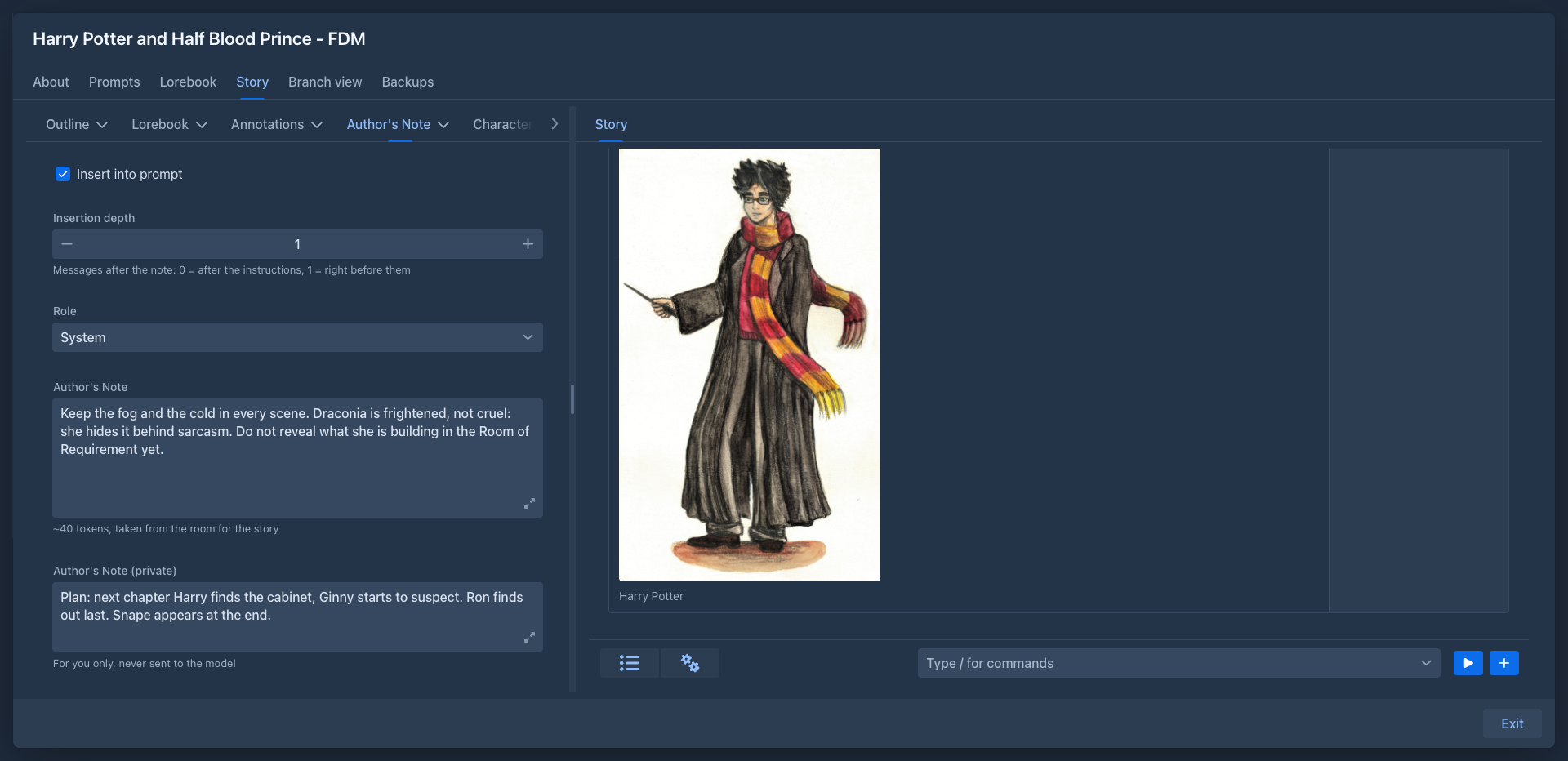
The closer the note is to the end of the prompt, the stronger its effect. Depth 1 with role System is a good start.
The note is not processed as a template: macros are sent as they are written.
How the prompt looks
A generation sends the system prompt first, then the story as a chat - each part as an answer of the model to
Generate story - and the instructions of the turn last. With depth 1 the note is inserted right before the
instructions:
- system prompt (template, lore, summaries)
- story parts…
- the Author's Note
- the instructions of the turn
The note's tokens are taken from the room for the story: a longer note means fewer story parts in the prompt. A note that doesn't leave room even for the rest of the prompt stops the generation with Contextual limit not sufficient.
Storage
The note is stored with the book, so it is part of book backups and copies.