# 模板与宏
Marginalia 发送给模型的所有内容都由**模板**构成:带有占位符的文本,会针对每个生成的部分填入具体内容。你可以修改全部模板,从提示词的框架一直到单个 lorebook 条目。
```handlebars
Write the next section of the story.
{{#povCharacter}}Point of View Character: {{.}}{{/povCharacter}}
{{instructions}}
```
## 模板的使用位置
| 模板 | 设置位置 | 生成内容 |
|---|---|---|
| **Master Template** | 书籍 [Prompts](../books/prompts.md),*Settings → Templates* | 系统消息:角色、设定、风格、摘要 |
| **User Prompt** | 书籍 Prompts,*Settings → Templates* | 针对正在生成的部分的请求 |
| **Summary Prompt** | 书籍 Prompts,*Settings → Templates* | 生成[摘要](../books/summaries.md)的请求 |
| **Meta Summary Prompt** | 书籍 Prompts,*Settings → Templates* | 生成[元摘要](../books/summaries.md#meta-summaries)的请求 |
| **Lorebook entry content** | [lorebook 条目](../lorebooks/entries.md) | 插入提示词中的设定内容 |
*Point of View*、*Tense* 和 *Style* 是纯文本,不是模板。
## 两种占位符
模板结合了两套语法:
- **Handlebars**:变量,如 `{{instructions}}`,以及区块,如 `{{#sceneSetting}}...{{/sceneSetting}}`,区块仅在其值不为空时输出。参见 [Prompt templates](templates.md)。
- **SillyTavern 宏**:`{{user}}`、`{{random::a::b}}`、`{{setvar::name::value}}`、`{{if ...}}`,以及 SillyTavern 用户熟悉的其他宏,因此来自 SillyTavern 的 lorebook 和提示词可以继续使用。参见 [Macro reference](macros.md)。
两种语法可以在任何模板中使用,也可以自由混用。
## 编辑器中的帮助
每个模板字段都有一个提示弹出框:
- **Insert Default Template** 将默认模板复制到该字段中;
- **Available Template Variables** 列出该模板的变量,包括在所有地方都可用的变量;
- **Available Macros** 列出所有宏及其简短说明。
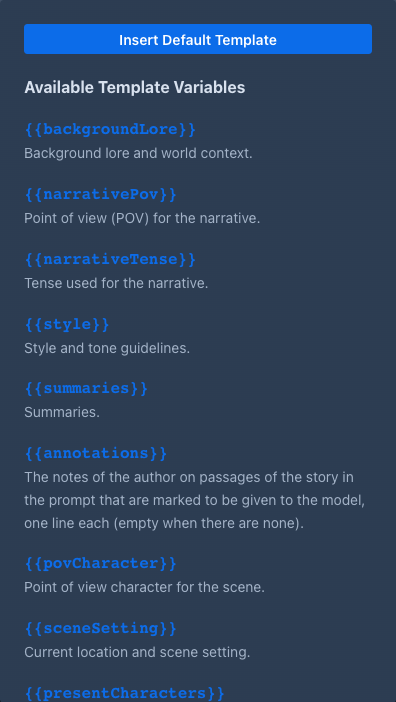
存在语法错误的模板(例如未闭合的区块)无法在书籍提示词和设置中保存;在 lorebook 条目中,它仍会被保存并标记为无效,在修正之前按纯文本使用。
未知变量(通常是拼写错误)不会阻止保存;该字段会在其下方将其列为警告,参见 [Typos](templates.md#typos)。
生成部分菜单中的 **Show Prompt** 会显示实际发出的提示词,这是检查模板效果的最佳方式。
## 本节内容
- [Prompt templates](templates.md):各模板的变量、区块、条件、求值顺序
- [Macro reference](macros.md):所有宏、变量、条件语句及 SillyTavern 兼容性