Prompt History
Shows what was really sent to the model and what it answered, for debugging a plugin or checking what is in the prompt of anything besides a regular generation.
How it works
The extension keeps the last 20 requests sent to the models in your session: the messages that were sent, the answer and the reasoning of the model (when the provider sends it). All kinds of requests are kept, generations too. It adds the panel Prompt history to Settings → Extension Settings; the button Show prompt history opens the list, newest request first, with:
-
the date of the request,
-
the model: the name of the AI and the model id,
-
the request type:
generation(a new part, a swipe, a regeneration),annotate,summary,impersonate,redraft,agent,help, or the name of an extension's own kind of work, -
the status (running, completed, cancelled, failed) and how long it took.
Choose a request to read it in the tabs under the list: Request (each message under its role), Reasoning, and Response (the answer, the functions the model called, and the error of a request that failed). Refresh reloads the list and Clear empties it. A request is listed when it is sent: while it runs its answer and reasoning grow in the dialog as the model writes them.
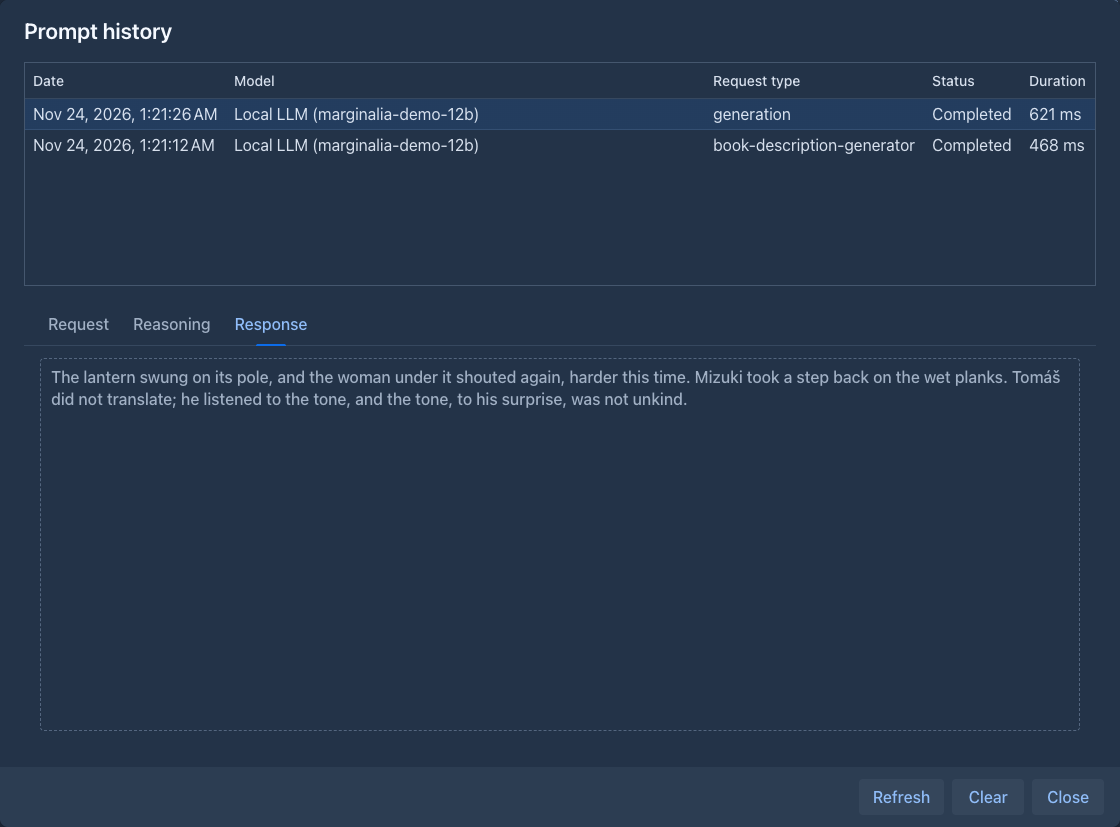
For an agent, the footer of its console has the button Prompt history: it opens the same list with the requests of that run.
Notes
- The history is kept in memory only, packed to take little room. It is gone when you log out or the server restarts, and it is not part of a backup.
- Each browser session has its own list. The requests of an agent are not in it: they are kept per run (20 per run, for the 10 latest runs) and shown from the console of the run.
- The messages are shown whole, story text included.