Prompt Inspector
Shows the prompt of a generation before it is sent to the model, and asks whether to send it.
How it works
The extension adds Inspect prompt before sending to the Analysis group of the settings menu (⚙) of the story editor. It is a check box item: choose it to switch the inspection on, choose it again to switch it off. The choice is a setting of your user, it applies to all your books.
While it is on, a generation (a new part, a swipe, a regeneration) stops just before the request and opens a dialog,
Send this prompt to the model? The text is the prompt as the model will get it, after every other extension has
changed it: each message under its role - [SYSTEM] (the template, the lore and the summaries), the earlier parts of the
story as [USER] and [ASSISTANT] messages, and the instructions of the turn last. Images sent along are counted at the
end of their message.
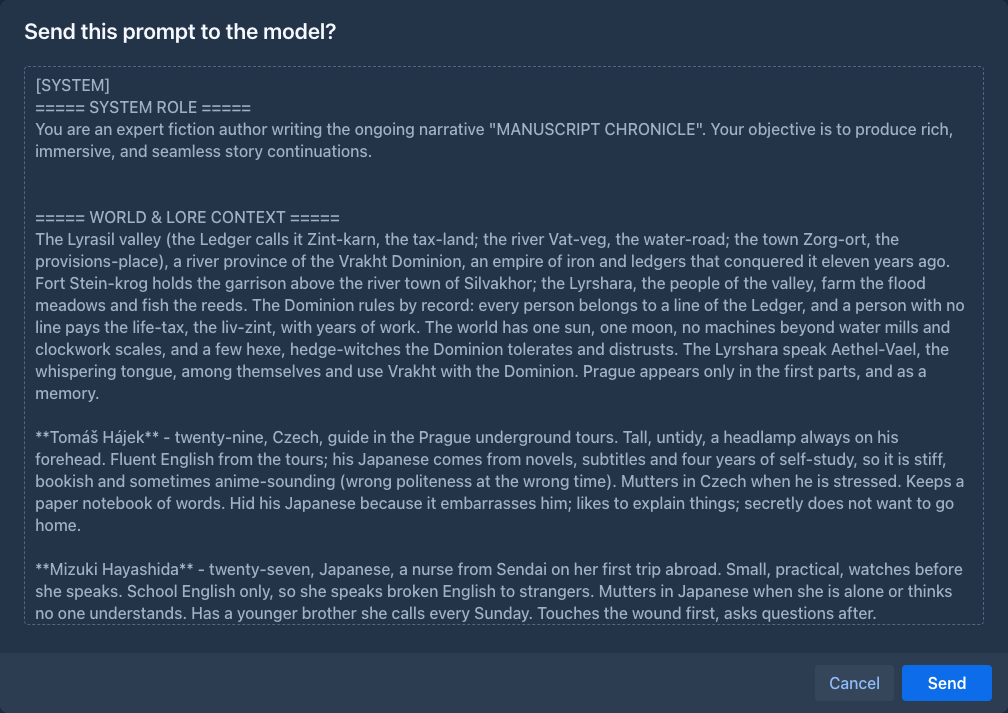
- Send sends the request and the generation goes on as usual.
- Cancel stops the generation. The part that was started for it is removed again (a regenerated part gets its old text back), as when a generation fails before any text arrives.
Notes
-
The prompt is built first, as for any generation, and you are asked as the last step before the request. If a summary became invalid, the usual question about continuing without it comes before the prompt is shown. No request is made to the model before you answer.
-
Only generations started from the story editor are held. Agents and commands have no page to show the prompt on, and their generations go on unasked.
-
The dialog can be moved and resized, and the text selected and copied. It has to be answered: Esc and a click outside do not close it. If you close the page with the dialog open, that counts as Cancel: the generation is stopped and nothing is sent, as soon as the server notices that the page is gone (that can take a while).
-
Other users are not asked, and the switch is kept when the page is reloaded.