Templates & macros
Everything Marginalia sends to the model is built from templates: texts with placeholders that are filled in for each generated part. You can change them all, from the frame of the prompt down to a single lorebook entry.
Write the next section of the story.
{{#povCharacter}}Point of View Character: {{.}}{{/povCharacter}}
{{instructions}}
Where templates are used
Point of View, Tense and Style are plain text, not templates.
Two kinds of placeholders
Templates combine two syntaxes:
-
Handlebars - variables like
{{instructions}}and sections like{{#sceneSetting}}...{{/sceneSetting}}that are printed only when the value isn't empty. See Prompt templates. -
SillyTavern macros -
{{user}},{{random::a::b}},{{setvar::name::value}},{{if ...}}and the rest of the macros SillyTavern users know, so lorebooks and prompts from SillyTavern keep working. See Macro reference.
Both work in every template, and they can be mixed freely.
Help in the editor
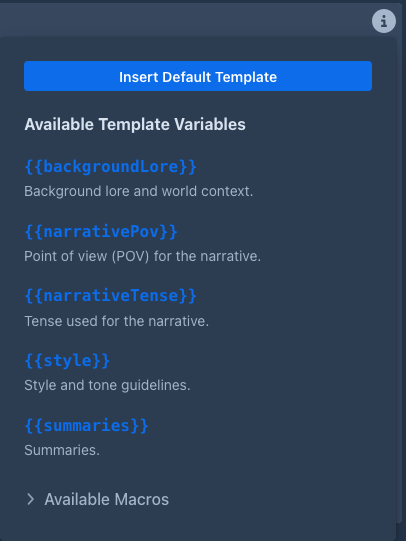
Every template field has a hints popover:
- Insert Default Template copies the default into the field;
- Available Template Variables lists the variables of that template, including those available everywhere;
- Available Macros lists all macros with a short description.
A template with a syntax error (an unclosed section, for example) can't be saved in the book prompts and Settings; in lorebook entries it is saved, marked as invalid, and used as plain text until it's fixed.
Unknown variables (usually typos) don't block saving; the field lists them under it as a warning, see Typos.
Show Prompt in the menu of a generated part shows the prompt as it was sent - the best way to check what a template produced.
In this section
- Prompt templates - variables of each template, sections, conditions, evaluation order
- Macro reference - all macros, variables, conditionals and SillyTavern compatibility