Entries & activation
The entry list
Each row of the lorebook editor is one entry:
Add Entry in the toolbar adds an entry with order 100. Changes are saved as you type.
Searching and deleting many entries
The box with the magnifier next to the buttons shows only the entries that have the text in their name, content, note or filter (the case does not matter); clear it to see all of them again. It looks only at the entries of the selected lorebook, not at the sub lorebooks. The phone layout has the box above the list.
The checkbox column at the left selects entries (the one in the header selects all that are shown, so a search and then the header box selects the matches). When something is selected, Delete selected appears in the toolbar with the number of the entries; it asks once and then moves them to the trash. The phone layout does not delete many entries at once.
Search and replace
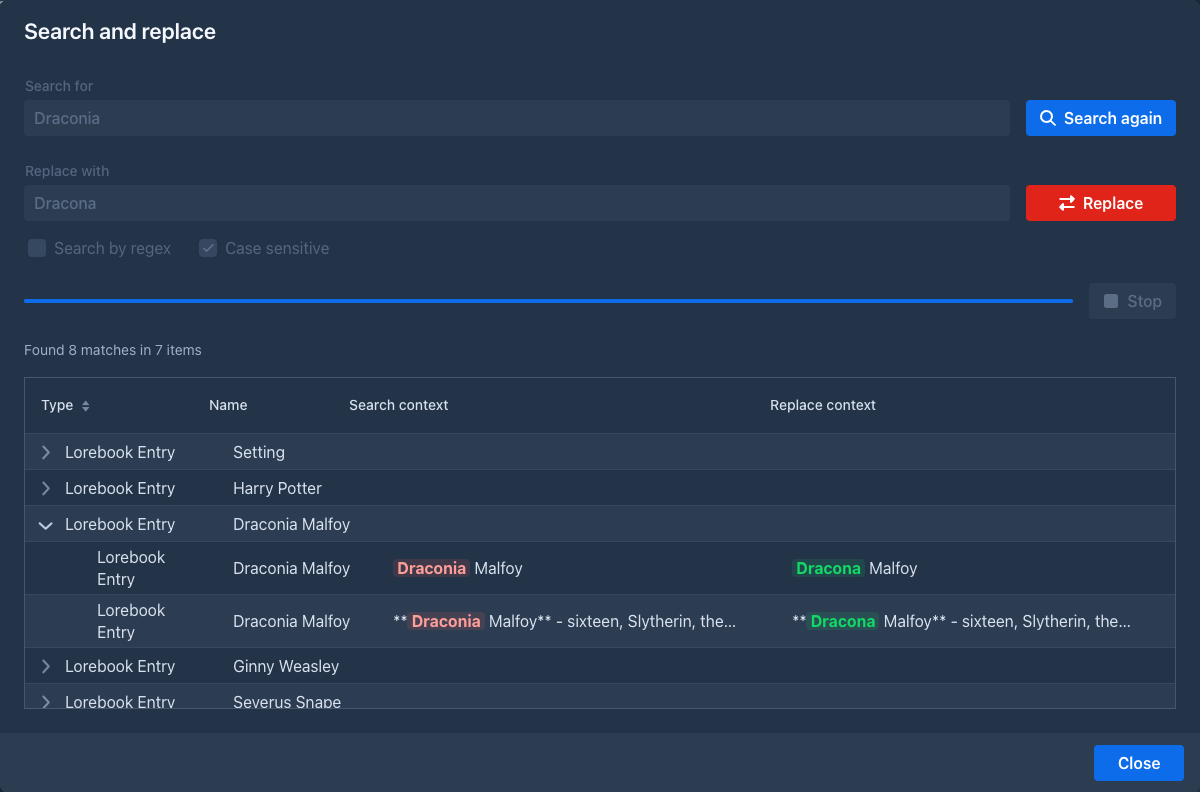
Search and replace (right of Add Entry) changes a word, a name or a phrase in the name, the text and the comment of
all the entries of the lorebook at once. It works like the search and replace of the story,
without the options for summaries and branches: Search lists the entries with matches (the table shows their names) and
the matches in them as they are and as they will be, Replace changes the entries. It has the options Search by regex (see Regular expressions) and Case sensitive (on by default; locked while the regex is on, which
can use (?i) to ignore the case). Entries that are disabled are searched too. On the phone the button (an icon next to the
Enabled check box) opens the same window in the phone layout.
The command line of the story editor has /search-replace-lore-entries for the lorebook of the open book, see
Commands.
Entry details
The ⌄ button opens the details:
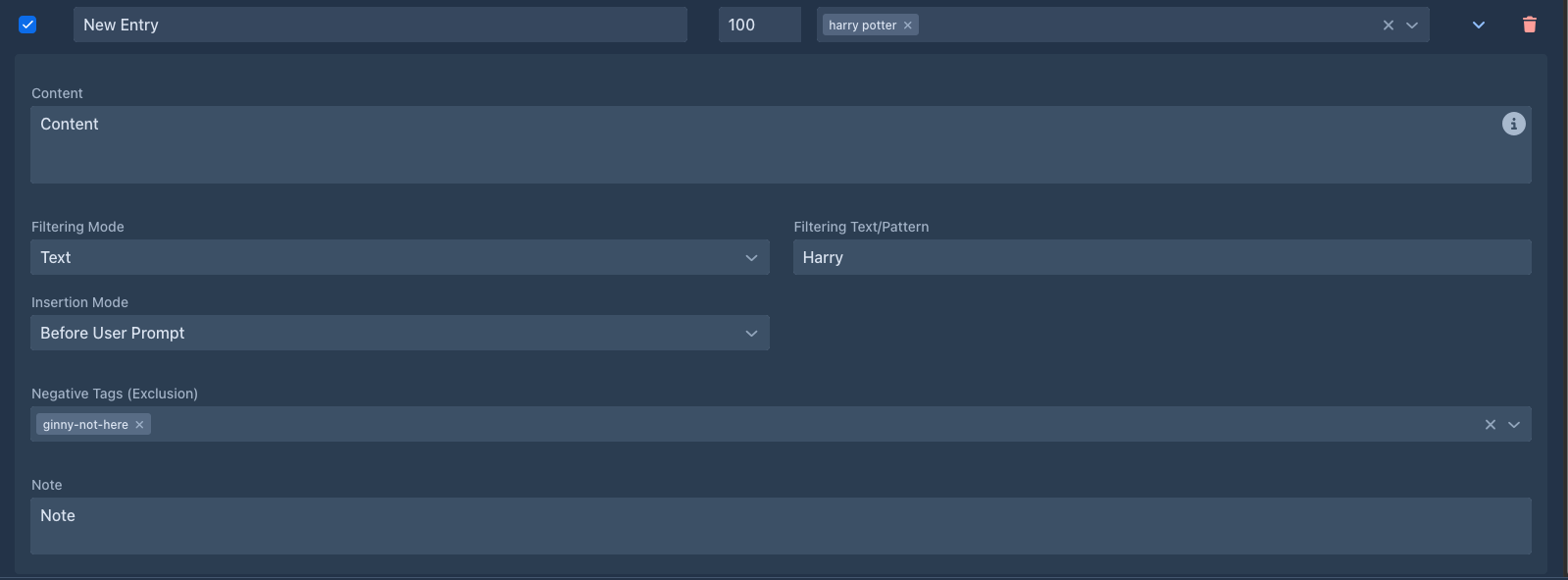
Write the content as you want the model to read it - a short, factual description works best:
Captain Varro - commander of the harbor watch of Ostra, fifties, scarred left hand. Loyal to the Duke, distrusts the mages' guild. Speaks in short, clipped sentences.
Activation
Before each generated part, Marginalia goes through the entries of the book's lorebook and its sub lorebooks. An entry is activated when:
- the entry is enabled, and so is its lorebook;
- the part being written is inside its range of parts, if it has one (From message, To message);
- none of its negative tags is a tag of the book;
- it has no tags, or at least one of them is a tag of the book;
- it has no filter, or the filter matches the instructions for the part (or, with Activation Context Instructions and parts of the story, the instructions and the newest parts of the story).
All conditions must hold. An entry without tags and filter is always active.
Tags
Tags connect entries with book tags (set on the book's About tab). Use them to share one lorebook between books that need different parts of it:
Tags must match exactly. A negative tag always wins over a tag.
Tags can also be given to a whole lorebook (the Tags field of the lorebook; lorebooks imported from files can carry them). They then count as tags of each of its entries.
Filters
A filter activates the entry only when the request for the part mentions it. It is matched against the user prompt of the part as it is sent - the Scene Setting, POV Character, Present Characters and Instructions you entered, inside the wording of the user prompt template.
For example, the regex \b(varro|captain)\b matches the whole word Varro or Captain, and
varro.*(harbor|docks) matches only when Varro and the harbor or the docks are both mentioned, in that order.
By default the filter sees the request, not the story
Unless the entry looks into the story (see
The request also contains the text of the user prompt template itself. A filter for a word the template uses (the default one mentions characters, plot, tone...) is always active.
An invalid regular expression never matches; the entry stays inactive.
Combine tags and a filter when an entry should only be used in some books, and there only when it's relevant.
Looking into the story
By default the filter is looked for in the request for the part only, so an entry about the dragon is used when you
mention the dragon. When the story should keep the entry in play - the dragon was in the last part, your new instruction
only says "he flies away" - set Activation Context of the entry to Instructions and parts of the story and Parts
to the number of the newest parts to search with the request (1 is the part before the one being written, 2 the two
before it...).
-
The filter is looked for in the text of those parts and the request together, so keywords of Keywords (all) may be split between them. The request always counts.
-
Only the text of the parts is searched, not their summaries, and only the parts of the branch you are writing (a swipe or a regeneration does not search the part it replaces).
-
A story shorter than Parts is searched whole. Marginalia reads only as many parts as the entries that are switched on need, so a lorebook without such entries does not touch the story at all.
-
Entries brought in by
other entries are not looked for in the story, only in the content of the entries that were used.
Limiting an entry to some parts
Some lore is true only for a part of the story: the disguise of a character that is blown in chapter 5, the rumours
before the war starts. Fill From message and/or To message with the numbers of the parts, as the outline of the story
numbers them (the first part is 1; both numbers are included). The entry is then used only when the part being written has
a number inside the range, whatever its filter says - an entry without a filter is a constant one inside the range only.
-
An empty field is no limit: only From message
10is "from part 10 on", only To message4is "until part 4". -
The part being written is the one after the last part of the branch (a story of 9 parts writes part
10). A swipe or a regeneration writes the part it replaces. -
Parts without text count too, as they do in the outline. Deleting or inserting parts moves the numbers.
-
If From message is bigger than To message the entry is never used.
-
An entry outside its range is not brought in by
other entries either. -
The Lorebook VCS extension keeps the range in the versions of an entry; import, export and cloning of a lorebook keep it.
Entries brought in by other entries
Normally only the request for the part activates entries. With a scan depth (the field of the
lorebook; 0, which is the default, switches this off) the content of the entries that
were activated is searched for the filters of the entries that were not, as if it were part of the request. An entry whose
filter is found there is activated too. That is pass 1; the content of the entries it activated is searched in pass 2,
and so on, as many passes as the scan depth says (at most 5).
For example, with a scan depth of 1, an entry Captain Varro (filter varro) is activated by the request, and its content
says "...serves the Duke of Ostra". An entry Ostra (filter ostra) is then activated too, although the request never
mentions the city. With a scan depth of 2, the entry Ostra would in turn bring in an entry about the harbor it mentions.
-
Only filters count: an entry that is already used because it has no filter needs nothing, and an entry that is switched off, or excluded by its tags, is not brought in.
-
The content that is searched is the text of the entry as written, the templates in it are not run.
-
The setting of the lorebook the book uses counts; the scan depth of a sub lorebook is ignored.
-
An entry with Do not search its content for other entries ticked can be activated, but it brings nobody in.
-
The order in the prompt does not depend on how an entry was found, see
Order and insertion . -
Extensions that change which entries are used (see Extensions) are asked about the entries that are brought in too.
Preview activation
Preview activation (the button with the eye in the toolbar of the lorebook editor, and on the phone next to the search and replace button) answers "which entries would be used for this text?" without generating anything. Type the text of the request into Text of the turn (the scene, the characters and the instructions, as you would enter them) and the table lists every entry of the lorebook and of its sub lorebooks, in the order they are used:
-
a green check mark for the entries that would be used and a gray mark for the others;
-
the lorebook of the entry, its Order, the Pass (empty for the entries the text activated,
1,2... for the entries brought in byother entries ); -
the Reason: no filter, filter found in the text, filter found in the content of another entry (with the filter and the entry), or why not: switched off, the part is outside its range, a negative tag of the book, the book lacks a tag of the entry, the filter was not found.
The tags decide too, so pick a book in Tags of the book to use its tags (without one, no tags count). That book also
gives the parts of its story for the entries that
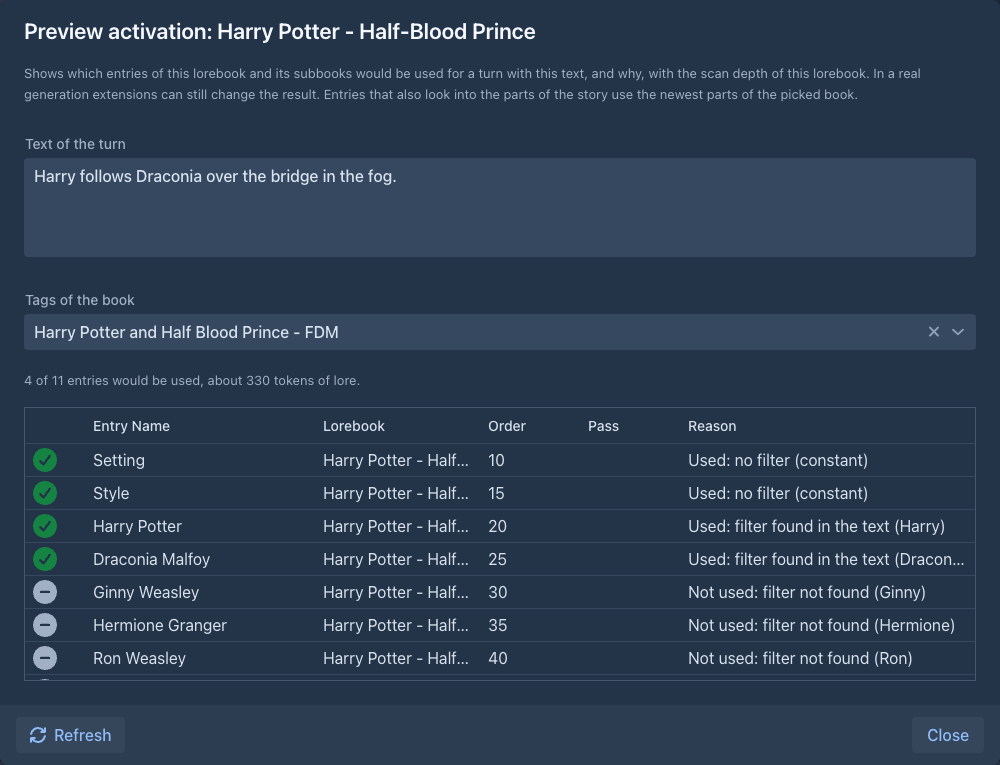
The preview applies the rules of Marginalia only: the text is the one you type (not the user prompt template around it), and what an extension changes while a part is generated is not part of it.
Order and insertion
Activated entries are put into the prompt sorted by Order, lowest first. Entries with the same order keep the order in which they were created. Entries from all included lorebooks are sorted together.
Insertion Mode decides where an entry goes:
Entries are separated by an empty line. Lore counts toward the context limit; with many long entries, less of the story fits into the prompt.
Templates in entries
The content of an entry is a template like the book prompts. It can use:
and all macros. For example, an entry that adapts to the point of view character:
Varro {{#povCharacter}}is seen through the eyes of {{.}}: {{/povCharacter}}a stern, scarred officer.All activated entries of one part share their variables in activation order: an entry can setvar a value that
entries later in the order (and the master template) read with getvar.
A syntax error in the content is shown under the field. The entry is still saved; until it is fixed, its content is used as plain text, without processing the template.
Tips
-
Keep entries short and factual; the model doesn't need prose, it needs facts.
-
One entry per character, place or concept, so each can be activated on its own.
-
Use always-active entries for the core of the world, filters for the cast and places, and tags to share a lorebook between books.
-
Check what was activated with Show Prompt on a generated part, or try a text before you write with
Preview activation . -
Use the scan depth sparingly: one pass is enough for most books, and every pass can bring in more lore than you wanted.