Chapter Marker
Turns the Outline of the story editor into a table of contents.
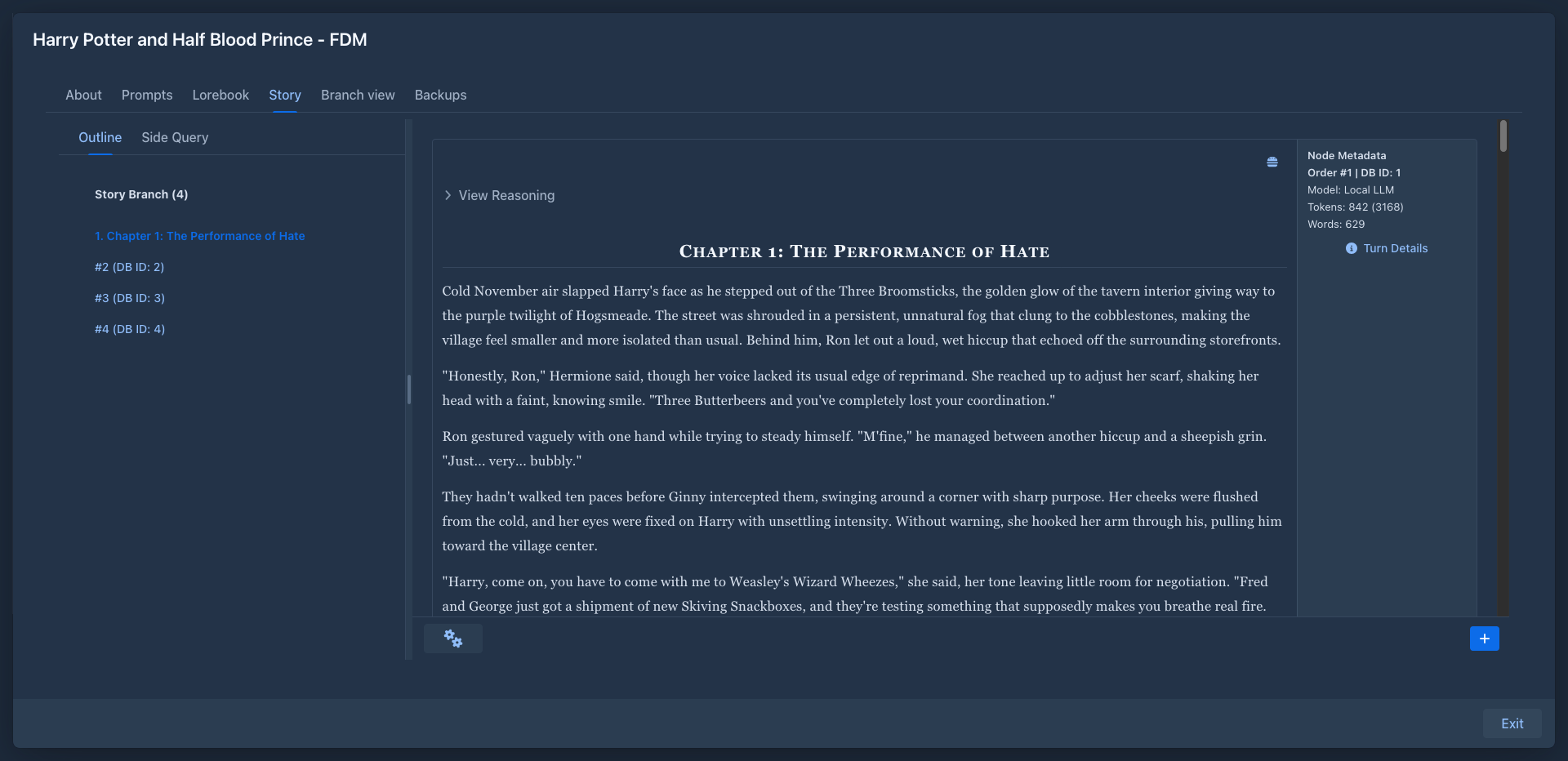
How it works
When the text of a part contains a Markdown heading - a line starting with # - the part's entry in the outline shows
the heading instead of the usual #n (DB ID: m) label, highlighted:
# Chapter 3: The Harbour

Rain had been falling on Ostra since dawn...
shows in the outline as 5. Chapter 3: The Harbour - the number is the part's position in the branch, followed by the heading. Parts without a heading keep their normal label.
- The heading can be on any line of the part; when there are several, the first one is used.
- Any heading level works (
#,##,###...). - The outline updates as soon as you save an edit: add a heading to start a chapter, remove it to merge the part back.
Usage
There is nothing to configure. Either write the heading into the part yourself, or ask the model for it in the instructions, e.g. Start a new chapter titled "The Harbour" with a Markdown heading.
The default user prompt tells the model not to write titles or chapter headings. When you want the model to write them, say so explicitly in the instructions, or change that rule in the user prompt.
The headings are part of the story text, so they are also sent to the model and shown in the viewer and in backups.
The same rule finds the chapters in the table of contents of exported books.