Desktop app
The desktop app is a self-contained version of Marginalia for one computer. It brings its own Java runtime and server, listens only on your computer and opens in your default browser.
Download
Download the installer or the archive for your system from the releases page. Four variants are published for every system:
Builds are available for Windows x64, macOS (Apple Silicon and Intel) and Linux (x64 and arm64). <arch> in the
file name is x86_64 for 64-bit Intel and AMD processors (Windows, macOS Intel, Linux) and aarch64 for ARM
(Apple Silicon, Linux arm64).
Install and start
With the installer: open the .dmg and drag Marginalia to Applications. With the archive:
- Extract the archive and move
Marginalia.appto Applications. -
Open it. The app is not signed yet, so the first time macOS refuses to open it. Right-click the app and choose Open, or run:
xattr -dr com.apple.quarantine /Applications/Marginalia.app
With the installer: run the .msi. It installs for your user (no administrator rights needed), adds Marginalia to the Start menu and the desktop, and a newer .msi upgrades the installed version (your data stays in .marginalia). With the archive:
- Extract the archive.
- Run
Marginalia\Marginalia.exe. - SmartScreen may warn about an unknown publisher. Click More info → Run anyway.
With the .deb (Debian, Ubuntu and derivatives):
sudo apt install ./marginalia-<version>-linux-<arch>.debIt installs to /opt/marginalia and adds Marginalia to the applications menu; sudo apt remove marginalia removes it (your data in ~/.marginalia stays). With the archive:
- Extract the archive.
- Run
Marginalia/bin/Marginalia.
- Extract the archive.
- Run
bin/marginalia(bin\marginalia.baton Windows).
Starting takes a few seconds. Marginalia then opens in your browser at http://127.0.0.1:8765 and shows the
first start dialog.
Installer with the plugins
The full installer (-full in the file name) is the same app and brings every plugin that is part of Marginalia
(the Anthropic and Google providers, Reviewer, Beta Readers, Side Query, Arc Outline, the generators and the rest). The
first time Marginalia starts, the plugins are copied into ~/.marginalia/extensions and show up in Admin → Extensions;
with the plain installer you install them there yourself, one by one.
-
A plugin is installed once. If you remove it in Admin → Extensions, it stays removed, also after you update to a newer version of Marginalia (which brings the newer plugins and puts them next to the old ones; Marginalia uses the newest and keeps the older JARs in
extensions/old-versions). A plugin that is new in an update is installed. -
Installing the full installer over the plain one (or the other way round) keeps your data and settings, and so does every update.
-
The plain installer does not remove plugins. Plugins that you installed yourself are never touched.
Tray icon
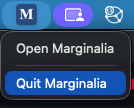
While it runs, Marginalia shows its icon (a manuscript page with a small branching tree in the margin) in the system tray (in the menu bar on macOS). Its menu has two items:
- Open Marginalia - opens Marginalia in the browser again, for example after you closed the tab.
- Quit Marginalia - stops the server. Closing the browser tab does not stop Marginalia.
Starting the app a second time while it already runs only opens it in the browser.
Where your data is
To move Marginalia to another computer, quit it and copy the .marginalia folder (with secret.key, which
decrypts the saved API keys). Before larger changes, make a
database backup.
Options
The portable launcher accepts these options:
marginalia --port 8765        # port to listen on; a free one is picked when 8765 is taken
marginalia --host 127.0.0.1   # address to listen on
marginalia --home /path       # directory that holds the .marginalia folder (default: your home directory)
marginalia --no-browser       # don't open the browser
marginalia --no-tray          # no tray icon; stop with Ctrl+C
marginalia --help
Other addresses
With --host 0.0.0.0 (or another address) Marginalia is reachable from your network over plain HTTP. For access from
other devices use the server behind HTTPS instead.
Updating
Quit Marginalia, replace the app (or the portable folder) with the new version and start it again. Your data stays in
.marginalia and is upgraded automatically on the first start; before the structure of the database changes,
Marginalia saves a copy of it in db-backups. Extensions are built for one Marginalia version, so
update them at the same time (see Managing extensions).
Uninstalling
Delete the app or the folder. To remove your data as well, delete the .marginalia folder.