Side Query
A chat with the model next to your story: ask about the plot, check continuity, brainstorm names or the next chapter - without adding anything to the book.
Side Query is not available in the phone layout.
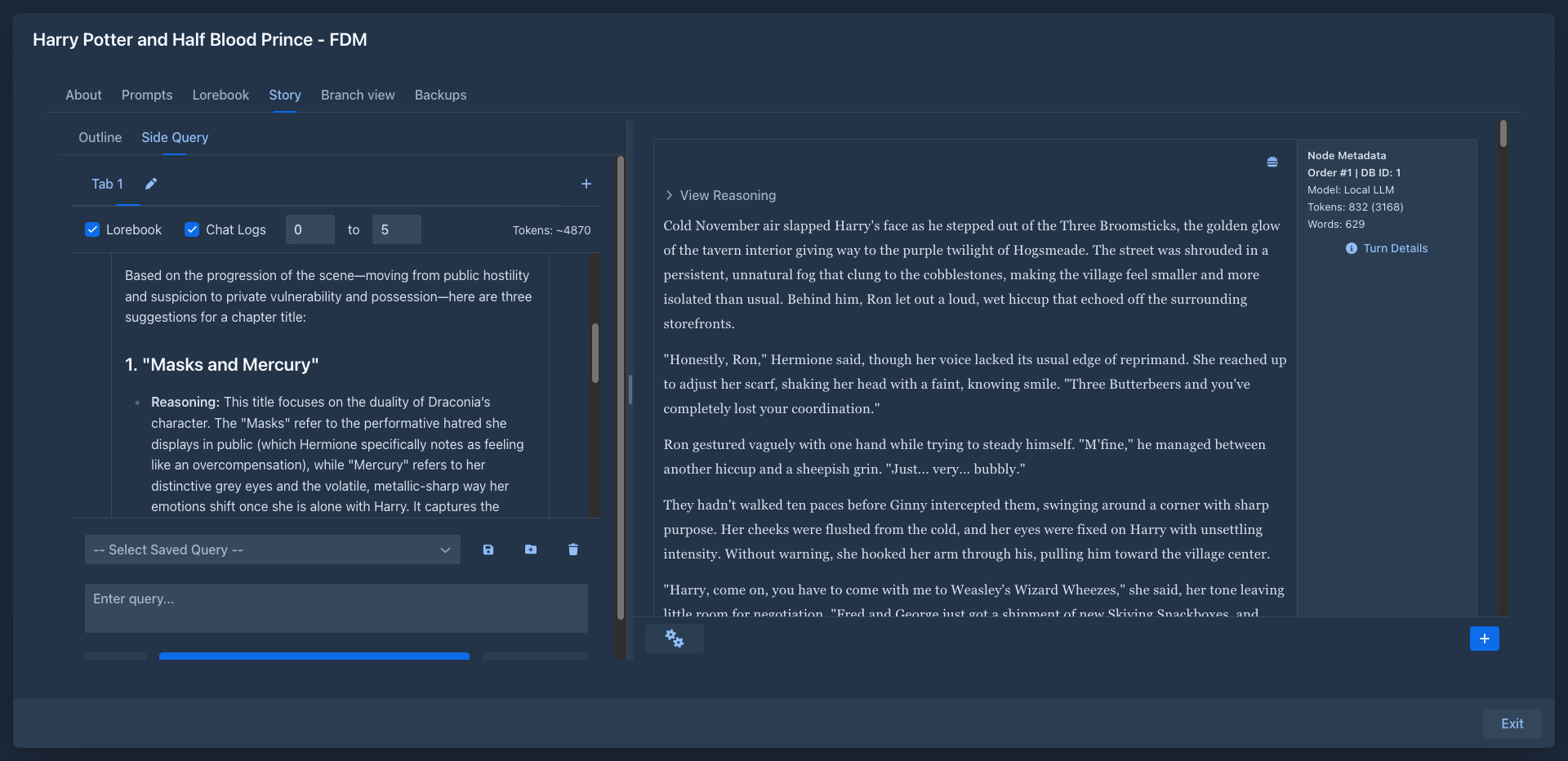
The Side Query tab
The left sidebar of the story editor gets a Side Query tab next to Outline. Drag the divider to give it more room.
The tab holds conversations, each in its own tab: + opens a new one (Tab 2, Tab 3...), the pen renames a tab, × closes it (the last tab can't be closed). With Enable AI Tab Naming in the profile, the model names a tab after its first answer, unless you renamed the tab yourself. Conversations belong to the book and are kept until you close their tab.
Asking
Type a question into the box at the bottom and click SEND. The answer appears as it is written; STOP (in place of SEND) interrupts it.
Every message has buttons to move it up or down, edit it, copy it to the clipboard, and exclude it from the context (or include it again). Excluded messages stay in the conversation but are not sent to the model - useful to drop a wrong answer without deleting it.
What the model sees
The options above the conversation choose what is sent with your questions:
Lorebook collects the lore like a generation does: the book's lorebook and its sub lorebooks (disabled lorebooks are skipped), the enabled entries whose tags match the book's tags, with macros processed. Keyword filters are not applied - there is no story prompt to match, so every applicable entry is sent. Variables set by the entries are not stored.
Data of other extensions
The plug button opens a popover with the additional sources that other extensions offer, for example the Arc Outline offers your outline. Every source has a checkbox; the list has up to two parts:
- About the book: a checked source is added to the request after the lorebook, under its name.
- About story parts: a checked source is asked for every story part in the Chat Logs range and what it returns is added after the text of that part. It has an effect only while Chat Logs is on.
The choice is kept with the tab. If an extension is not installed (or stopped) its sources are not in the list and not sent, and they come back when the extension does. With none offered the popover says so.
The request is built like this:
-
one system message: the profile's Initial System Query, the lorebook entries (Lorebook Context), the checked sources about the book and the story parts (Chat History Context, labelled with their outline numbers Message #1, #2..., each followed by the checked sources about story parts);
-
the messages of the conversation that are included, as a chat. The profile's Instructions Before User Input are put at the start of your last question, before its text.
The model and protocol come from the profile (see below), by default those of the book. A cheap, fast model is usually enough for questions about the story.
Saved queries
Questions you ask often can be saved:
- Save prompt (disk icon) saves the text in the box under the name selected in the list, or asks for a name;
- Save prompt as... saves it under a new name;
- pick a name in the list to put the saved text into the box;
- the trash button deletes the selected saved query.
Saved queries belong to your account and are available in every book.
Some useful ones:
- List every named character that appeared so far, with one line about each.
- Which threads of the plot are still open?
- Suggest five names for a harbor town in this world.
Profiles
Side Query settings are in Settings → Extension Settings → SideQuery Settings, organized in profiles like the Reviewer ones. The selected profile is the one used:
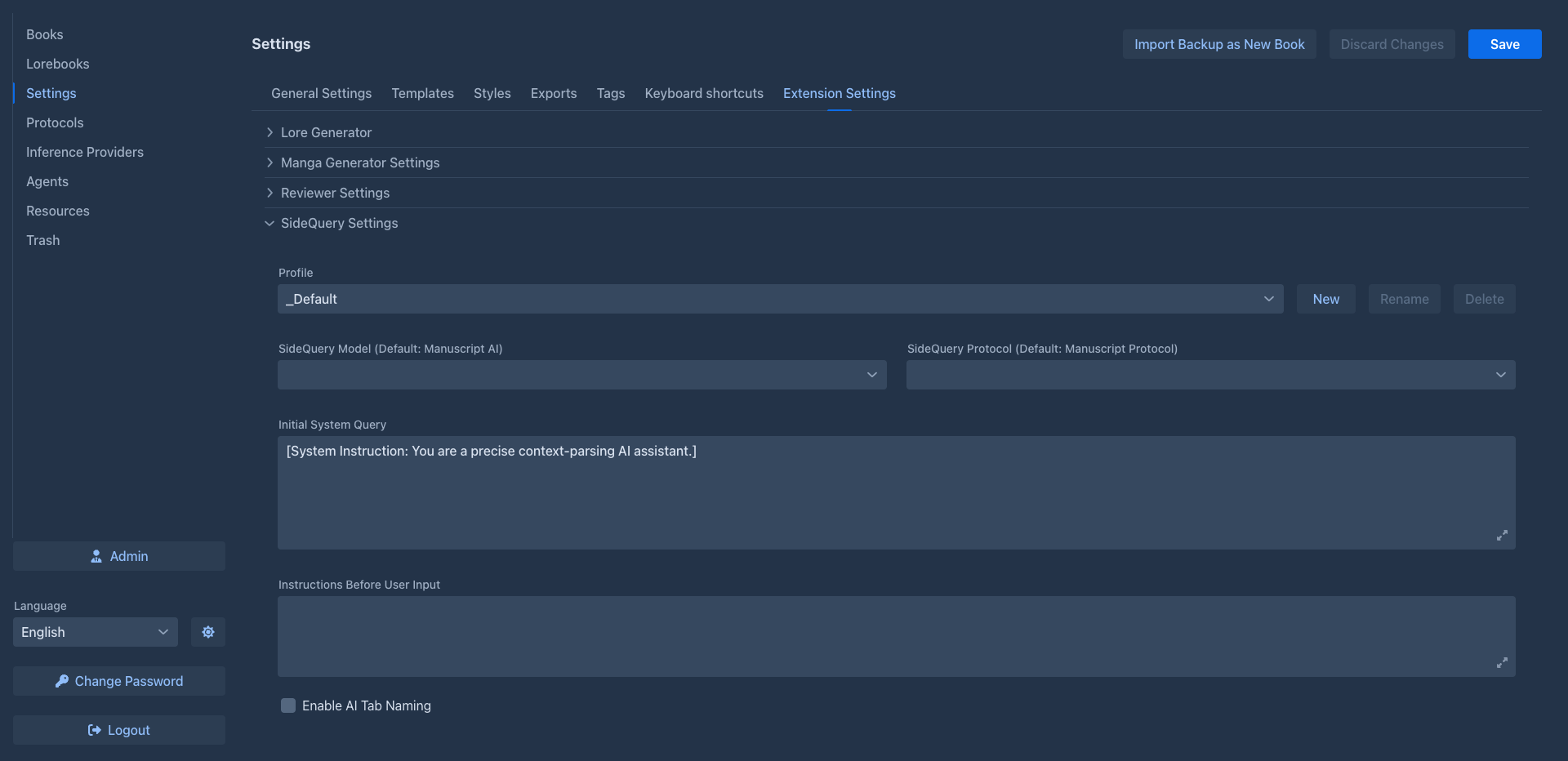
Click Save at the top of the Settings page to keep the changes.
Storage
Conversations are stored with the book, so they are part of book backups and copies. Profiles and saved queries are stored in your user settings.