Inference providers
An inference provider is a connection to a model: the API address, the API key, the model and its limits. Every book uses one provider. You can have as many as you like, for example a large cloud model for the story and a small local one for experiments, and switch a book between them at any time.
Providers belong to your account. Other users don't see them or their API keys. API keys are stored encrypted (see The data folder).
Adding a provider needs the permission Create own models, which an administrator gives you (administrators always
have it, see Permissions). Without it you can only use the providers the
administrators
Supported APIs
Marginalia works with any API that implements the OpenAI Chat Completions interface (/v1/chat/completions,
with streaming). Most services and local servers do:
The ports are the defaults of each server; use the ones your server actually runs on.
Port 8080
The Docker version of Marginalia uses port 8080 as well. If you run llama.cpp on the same machine, start it on another
port (llama-server --port 8081).
With the Docker version, localhost means the Marginalia container. Use
http://host.docker.internal:<port>/v1 for a model server on the same machine, see
Models on the same machine.
Adding a provider
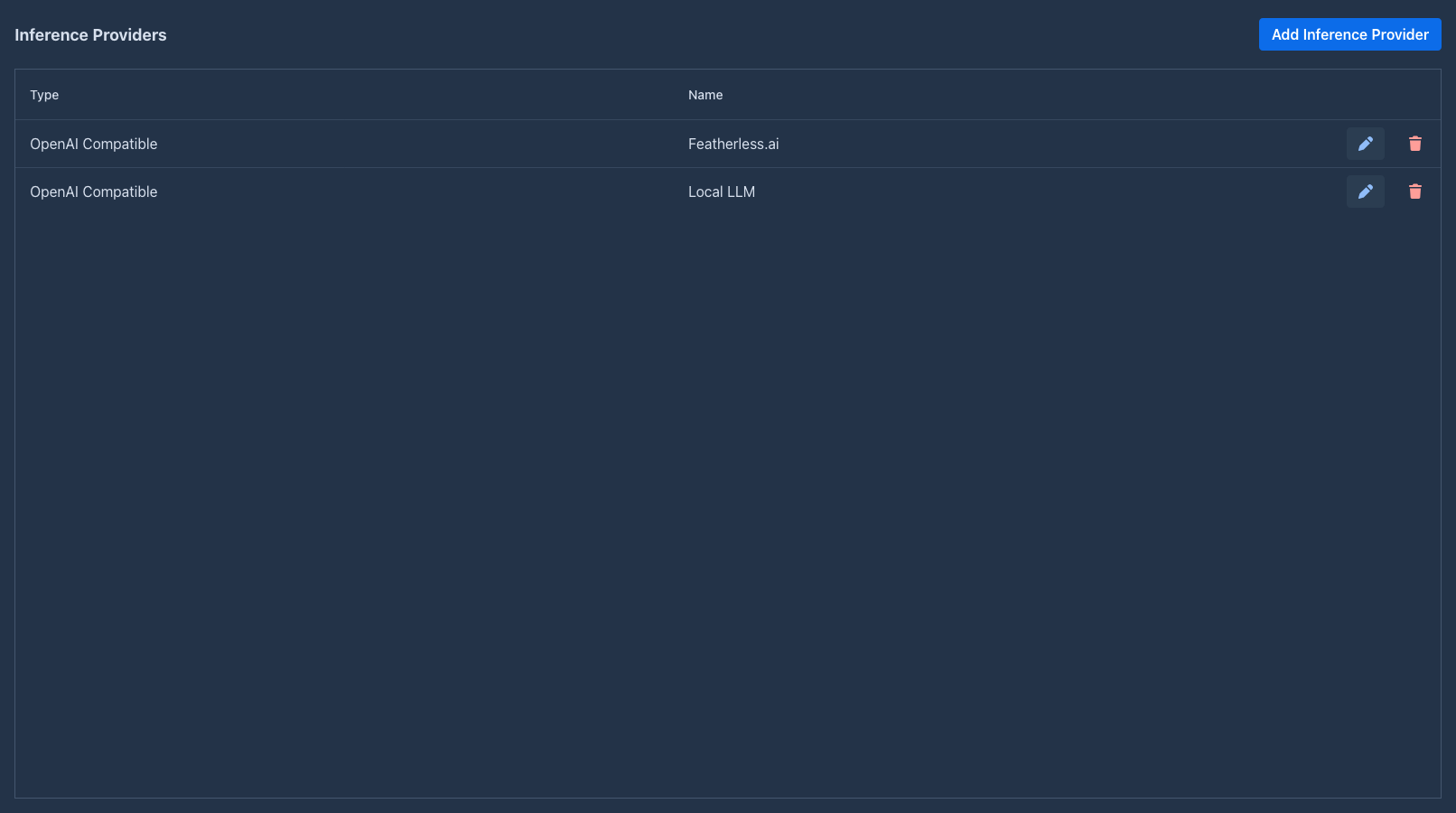
Open the Inference Providers tab and click Add Inference Provider. Existing providers are edited with the pen button and deleted with the trash button. The clone button (two sheets) makes a copy of a provider under a name you confirm (the original's with (Copy)): the copy has the same address, model, API key (or the settings of the extension), reasoning, token limits and parameters, so a second model on the same service takes a name and a click. The copy is not shared and has no limits or usage of its own. You can clone only your own providers (not a shared one of an administrator, whose key you must not see) and only when you may create providers.
At the top of the dialog:
Per Type Settings
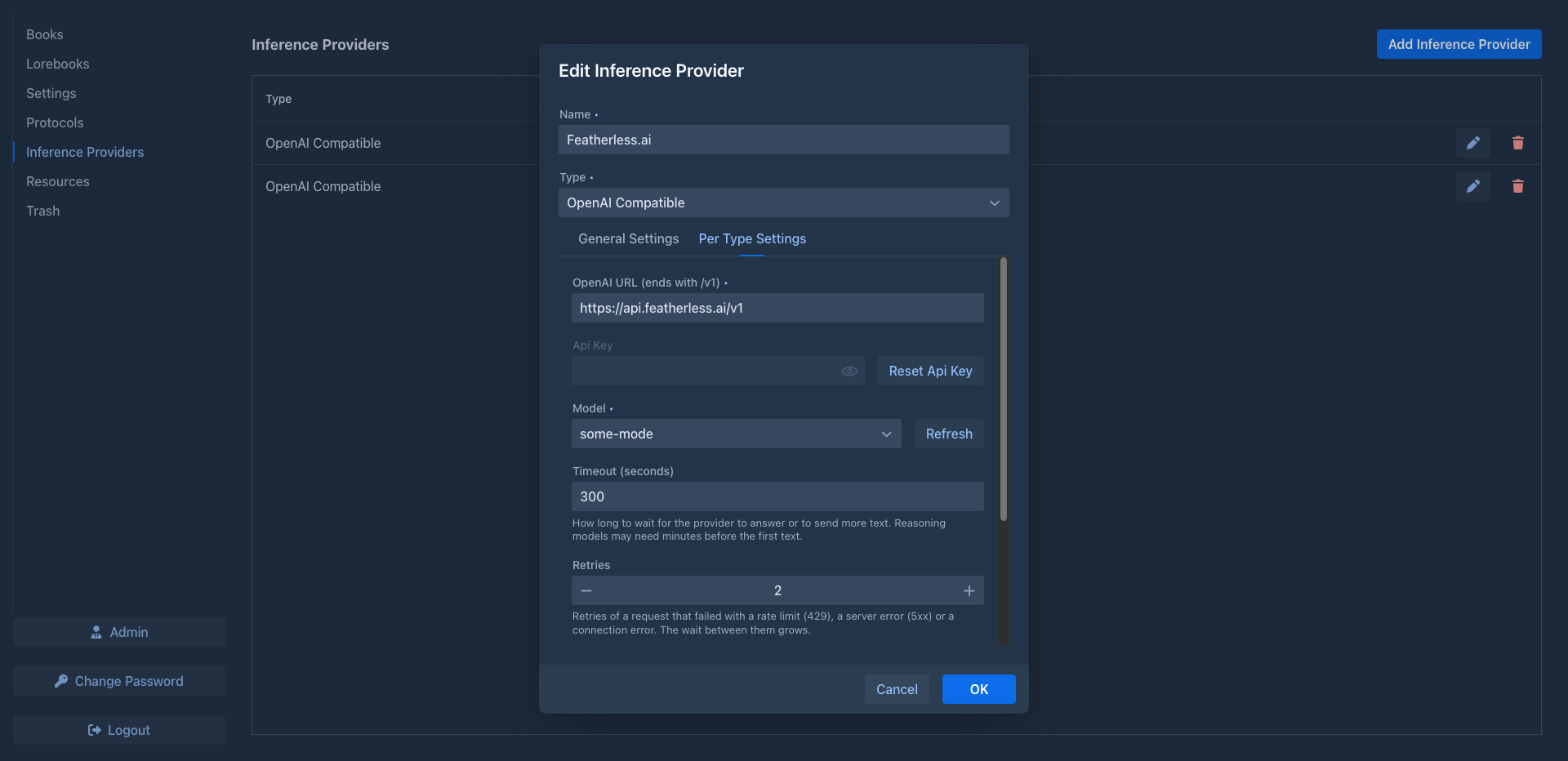
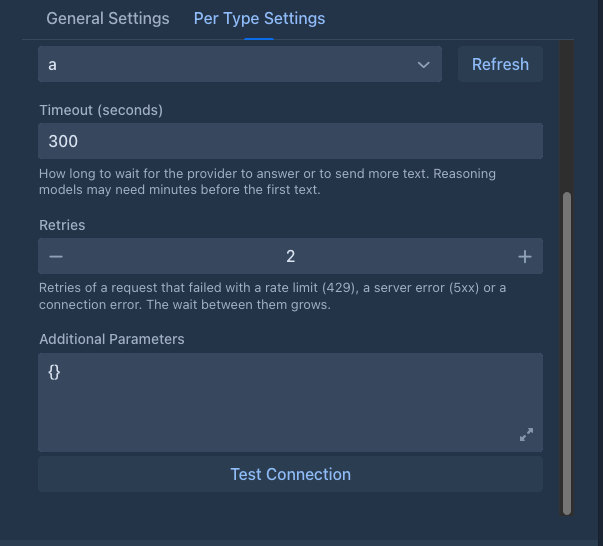
The tab is taller than the dialog and scrolls. The lower fields:
When you edit an existing provider, the API key is not shown again. It is kept as it is unless you click Reset Api Key and enter a new one.
Refresh asks the API for its model list (/v1/models) with the URL and key from the form. If it fails with
Failed to download model list, check the URL (it must end with /v1), the key, and that the server is running.
Some services don't list models; type the model ID instead.
Test Connection checks the values in the form without saving: it asks the API for its model list and then for a
one-token answer from the selected Model, without retries. A success message means the URL, key and model work
together. A failure names the cause (see
General Settings
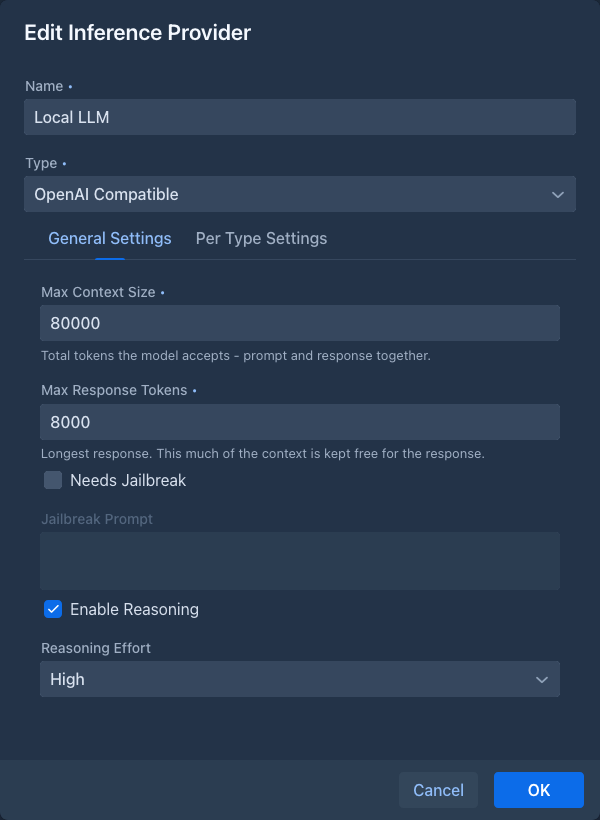
Marginalia keeps Max Response Tokens of the context free for the response and fills the rest with the prompt: templates, lorebook entries and summaries are counted in, and the oldest parts of the story that don't fit are left out. With a context of 32 000 tokens and responses of up to 2 000 tokens, the prompt gets 30 000 tokens.
Take Max Context Size from the documentation of the service, and set it a little lower: token counts are not always exact, and a request that exceeds the real limit fails. A protocol can lower both limits for some books, but not raise them.
Error messages
When the API refuses a request, Marginalia says what to fix instead of showing an internal error, followed by what the API itself said:

Warning before sending
Marginalia fills the context only up to Max Context Size minus Max Response Tokens. If the finished prompt is still bigger than that (for example because an extension added text, or the token count was off), a warning shows the estimated sizes before the request is sent. The request is sent anyway; the API may reject it or cut the prompt.

Reasoning models
Reasoning models think before they answer. With Enable Reasoning checked, Marginalia sends the chosen
Reasoning Effort (None, Low, Medium or High) to the API as reasoning_effort. More effort usually means
better planned text, but slower and more expensive responses. Not every API supports the parameter; if requests
fail with reasoning enabled, turn it off.
When the model returns its reasoning (as reasoning_content or reasoning, depending on the server), it is shown
above the generated part under View Reasoning. The reasoning is not part of the story and is not sent back to the
model.
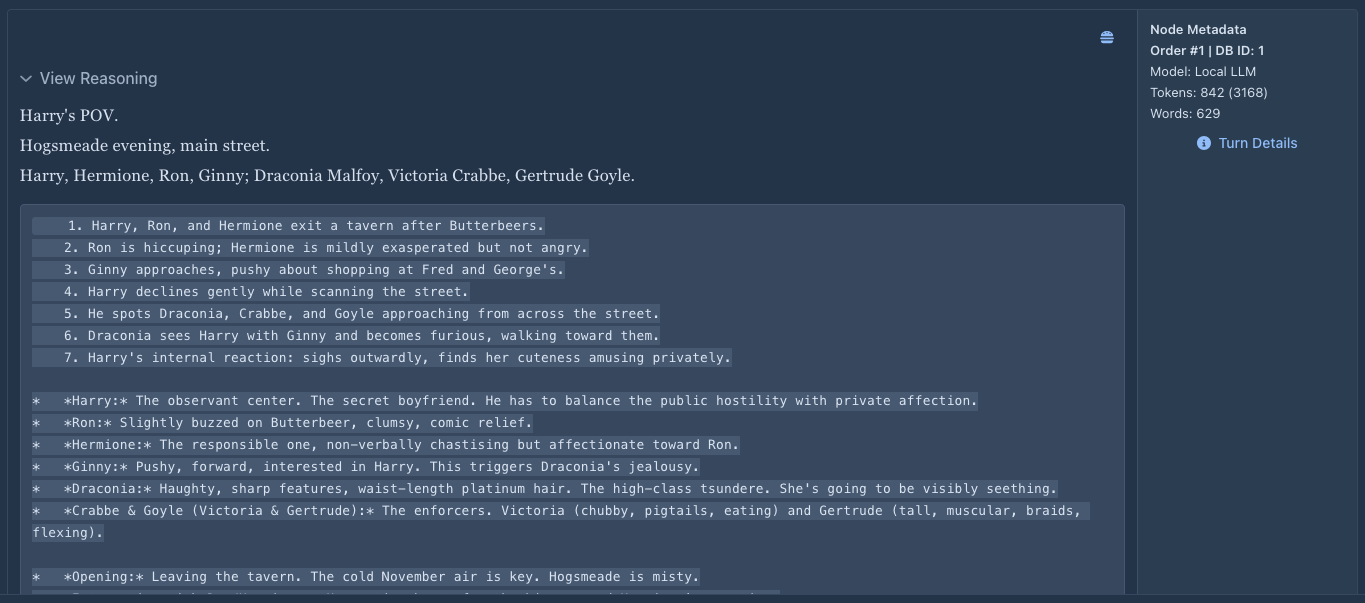
Reasoning counts toward the response: give reasoning models a larger Max Response Tokens, or the text may be cut off after a long reasoning.
Token counting
Marginalia counts tokens to decide how much of the story fits into the prompt. It asks the provider when it can, and tries these methods in order:
- the OpenAI token counting endpoint (
/v1/responses/input_tokens), - the
/tokenizeendpoint of llama.cpp, - the
/tokenizeendpoint of LiteLLM, - the
/v1/messages/count_tokensendpoint of LiteLLM (for Anthropic models), - a local estimate with the OpenAI tokenizer.
The first method that works is used from then on. The local estimate is close for most models but not exact, which is another reason to keep Max Context Size a little below the real limit. Providers of the type Extension count as their extension says; the Google Gemini and Anthropic Claude ones ask the provider to count.
Prompt cache
Every request Marginalia makes for a kind of work (a new part, an annotation, a redraft, a summary...) carries the header
X-Session-ID, a hash that is the same for the same user and kind. A server or proxy that keeps a prompt cache can use it
to find the cache of the previous request of that kind. A server that doesn't know it ignores it. See
Prompt cache and session id, with an example for one slot of llama.cpp kept on disk.
Shared providers
On an installation with several users, an administrator can share a provider: check Shared with all users in the provider's dialog (the checkbox is only there for administrators). Every user then finds it in the Model list of their books and in their Inference Providers tab, marked Shared Yes. They can use it, but they can't open it, see its address or API key, change it or delete it; only its owner can. Books, backups and restores that refer to a shared provider keep working for everybody who can see it.
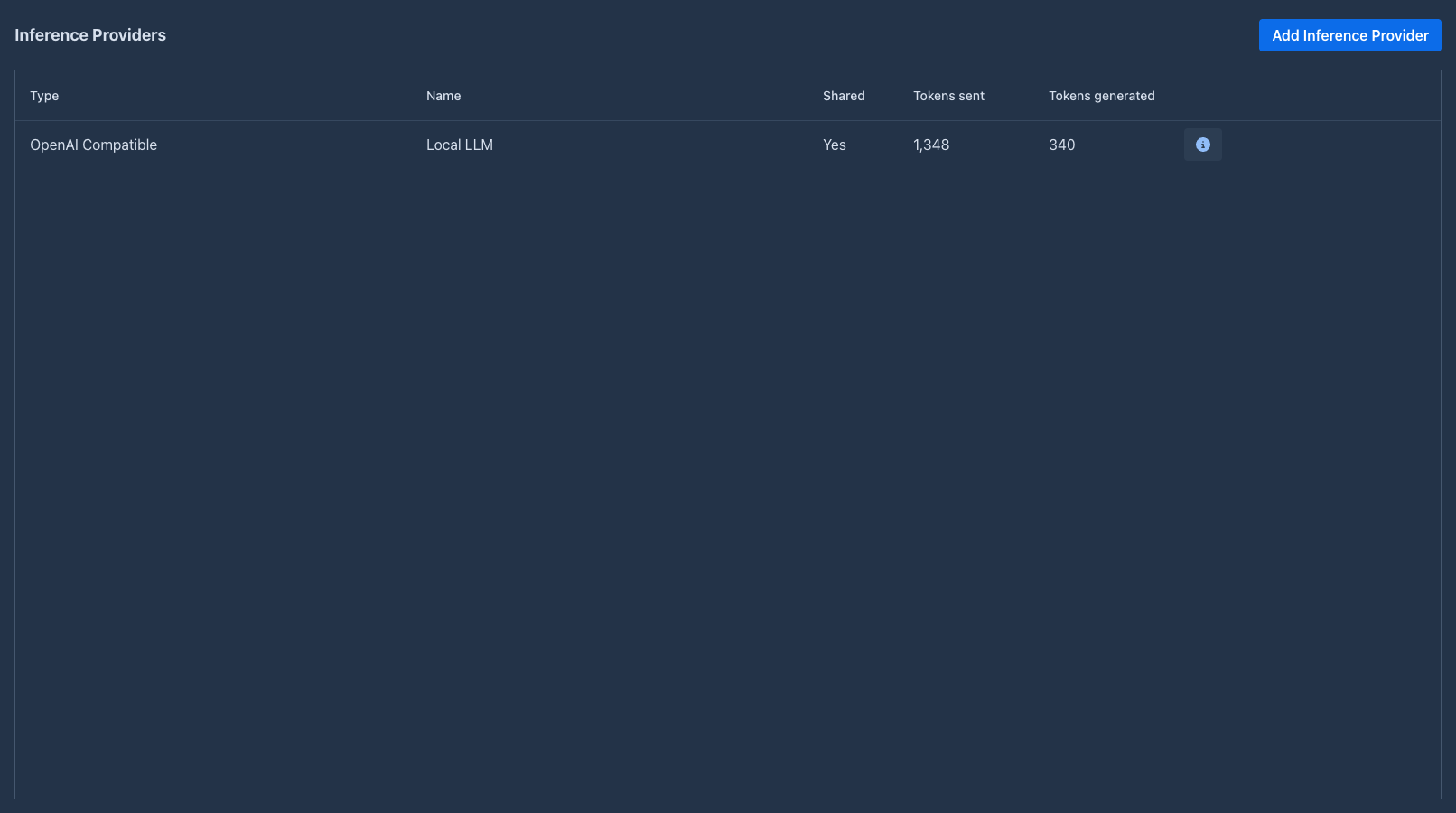
Sharing a provider lets the other users spend the owner's quota with the service. To stop users from adding providers of their own, so that they can only use the shared ones, see Users and providers.
Limits of shared providers
An administrator can limit what each user may do with a shared provider. In the Inference Providers tab, the administrator who owns a shared provider has a Limits button (a user with a lock) in its row, which opens a table with the limits that were set. Add limit creates a new one: pick the user and a limit type.
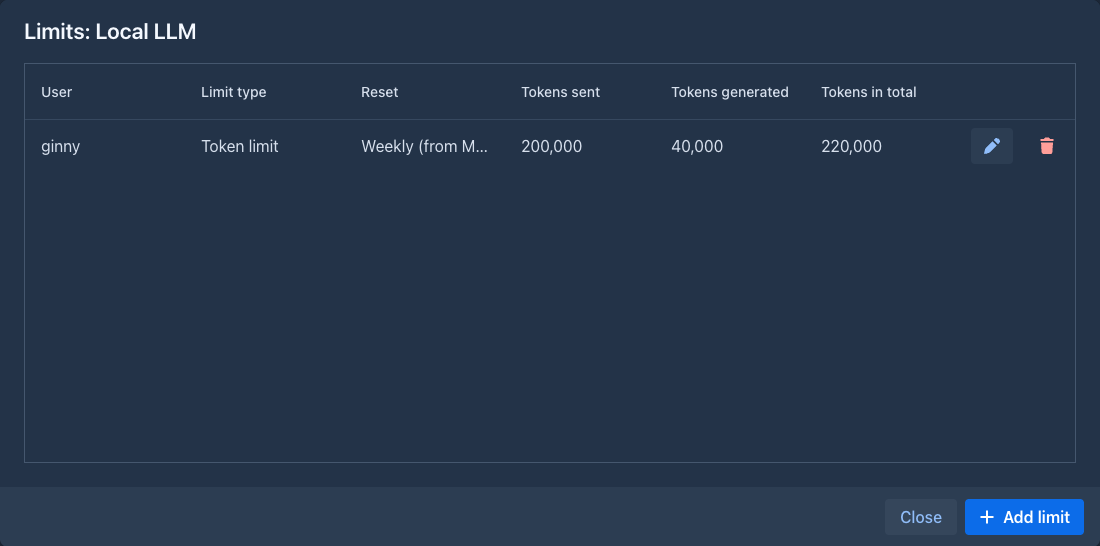
A token limit has a reset (daily, weekly from Monday, or monthly; calendar periods in the time zone of the server) and three limits that can each be left empty for no limit: the tokens sent, the tokens generated, and both together (in total). Whichever is reached first stops the user until the next reset. If all three are set, the sent plus the generated limit must not be below the total (the total could then never be reached), otherwise the dialog refuses to save. For example a total of 100,000 with 100,000 sent and 20,000 generated is fine, a total of 100,000 with 20,000 sent and 10,000 generated is not.
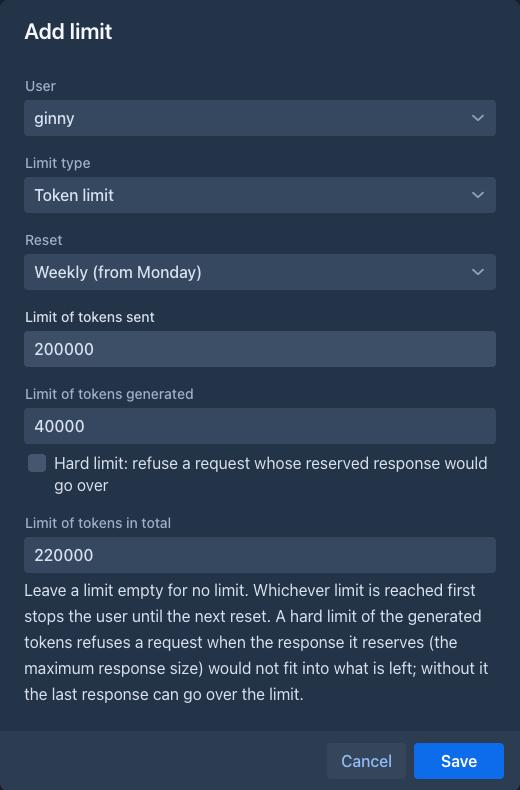
Nothing is reset on a timer: the tokens used start from zero when the user uses the provider (or looks at their limits) for the first time in a new period. The size of a request is known before it is sent, so a request whose prompt would take the user over the sent or in total limit is refused (the prompt is measured with Marginalia's own estimate, which can differ a little from the service's count). The tokens generated are not known in advance: they are counted when the request ends, so the user is stopped only once the limit is reached and the last response can go over it. Users without a limit in the table are not limited.
To keep the generated tokens from going over, check Hard limit (only available with a limit of the generated tokens). A request reserves room for the largest response it allows (the Max Response Size of the provider, or the lower one of the protocol), and with a hard limit it is refused when that reserve does not fit into what is left of the generated limit. So a hard limit lower than the response size of the provider refuses every request; the table and the user's info show hard next to such a limit. The hard limit only covers the generated tokens, the in total limit can still be gone over by the last response.
Every user sees the shared providers in their tab as read-only rows. The info button (the circle with an i) of a shared provider shows their own limit: what they used in this period, the limits and when they reset. When a limit is reached, the story editor, summaries and extensions show an error instead of sending the request.
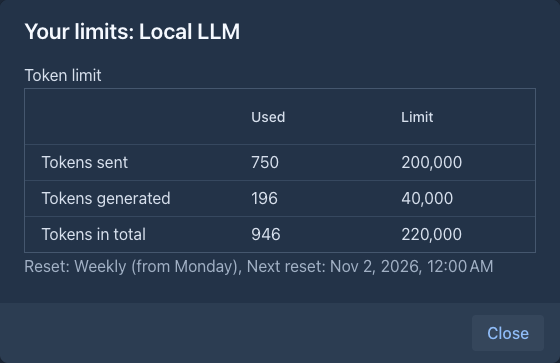
Usage
The Inference Providers tab shows, per provider, the Tokens sent (the prompt, "prefill") and Tokens generated (the response, reasoning included) you have used with it, added up over all your books, summaries and extensions. A shared provider has a count of its own for each user, so you see only your part.
Administrators also get a Usage per user button on the tab, which opens a table with what every user has used of every provider (tokens sent, tokens generated, requests and the time of the last one).
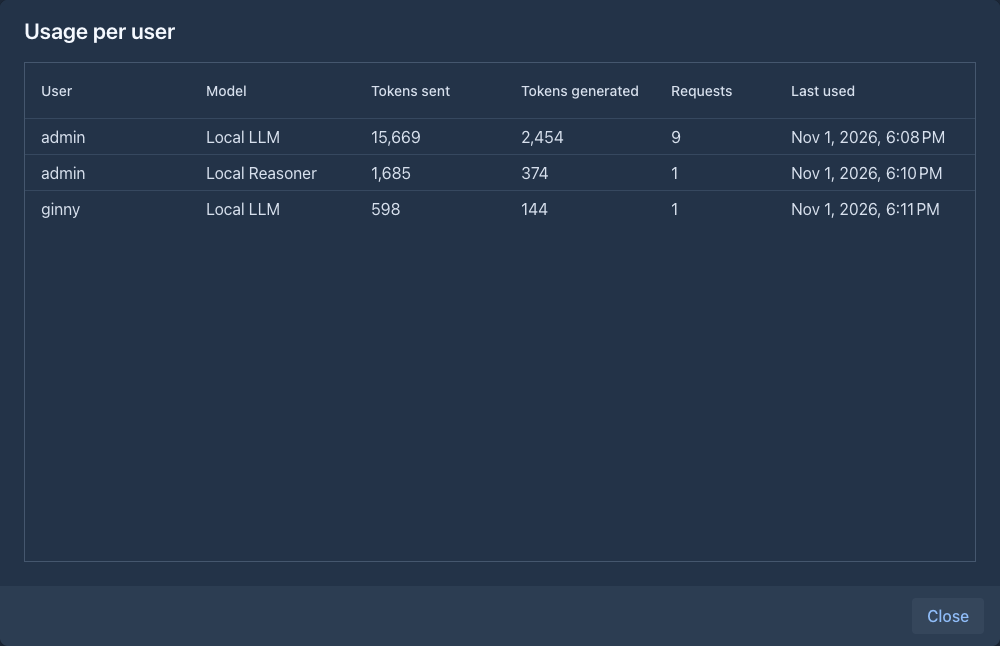
The numbers are what the service reports. A service that doesn't report them (or a request you stop in the middle)
is counted with the local estimate described in
Marginalia asks the service to report the token counts (stream_options with include_usage). To change that for a
provider, put your own stream_options into its Additional Parameters, for example
{"stream_options": {"include_usage": false}}: it replaces what Marginalia sends, and the local estimate is used.
Using a provider in a book
Each book has its model in the Model field of its About tab. To use a provider for all new books, select it as Default Model in the Settings tab. Changing the provider of a book takes effect with the next generated part; parts written before stay as they are.