推理提供商
推理提供商是通往某个模型的连接,包括 API 地址、API 密钥、模型及其限制。每本书使用一个提供商。你可以设置任意多个提供商,例如用大型云端模型写故事,用小型本地模型做实验,并随时在不同提供商之间切换某本书。
提供商属于你的账户。其他用户看不到它们,也看不到你的 API 密钥。API 密钥以加密方式存储(参见 数据文件夹)。
添加提供商需要权限 Create own models,由管理员授予(管理员始终拥有该权限,参见 权限)。没有该权限时,你只能使用管理员与你
支持的 API
Marginalia 支持任何实现了 OpenAI Chat Completions 接口(/v1/chat/completions,支持流式输出)的 API。大多数服务和本地服务器都支持该接口:
端口为各服务器的默认值;请使用你的服务器实际运行的端口。
端口 8080
Docker 版 Marginalia 同样使用端口 8080。如果你在同一台机器上运行 llama.cpp,请将它启动在其他端口(llama-server --port 8081)。
添加提供方
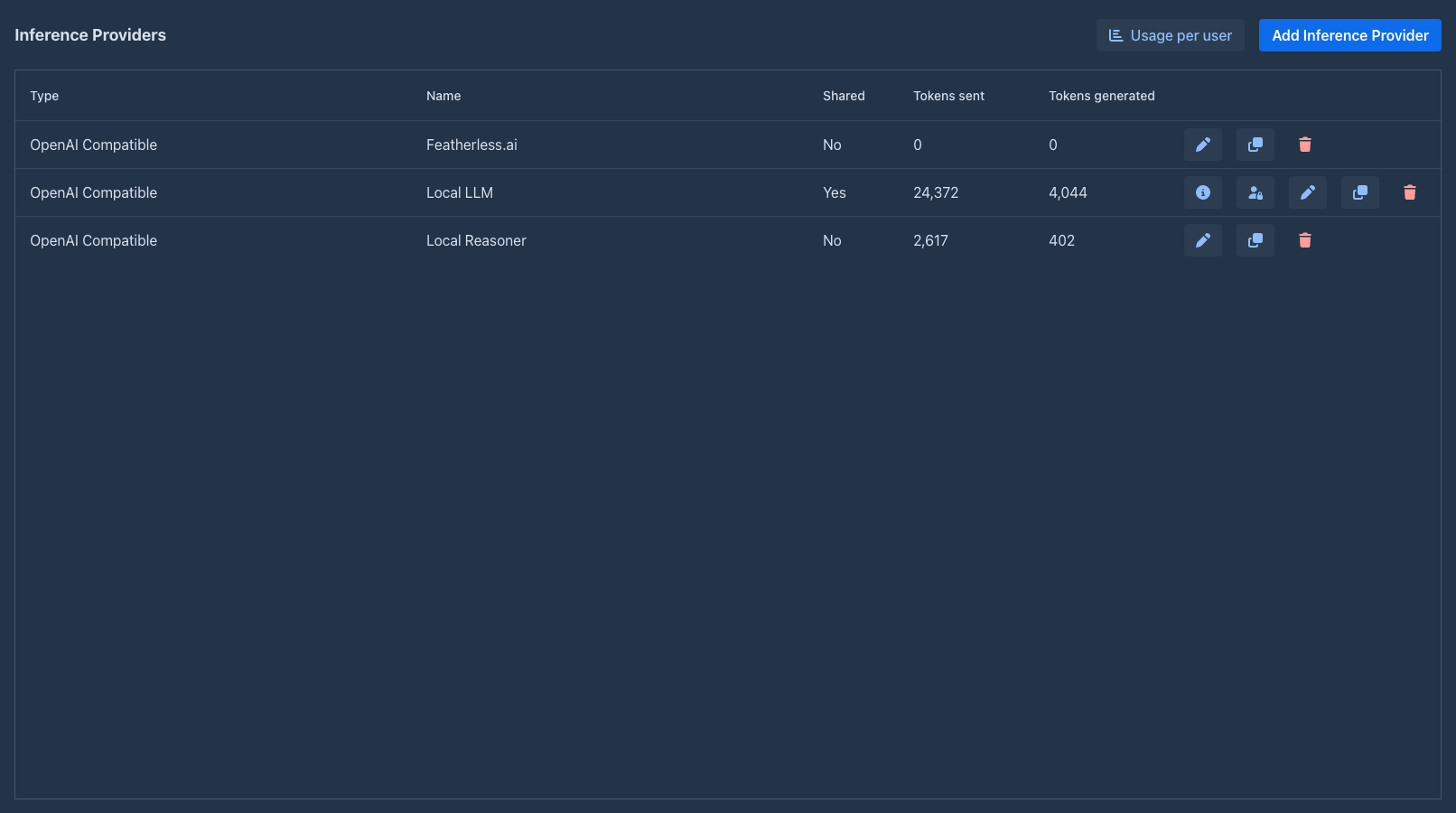
打开 Inference Providers 标签页,点击 Add Inference Provider。编辑已有提供方用铅笔按钮,删除用垃圾桶按钮。复制按钮(两张叠放的纸)会复制一个提供方,并让你确认新名称(默认为原名称加 (Copy))。副本与原提供方的地址、模型、API key(或扩展的设置)、推理设置、token 上限和参数相同,因此在同一服务上添加第二个模型只需取个名字并点击一次。副本不会共享,也没有自己的限额和用量。你只能复制自己的提供方(不能复制管理员共享的提供方,因为你看不到它的密钥),而且只有在你有权创建提供方时才能复制。
对话框顶部的字段:
Per Type Settings
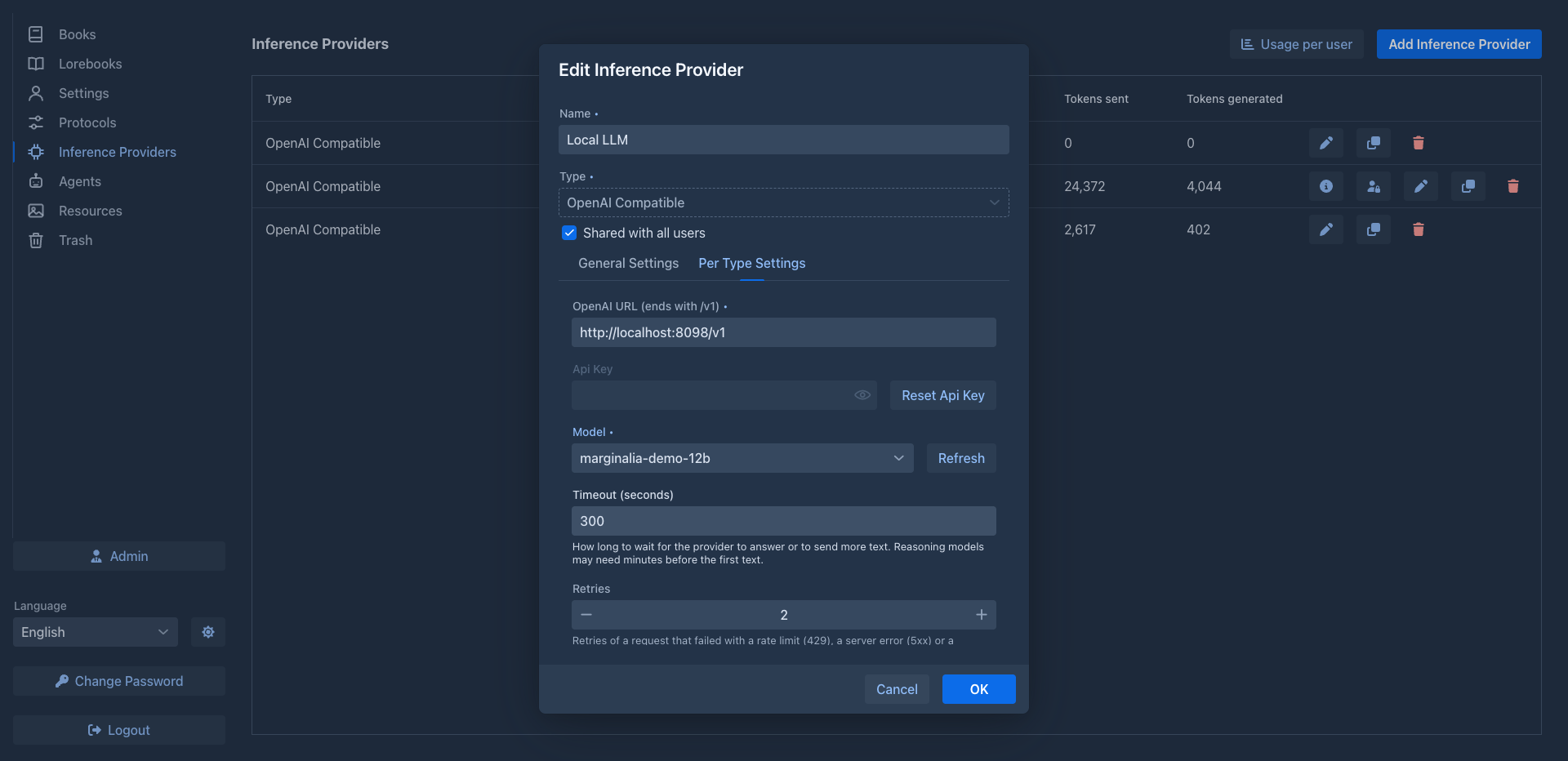
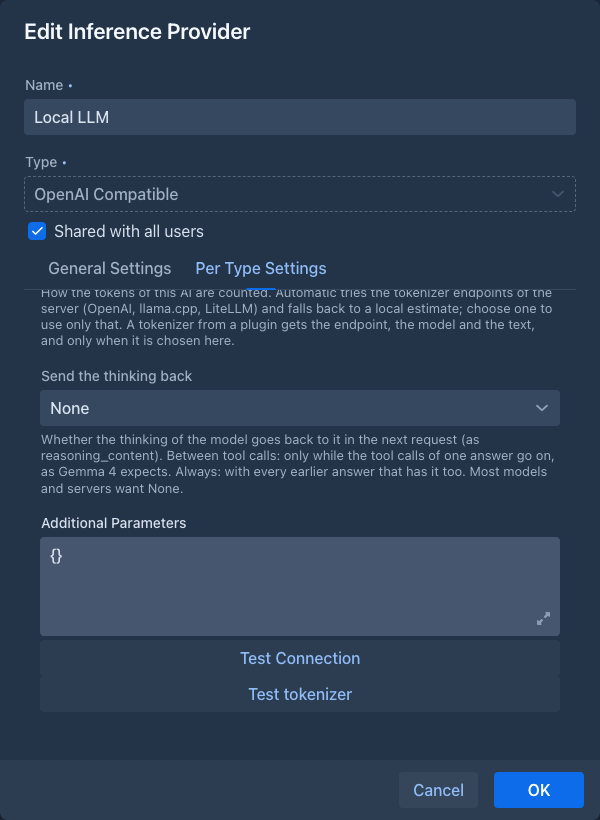
该标签页比对话框高,可以滚动。下方的字段如下:
编辑已有提供方时,API 密钥不会再次显示。除非点击 Reset Api Key 并输入新密钥,否则它会保持原样。
Refresh 会使用表单中的地址和密钥向 API 请求模型列表(/v1/models)。如果失败并显示 Failed to download model list,请检查地址(必须以 /v1 结尾)、密钥,以及服务器是否正在运行。有些服务不提供模型列表,此时请直接输入模型 ID。
Test Connection 会检查表单中的值,但不保存:它先向 API 请求模型列表,然后用所选 Model 请求一个 token 的简短回答,且不重试。显示成功信息即表示地址、密钥和模型可以正常协同工作。失败时会指出原因(参见
General Settings
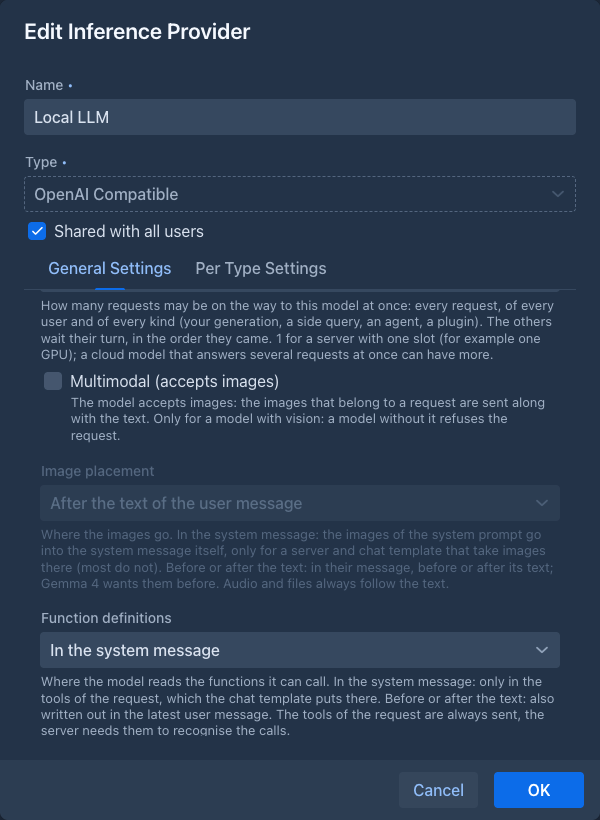
Marginalia 会在上下文中为回应保留 Max Response Tokens 的空间,并用提示词填满其余部分:模板、lorebook 条目和摘要都会计入其中,而放不下的最早的故事部分会被省略。例如,上下文为 32 000 个 token、回应最多 2 000 个 token 时,提示词可使用 30 000 个 token。
Max Context Size 请参考服务的文档,并将其设置得略低一些:token 计数并不总是精确的,超出真实上限的请求会失败。协议可以为某些书籍降低这两个上限,但不能提高它们。
错误信息
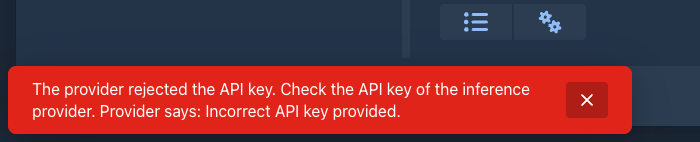
当 API 拒绝请求时,Marginalia 会说明应当如何修正,而不是显示内部错误,随后显示 API 本身返回的内容:
发送前的警告
Marginalia 只会把上下文填充到 Max Context Size 减去 Max Response Tokens 的量。如果最终提示词仍然超过这个值(例如扩展添加了文本,或 token 计数有偏差),则会在发送请求前显示一条警告,列出估计的大小。请求仍会照常发送;API 可能会拒绝它,或截断提示词。

推理模型
推理模型在回答之前会先进行思考。勾选 Enable Reasoning 后,Marginalia 会把所选的 Reasoning Effort(None、Low、Medium 或 High)以 reasoning_effort 的形式发送给 API。投入的力度越大,通常文本规划得越好,但响应也越慢、成本越高。并非所有 API 都支持该参数;如果在启用推理的情况下请求失败,请将其关闭。
当模型返回其推理内容时(以 reasoning_content 或 reasoning 的形式,取决于服务器),它会显示在生成部分的上方,位于 View Reasoning 之下。推理内容不属于故事的一部分,也不会回传给模型,除非你设置了 Send the thinking back(见下文)。
Send the thinking back
Send the thinking back(位于 OpenAI 兼容提供方的 Per Type Settings 中)决定模型的思考内容是否在下一次请求中回传给它,作为其先前消息的 reasoning_content:
它适用于工具循环(剧情向导、使用工具的生成器)以及代理:只要同一轮的工具调用仍在继续,代理就会收到其早先轮次的思考内容(思考内容保存在控制台中的消息里,而不是存储的消息里)。服务器必须接受该字段:llama.cpp 支持(它读取的是 reasoning_content,而不是 reasoning),通过 LiteLLM 使用时同样支持;如果提供方拒绝未知的消息字段而导致失败,则将其保持为 None。
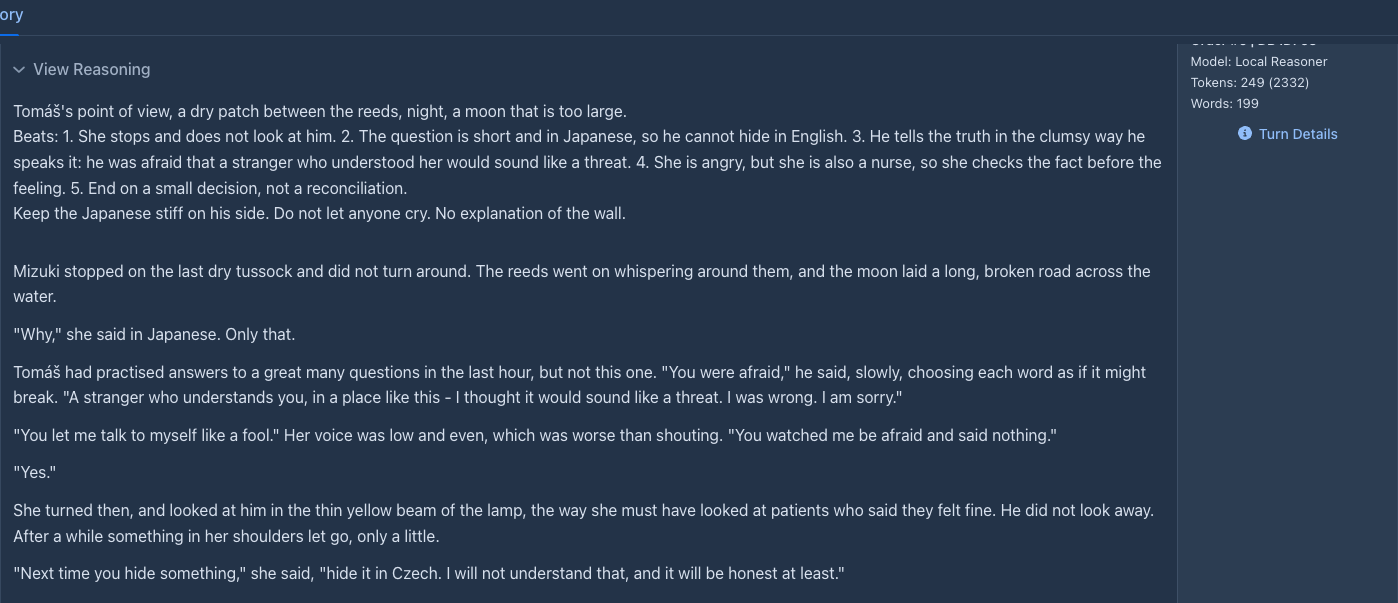
推理内容计入响应长度:对于推理模型,请设置更大的 Max Response Tokens,否则在长篇推理之后,文本可能会被截断。
Token 计数
Marginalia 会计算 token,以决定有多少故事内容可以放入提示词。它会在可能的情况下向提供方请求计数,并按以下顺序尝试各种方法:
- OpenAI 的 token 计数端点(
/v1/responses/input_tokens), - llama.cpp 的
/tokenize端点, - LiteLLM 的
/tokenize端点, - LiteLLM 的
/v1/messages/count_tokens端点(适用于 Anthropic 模型), - 使用 OpenAI 分词器进行的本地估算。
第一个成功的方法会被此后一直使用。本地估算对大多数模型来说已较为接近,但并不精确,这也是为什么应当将 Max Context Size 设置得略低于实际上限的另一个原因。Extension 类型的提供方按其扩展所定义的方式计数;Google Gemini 和 Anthropic Claude 的提供方则会请求提供方进行计数。
提示词缓存
Marginalia 为每一类工作(新的部分、批注、重写、摘要……)发出的每个请求都会带有 X-Session-ID 请求头,这是一个哈希值,对于同一用户和同一类工作来说是相同的。保留提示词缓存的服务器或代理可以借助它找到同类上一个请求的缓存。不认识该请求头的服务器会忽略它。参见 Prompt cache and session id,其中有一个将 llama.cpp 的单个槽位保存到磁盘的示例。
共享提供方
在多用户的安装环境中,管理员可以共享一个提供方:在提供方的对话框中勾选 Shared with all users(该复选框仅对管理员可见)。之后,每位用户都会在其书籍的 Model 列表以及 Inference Providers 选项卡中找到该提供方,并在 Shared 列中标记为 Yes。他们可以使用它,但不能打开它、查看其地址或 API 密钥、修改或删除它;只有其所有者可以。引用共享提供方的书籍、备份和恢复对所有能看到它的人都保持有效。
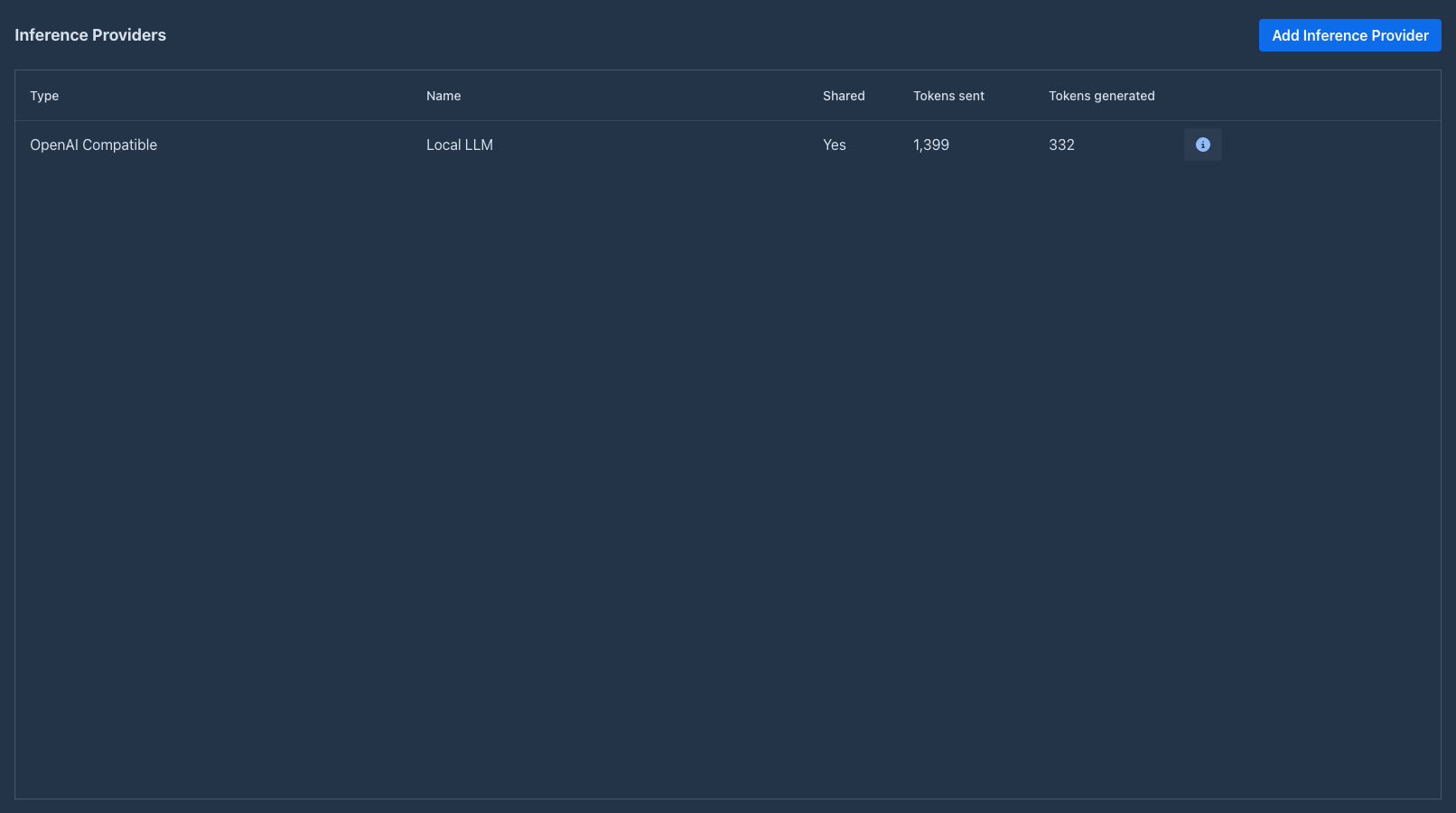
共享提供方意味着其他用户会消耗所有者在该服务上的配额。若要阻止用户添加自己的提供方,使其只能使用共享的提供方,请参见 Users and providers。
Limits of shared providers
An administrator can limit what each user may do with a shared provider. In the Inference Providers tab, the administrator who owns a shared provider has a Limits button (a user with a lock) in its row, which opens a table with the limits that were set. Add limit creates a new one: pick the user and a limit type.
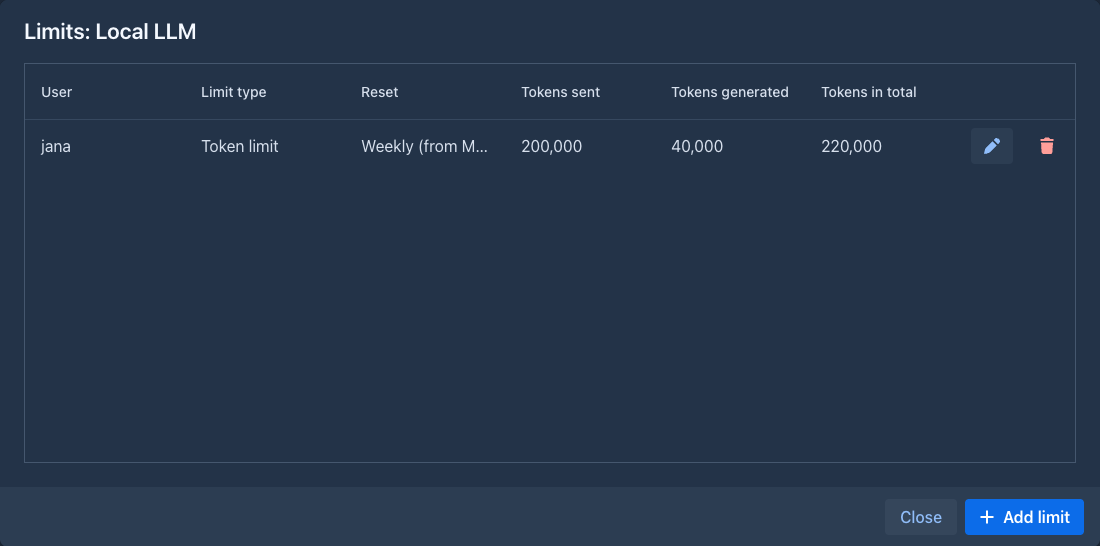
A token limit has a reset (daily, weekly from Monday, or monthly; calendar periods in the time zone of the server) and three limits that can each be left empty for no limit: the tokens sent, the tokens generated, and both together (in total). Whichever is reached first stops the user until the next reset. If all three are set, the sent plus the generated limit must not be below the total (the total could then never be reached), otherwise the dialog refuses to save. For example a total of 100,000 with 100,000 sent and 20,000 generated is fine, a total of 100,000 with 20,000 sent and 10,000 generated is not.
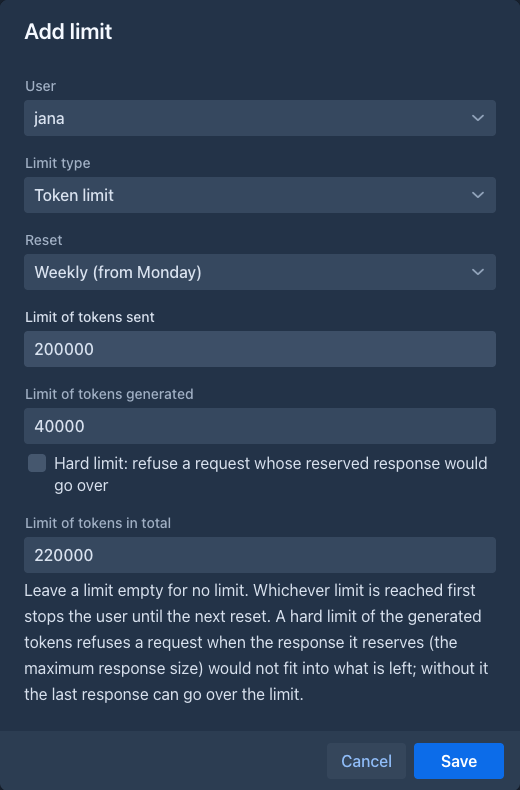
Nothing is reset on a timer: the tokens used start from zero when the user uses the provider (or looks at their limits) for the first time in a new period. The size of a request is known before it is sent, so a request whose prompt would take the user over the sent or in total limit is refused (the prompt is measured with Marginalia's own estimate, which can differ a little from the service's count). The tokens generated are not known in advance: they are counted when the request ends, so the user is stopped only once the limit is reached and the last response can go over it. Users without a limit in the table are not limited.
To keep the generated tokens from going over, check Hard limit (only available with a limit of the generated tokens). A request reserves room for the largest response it allows (the Max Response Size of the provider, or the lower one of the protocol), and with a hard limit it is refused when that reserve does not fit into what is left of the generated limit. So a hard limit lower than the response size of the provider refuses every request; the table and the user's info show hard next to such a limit. The hard limit only covers the generated tokens, the in total limit can still be gone over by the last response.
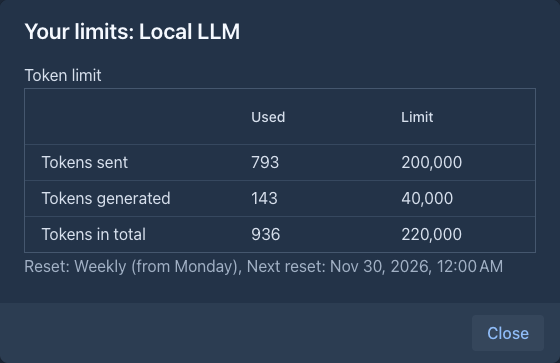
Every user sees the shared providers in their tab as read-only rows. The info button (the circle with an i) of a shared provider shows their own limit: what they used in this period, the limits and when they reset. When a limit is reached, the story editor, summaries and extensions show an error instead of sending the request.
Usage
The Inference Providers tab shows, per provider, the Tokens sent (the prompt, "prefill") and Tokens generated (the response, reasoning included) you have used with it, added up over all your books, summaries and extensions. A shared provider has a count of its own for each user, so you see only your part.
Administrators also get a Usage per user button on the tab, which opens a table with what every user has used of every provider (tokens sent, tokens generated, requests and the time of the last one).
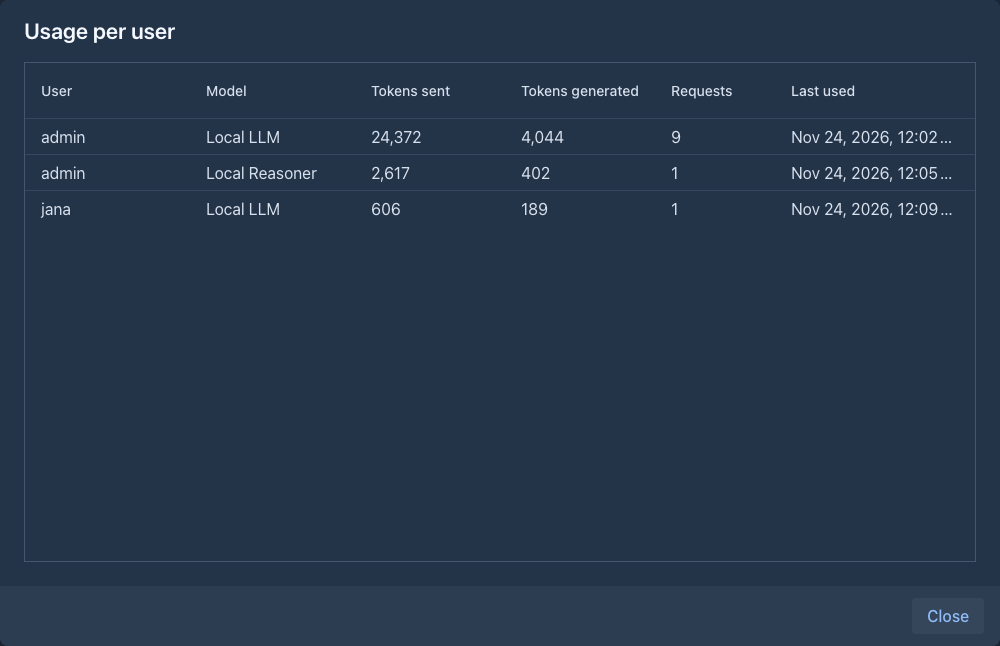
The numbers are what the service reports. A service that doesn't report them (or a request you stop in the middle)
is counted with the local estimate described in
Marginalia asks the service to report the token counts (stream_options with include_usage). To change that for a
provider, put your own stream_options into its Additional Parameters, for example
{"stream_options": {"include_usage": false}}: it replaces what Marginalia sends, and the local estimate is used.
Using a provider in a book
Each book has its model in the Model field of its About tab. To use a provider for all new books, select it as Default Model in the Settings tab. Changing the provider of a book takes effect with the next generated part; parts written before stay as they are.