GPUs
A graphics card often holds one model at a time: the language model, or the image model, or the speech model. The GPUs tab of the Admin page lets the models and servers on one card take turns on it, so that an image or an audiobook does not start while the language model fills the card, and the language model comes back when it is needed.
You set it up once, as the administrator; every user then picks a lock for their AI or their backends.
What it is made of
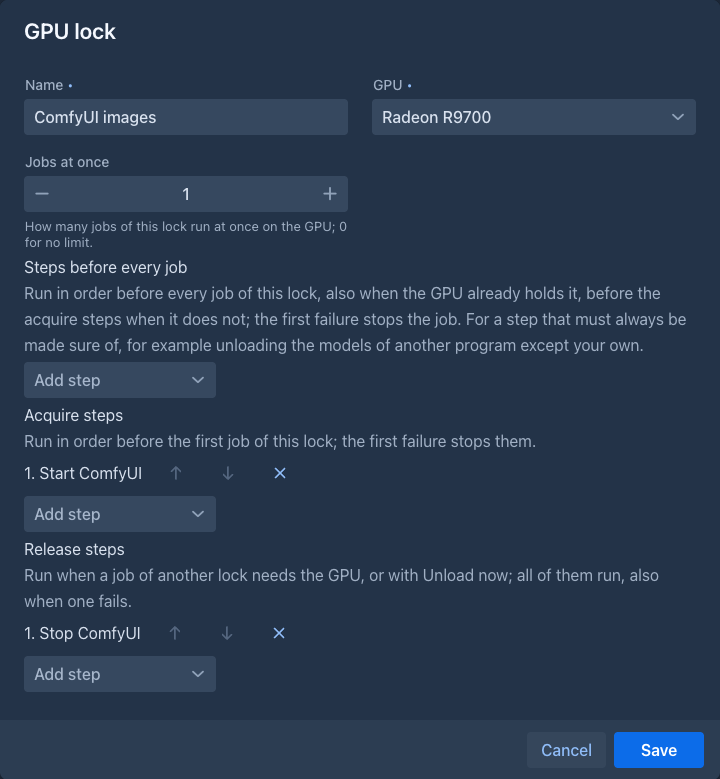
Pick the lock in:
- the settings of an AI (GPU lock in the general settings), for the language model;
- a backend of the Image Generator;
- a backend of the Audiobook.
The GPU lock box is shown only when at least one lock exists.
Variables in the steps
A step can name what the job is for, so that one step serves several models and the locks need no editing when you try another one. In the address, the headers and the body:
Filters change the value: {{model | strip:openai/}} removes the prefix when the value starts with it (LiteLLM's route name, which the
server behind it does not know), {{model | last}} keeps what follows the last /, {{model | json}} escapes it for a JSON string and
{{model | url}} encodes it for an address; they can be chained ({{model | last | json}}). The acquire steps and the steps before every job
get the job's values; the release steps get the ones of the last job of the lock that is loaded (the model that is to be unloaded). Test
runs a step with the variables empty.
How the turns work
-
Every request to a model, every image and every audiobook batch or sample takes the lock of its AI or backend for its own length.
-
When the GPU is already loaded with that lock, the job starts at once and no step runs, except the lock's steps before every job.
-
When it is loaded with another lock, the job waits until the jobs of that lock are done. Then the release steps of that lock run (all of them, also when one fails), then the steps before every job and the acquire steps of the new lock (in order; the first failure stops them and the job fails with the message of the step).
-
When a release step fails, the new lock is not loaded at all (the card may still be full): the job fails with the error and the GPU stays with the lock it had. The next job of another lock tries to free it again.
-
After a job the GPU stays loaded with its lock. Nothing is unloaded on a timer: an image window that is left open, folded or closed keeps no GPU, and the image model stays loaded until the language model (or another lock) needs the card.
-
Jobs wait in the order they came. Once a job waits for another lock, new jobs of the loaded lock wait behind it, so a busy language model cannot keep an image waiting for ever.
-
An AI or backend without a lock, or with a lock that was deleted, does not wait for anything.
What a GPU holds is known only while the application runs: after a restart nothing is known to be loaded, and the first job runs only its acquire steps.
A GPU that others use too
The locks order the jobs of Marginalia only. What it knows the card holds comes from its own jobs: after a restart of Marginalia, or when another program, a script or a person loads a model on the card (a request to the router that wakes the language model, a workflow queued in ComfyUI's own page), what Marginalia thinks is loaded is wrong, and a job may start on a full card.
-
Also used outside Marginalia on the GPU makes Marginalia stop trusting what it knows: the acquire steps run before every job, not only when the GPU changes locks (the release steps still run only on a change). Each lock's acquire steps must then make room by themselves (unload the other models, stop the other server) and be safe to repeat: a start of a server that already runs, an unload of a model that is not loaded and a stop of a stopped container must answer with success, or every job fails. It costs those requests on every job.
-
Steps before every job do the same for one lock without the others: only the steps that must be checked each time (unload the other program's models, make sure a server answers) run before every job, the rest only on a change.
-
The safe place for this is the GPU machine itself, which every user goes through: a proxy whose start ComfyUI unloads the language model first, a router hook that stops ComfyUI before it loads the language model. Then nobody can fill the card twice, whatever program asks.
The tab
The tab lists the GPUs with the lock each is loaded with now (Unknown when nothing ran yet or it was unloaded) and how many jobs run and wait on it, then the locks and the steps, each with buttons to add, edit and delete. Refresh reads what the GPUs hold again.
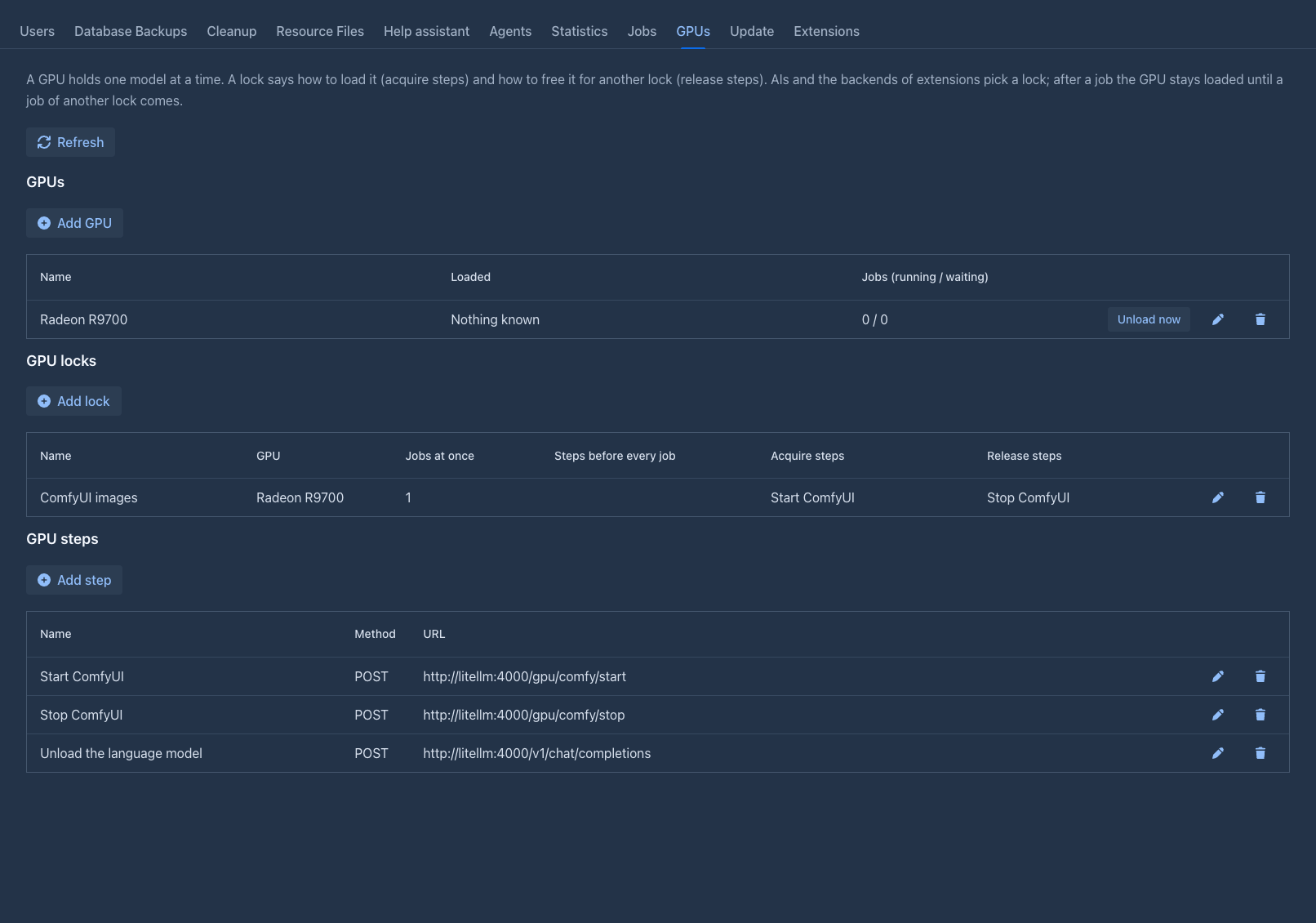
Unload now frees a GPU by hand, for example to use the card for something outside Marginalia: it waits for the running jobs, runs the release steps of the loaded lock and leaves the GPU unknown (also when a step failed; the message says which). The next job loads its lock again.
Deleting a GPU deletes its locks; deleting a step takes it out of the locks that run it. AIs and backends that named a deleted lock run without one.
An example: one card, several models
With llama-server behind LiteLLM and a tools/gpu-control style
proxy that starts and stops containers:
Used only by Marginalia, each lock frees the card of itself and nothing more:
A batch of speech after a chat runs Unload the language model (the release of the language model) and Start ComfyUI; the next chat message runs Stop ComfyUI first. The ComfyUI locks are separate on purpose: going from one to another stops and starts ComfyUI, which is what frees the memory a model keeps after it is unloaded (fp32 Higgs keeps about 16 GB of the server's memory), so the image model, Higgs, the recognition and the cleanup models are never in it together.
With Also used outside Marginalia each acquire must make room by itself instead: Language model acquires with Stop ComfyUI, and every ComfyUI lock with Unload the language model, Start ComfyUI.
When another program uses the same llama-server router with a model of its own (for example a small model next to its speech model), Unload the
language model would throw out its model too, and its own unload would throw out Marginalia's. tools/gpu-control has a call that unloads every model of
the router except the ones named: a step POST http://litellm:4000/gpu/llama/unload with the body {"keep": ["{{model | strip:openai/}}"]} (its README has the
pass-through). Make it a step before every job of Language model: every AI on that lock keeps its own model, whichever you pick; the other program does the same with its own model before each of its jobs.
When the kept model is the only one loaded the call does nothing and answers at once, so neither program needs to know about the other.
When one lock serves the language model and the speech model (both run side by side on the card), {{model}} in that step is the speech
model during a speech job, which no router model matches, and the language model would be unloaded right after each reply. Keep
{{last_text_model}} instead, {"keep": ["{{last_text_model | strip:openai/}}"]}: every job of the lock keeps the model of the last text
generation, whatever kind of job it is. Before the first text generation nothing is kept, and the first one loads its model.
For ComfyUI the same kind of step is POST http://litellm:4000/gpu/comfy/ensure: it does nothing when ComfyUI answers, starts the container when
it is stopped, and restarts it when it runs but ComfyUI does not answer (crashed inside, hung), then waits until it is ready. As a step before every job
of the ComfyUI locks it makes sure ComfyUI is alive, whoever stopped it.
The AI of the language model picks Language model, the image backend ComfyUI images, the speech backend ComfyUI speech, the speech recognition and the cleanup of clips of the Audiobook their own locks.